Participant
April 24, 2018
Question

Search box is not appearing in Safari in mac

  • April 24, 2018
  • 3 replies
  • 1379 views

Hi Team,

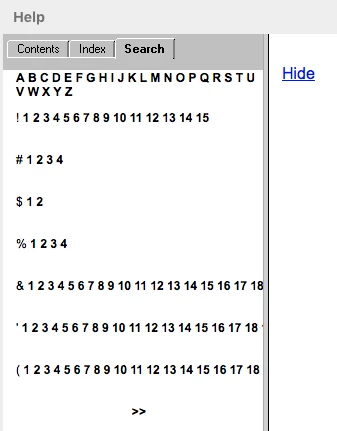
We are facing an issue with the opening search box while clicking on the "search" navigation tab from the left side navigation in safari browser(version: 11.0.2 ), well then I had checked with different browsers like Chrom, IE11, Mozilla FireFox it worked properly for all of them.

Even it worked properly when I checked with safari browser(version: 5.1.7 ).

We have also tried to update the RoboHelp with the available updates and had a look at the generated OUTPUT locally as well and we found the same issue.

Here I am attaching the files with the issue and without issue, please have a look:
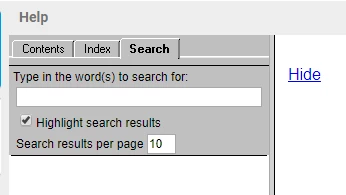
Looking forward to the positive response from your side.

This topic has been closed for replies.

3 replies

Participant
June 21, 2018

Hi,

We are also seeing the exact same issue. Our Webhelp output from RH2017 looks fine in Chrome, IE11 and Firefox. But when viewed using Safari 11, the Search tab is unusable. We see the following:

I went to the tracker and voted on this as an issue. Hopefully Adobe will address it soon.

TatuMbili
Inspiring
September 18, 2018

I have also voted. There doesn't seem to have been any action for a while. Hoping it will come soon as my output worked well with RoboHelp 10, have recently upgraded to 2015.

Matt-Tech Comm Tools
Community Expert
Community Expert
April 26, 2018

Hi Himesh512, I can confirm that Safari doesn't properly display local output of my RoboHelp project output either.

The local output does work when viewing with Chrome and Firefox browsers, though the search feature still has display issues

In fact, under Safari 11.1, it doesn't display at all.

Do you have the same display issues when you publish to a server and access files via HTTP, rather than accessing the file directly on your hard drive?

Firefox

Chrome

-Matt Sullivan, FrameMaker Course Creator, Author, Trainer, Consultant
Himesh512Author
Participant
April 27, 2018

Hi Tech Comm Tools,

Actually, I have same display issues when you publish to a server and access files via HTTP, so that I checked with sample projects files locally from the hard drive, then after I logged a bug for that (RH-1691) as well and here is the URL Tracker

you can have a look.

Peter Grainge
Community Expert
Community Expert
April 24, 2018

That looks like in your output dialog you have ticked the Pure HTML setting. Try DHMTL (Pure HTML). See the Navigation settings.


See www.grainge.org for free RoboHelp and Authoring information.

@petergrainge

Use the menu (bottom right) to mark the Best Answer or Highlight particularly useful replies. Found the answer elsewhere? Share it here.
Himesh512Author
Participant
April 24, 2018

HI, Peter Grainge

as you mentioned in reply I checked for the output settings and they were like I am attaching the image

in the settings, DHTML radio button is selected, still, the problem remains same for the Safari browser(version: 11.0.2 ) only

also, i checked by selecting Pure HTML radio button the problem occurred with the all mentioned browsers in question.

Himesh512Author
Participant
April 25, 2018

I hadn't realised that Safari on Windows was no longer supported as I am not a Mac user. If you had said it was the same on both operating systems I was going to run some tests on a Windows machine.

Try a new simple two or three topic project and see if that is the same or try one of the sample projects. Click Open on the RoboHelp Starter page and then click Samples in the ribbon on the left.

If they are the same, then that looks like a bug. Please follow this link to report bugs and request features. The more people who do so, the higher it gets prioritised.

https://tracker.adobe.com

Post the link to that bug/feature in this thread and others can vote for it.


See www.grainge.org for free RoboHelp and Authoring information.

@petergrainge


HI, Peter Grainge

As you have mentioned in the previous comment to check by generating output for one or more sample projects.

yesterday I had a look in chrome and safari in windows and Mac machines as well and found that issue is replicable, please have a look the images I am attaching to this reply.

     sample project 1

      sample project 2

      sample project 1 opened in chrome to mac and windows both machines\

      sample project 2 opened in chrome to mac and windows both machines

hope you guys will raise a bug for this