
Known Participant
November 5, 2013
Question

Search Input Field in Toolbar Doesn't Work

  • November 5, 2013
  • 2 replies
  • 1938 views

Hi all,

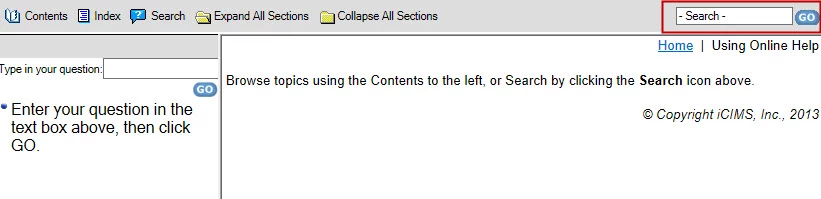
I'm currently working on a project in RH HTML 10, which is being generated (and published) with WebHelp Pro. I've enabled the Search Input Field, but it doesn't work when generated, published, and hosted via RoboServer. Entering text into the Search Input via the toolbar and selecting Go simply brings me to a blank search pane (see image below), as if I had accessed Search from the toolbar button.

This is occurring in both the most recent versions of Chrome, Firefox, and IE (10).

Any suggestions to get this Search Input to work?

Thanks!

Siobhan

The Search Input Field is boxed in red below for clarity's sake:
This topic has been closed for replies.

2 replies

swatson_Author
Known Participant
November 26, 2013

Okay, so after a few weeks of frustrating investigation, I still have no clear indication what is going wrong. I'm even getting the same toolbar search problem with one of the RH test projects published to the server! (I've also noticed that not only is the toolbar search a problem, but I'm not seeing the correct search options along with my search, like the "And" searching that I have enabled for the project.)

I did find a strange workaround, however, and I'm wondering if this will perhaps inspire any brilliant breakthroughs from the community...

On a whim, I decided to open a random topic in a new tab, isolating the .htm page itself. From that topic, if I click "Show" to reveal the navigation pane and toolbar again... voila! The search toolbar works, and the appropriate search options are present:

After using the "workaround," the URL of my project is different (Test Project vs. Please enter Project title here), and the title in the browser is also changed, as well:

  • The end of the original (broken toolbar) URL: /robohelp/server?%26area%3Dgeneral%26mgr%3Dagm%26agt%3Dwsm%26wnd%3Dconditional_build_tags%7CTest%20Project%26tpc%3D%2Frobohelp%2Frobohelp%2Fserver%2Fgeneral%2Fprojects%2Fconditional_build_tags%2FGeneral_Office_Information%2FMission.htm%3FRINoLog28301%3DT%26ctxid%3D%26project%3Dconditional_build_tags
  • The end of the workaround URL: /robohelp/robohelp/server/general/projects/conditional_build_tags/conditional_build_tags.htm#General_Office_Information/absence.htm
    • (Note that this URL indicates the topic.htm, even though I was on an entirely different topic at the time.)

Any idea what the heck is going on?

Jeff_Coatsworth
Community Expert
Community Expert
November 26, 2013

I think I missed something back in your original post – you said you’re creating WebHelp Pro for use with RH Server; I wonder if it’s something busted in that output format. Try doing a test with just regular WebHelp and see if the Search is busted too.

swatson_Author
Known Participant
November 26, 2013

This is definitely a newbie question, but--can I publish WebHelp to RH Server?

Jeff_Coatsworth
Community Expert
Community Expert
November 5, 2013

Is the “regular” search button working? Have you applied all the latest hacks for browser “security” fixes? There’s ones for Chrome & IE10/11.

swatson_Author
Known Participant
November 5, 2013

I just did, re-generated, re-published, re-tried it... and no dice, the search input is still kaput. Thank you for that suggestion, though!

Jeff_Coatsworth
Community Expert
Community Expert
November 5, 2013

How about the “Search” button – is that working?