
Inspiring
February 17, 2012
Answered

Snippets cause script error when placed in different order

  • February 17, 2012
  • 2 replies
  • 1928 views

In a new topic, I insert two snippets: SnippetA and SnippetB. All is well.

Now I want SnippetB to come before SnippetA, so I move it (or delete and replace it, or any other method one might use to get the order changed). Now in the preview or compiled file, the topic gives a script error:
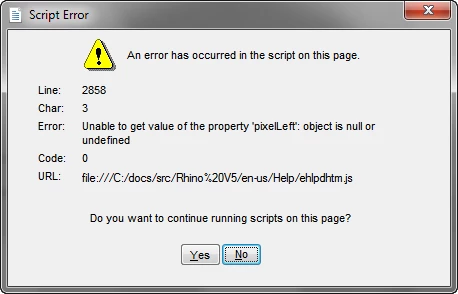
Nothing is changed in the topic except the order of the two snippets and the ehlpdhtm.js file has never been touched.

I have come across this error under many circumstances, and I have never been able to figure out what causes it.

Any ideas?

~M Becker

Windows 7, RH9.0.2.217

This topic has been closed for replies.
Correct answer Willam van Weelden

I don't follow you. What DHTML effect are you talking about? If removing DHTML effects is the solution, why is it that when I put the snippets into a topic in one order, I get the error message, but when I change the order I don't? Also, why does the same snippet cause the error in one topic, but does not when I put the same snippet in a different topic?

I am creating an application help file that I deliver as both a .chm and as WebHelp.

~Margaret Becker


Hi,

Look at the HTML of the snippets. At the bottom of the page, you can see that an event is added that is fired when the page opened. It doesn't seem to do much, besides causing an error. Removing this code by hand solved the problem in the files you send me.

I don't know about the snippet order, but the difference (I guess) comes from the ID's used by the script. The ID may be unique in one topic, but not in another.

Greet,

Willam

2 replies

Inspiring
March 21, 2012

Well, I don't have a solution yet. I can't see a way to post the topic with its snippets, so if someone can help, I'll send you an example.

Sometimes I can solve this problem by shifting things around or doing some other simple things. In this case, if I move two table rows as shown in the image to the top, the problem goes away. When I move them back, the error pops up again. What gives? Anybody?

Willam van Weelden
Inspiring
March 21, 2012

Sorry, I've forgotten about this, otherwise I'd have asked for an example some time ago. I'd like a sample to see what's going on. You can mail me at contact [at] wvanweelden [dot] eu.

Greet,

Willam

Willam van Weelden
Willam van WeeldenCorrect answer
Inspiring
March 30, 2012

I don't follow you. What DHTML effect are you talking about? If removing DHTML effects is the solution, why is it that when I put the snippets into a topic in one order, I get the error message, but when I change the order I don't? Also, why does the same snippet cause the error in one topic, but does not when I put the same snippet in a different topic?

I am creating an application help file that I deliver as both a .chm and as WebHelp.

~Margaret Becker


Hi,

Look at the HTML of the snippets. At the bottom of the page, you can see that an event is added that is fired when the page opened. It doesn't seem to do much, besides causing an error. Removing this code by hand solved the problem in the files you send me.

I don't know about the snippet order, but the difference (I guess) comes from the ID's used by the script. The ID may be unique in one topic, but not in another.

Greet,

Willam

Willam van Weelden
Inspiring
February 20, 2012

Hi,

What is the content of these snippets? Do you use any DHTML effects on the topic? ehlpdhtml.js controls dropdowns and other DHTML effects, so it is probably related to something like that.

Greet,

Willam

Inspiring
February 21, 2012

Well, the content is pretty much the same in both snippets: a list of links. I can't see what difference the content would make if when I put the two snippets in the topic in one order there is an error message but when I reverse the order there isn't. I know what the ehlpdhtml.js file does, but it really doesn't seem to have any bearing in this case.

~Margaret