
Exit
  • Global community
    • Language:
      • Deutsch
      • English
      • Español
      • Français
      • Português
  • 日本語コミュニティ
  • 한국 커뮤니티
0

Snippets cause script error when placed in different order

Explorer ,
Feb 17, 2012 Feb 17, 2012

In a new topic, I insert two snippets: SnippetA and SnippetB. All is well.

Now I want SnippetB to come before SnippetA, so I move it (or delete and replace it, or any other method one might use to get the order changed). Now in the preview or compiled file, the topic gives a script error:
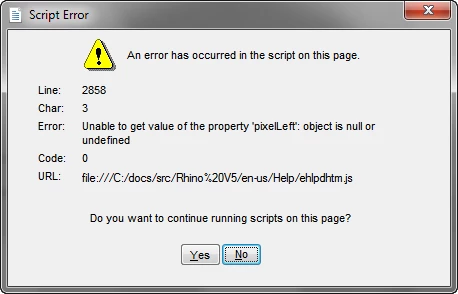
RHScriptError2-17-2012.png

Nothing is changed in the topic except the order of the two snippets and the ehlpdhtm.js file has never been touched.

I have come across this error under many circumstances, and I have never been able to figure out what causes it.

Any ideas?

~M Becker

Windows 7, RH9.0.2.217

2.0K
Translate
Report
Community guidelines
Be kind and respectful, give credit to the original source of content, and search for duplicates before posting. Learn more
community guidelines

correct answers 1 Correct answer

LEGEND , Mar 30, 2012 Mar 30, 2012

Hi,

Look at the HTML of the snippets. At the bottom of the page, you can see that an event is added that is fired when the page opened. It doesn't seem to do much, besides causing an error. Removing this code by hand solved the problem in the files you send me.

I don't know about the snippet order, but the difference (I guess) comes from the ID's used by the script. The ID may be unique in one topic, but not in another.

Greet,

Willam

Translate
LEGEND ,
Feb 20, 2012 Feb 20, 2012

Hi,

What is the content of these snippets? Do you use any DHTML effects on the topic? ehlpdhtml.js controls dropdowns and other DHTML effects, so it is probably related to something like that.

Greet,

Willam

Translate
Report
Community guidelines
Be kind and respectful, give credit to the original source of content, and search for duplicates before posting. Learn more
community guidelines
Explorer ,
Feb 21, 2012 Feb 21, 2012

Well, the content is pretty much the same in both snippets: a list of links. I can't see what difference the content would make if when I put the two snippets in the topic in one order there is an error message but when I reverse the order there isn't. I know what the ehlpdhtml.js file does, but it really doesn't seem to have any bearing in this case.

~Margaret

Translate
Report
Community guidelines
Be kind and respectful, give credit to the original source of content, and search for duplicates before posting. Learn more
community guidelines
Explorer ,
Mar 21, 2012 Mar 21, 2012

Well, I don't have a solution yet. I can't see a way to post the topic with its snippets, so if someone can help, I'll send you an example.

Sometimes I can solve this problem by shifting things around or doing some other simple things. In this case, if I move two table rows as shown in the image to the top, the problem goes away. When I move them back, the error pops up again. What gives? Anybody?

3-21-2012 12-28-31 PM.png

Translate
Report
Community guidelines
Be kind and respectful, give credit to the original source of content, and search for duplicates before posting. Learn more
community guidelines
LEGEND ,
Mar 21, 2012 Mar 21, 2012

Sorry, I've forgotten about this, otherwise I'd have asked for an example some time ago. I'd like a sample to see what's going on. You can mail me at contact [at] wvanweelden [dot] eu.

Greet,

Willam

Translate
Report
Community guidelines
Be kind and respectful, give credit to the original source of content, and search for duplicates before posting. Learn more
community guidelines
LEGEND ,
Mar 29, 2012 Mar 29, 2012

Hi,

Sorry it took me so long, it kinda slipped my mind for a week

The problem comes from the DHTML effect you applied in the snippets. I removed the DHTML effects (in HTML mode, the toollbar didn't work) and the problem was solved in the example topics you send me. It did work in the output however with WebHelp. My guess is that's because RoboHelp correctly applies unique ID's in the output but not in the preview. It didn't work in your output? What are you creating?

Greet,

Willam

Translate
Report
Community guidelines
Be kind and respectful, give credit to the original source of content, and search for duplicates before posting. Learn more
community guidelines
Explorer ,
Mar 29, 2012 Mar 29, 2012

I don't follow you. What DHTML effect are you talking about? If removing DHTML effects is the solution, why is it that when I put the snippets into a topic in one order, I get the error message, but when I change the order I don't? Also, why does the same snippet cause the error in one topic, but does not when I put the same snippet in a different topic?

I am creating an application help file that I deliver as both a .chm and as WebHelp.

~Margaret Becker

Translate
Report
Community guidelines
Be kind and respectful, give credit to the original source of content, and search for duplicates before posting. Learn more
community guidelines
LEGEND ,
Mar 30, 2012 Mar 30, 2012

Hi,

Look at the HTML of the snippets. At the bottom of the page, you can see that an event is added that is fired when the page opened. It doesn't seem to do much, besides causing an error. Removing this code by hand solved the problem in the files you send me.

I don't know about the snippet order, but the difference (I guess) comes from the ID's used by the script. The ID may be unique in one topic, but not in another.

Greet,

Willam

Translate
Report
Community guidelines
Be kind and respectful, give credit to the original source of content, and search for duplicates before posting. Learn more
community guidelines
Explorer ,
Mar 30, 2012 Mar 30, 2012

This does seem to fix the problem. I'll have to run through and delete this from any snippets that have it. This code is added by RoboHelp, so I can't see how to prevent it. But hand deleting does seem to stick. Thanks. I'll let you know if this works all over.

~Margaret

Translate
Report
Community guidelines
Be kind and respectful, give credit to the original source of content, and search for duplicates before posting. Learn more
community guidelines
LEGEND ,
Mar 30, 2012 Mar 30, 2012

Hi,

If you like, I can create a script for you that quickly removes this code from your snippets. Let me know whether you're interested.

Greet,

Willam

Translate
Report
Community guidelines
Be kind and respectful, give credit to the original source of content, and search for duplicates before posting. Learn more
community guidelines
Explorer ,
Mar 30, 2012 Mar 30, 2012

I have already done this with my own script, thanks. Now the problem is that RoboHelp puts these scripts right back in. However, deleting them and having RoboHelp recreate them seems to have solved the problem anyway. It seems that only snippets with more than one link in them were the real culprits. I'll see how this stands up. I have not yet been able to figure out how to get RoboHelp to quit either putting scripts in or taking custom ones out.

~Margaret Becker

Translate
Report
Community guidelines
Be kind and respectful, give credit to the original source of content, and search for duplicates before posting. Learn more
community guidelines
Explorer ,
Apr 18, 2012 Apr 18, 2012
LATEST

Willam,

I would be interested in your script. I have had teh same problem crop up again.

Thanks.

~Margaret Beckier

Translate
Report
Community guidelines
Be kind and respectful, give credit to the original source of content, and search for duplicates before posting. Learn more
community guidelines
Resources
RoboHelp Documentation
Download Adobe RoboHelp