

Jared Hess
Legend
April 2, 2012
Answered

Some child chms don't display topic in topic pane when TOC item is clicked

  • April 2, 2012
  • 1 reply
  • 2108 views

Okay. I'm not sure what's going on.

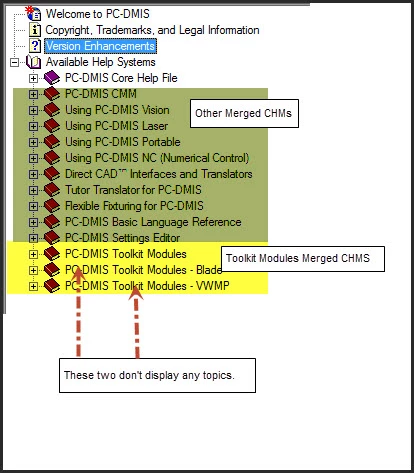
We have a master project and various sub-chms that get merged into the TOC of that master project. We have a fairly new sub RH project named "Toolkit Modules" that generates three additional sub chms that are also merged into the master help. They appear at the very end of the master project's TOC:

<master help's toc>

<10 other merged chms>

toolkitmodules.chm

toolkitmodules_blade.chm

toolkitmodules_vwmp.chm

All the topics for the three toolkit modules chms exist in the Toolkit Modules project and are conditionally marked with topic-level build tags so that the right topics appear in their respective chm.

I compiled the three toolkit chms and then put them in the master root directory so that when the master help is generated, they get included properly.

At first glance, all three of these chms appear to be working fine in the master TOC. I can expand and view the master help's TOC for the sub projects just fine, but clicking on a TOC entry does not display

the topics for these two chms in the topic pane:

toolkitmodules_blade.chm

toolkitmodules_vwmp.chm
I'm not sure why.

If I double-click and open up the individual chms from within Windows and view their contents, the topics appear as expected in those chms. It's just when merged, these latter two chms don't do anything from the TOC side. However, I have verified that the topics are indeed getting merged in, because I can use the Search tab to see the topics. In fact, the Locate button on the toolbar even expands the correct TOC and highlights the entry that matches. So something's just not working from the TOC side.

Any ideas?

I'm using RH 9.02.271

Windows 7 64-bit

HtmlHelp output (chm)

Thanks!

This topic has been closed for replies.
Correct answer Jared Hess

Jared

If I am right, you are going to want to bang your head on a wall so stand well clear before you read on.

Try recreating the merge without underscores in the CHM file names. I believe it is those three projects that are causing the trouble.

Suddenly remembered that one from a few years back.


See www.grainge.org for RoboHelp and Authoring tips

@petergrainge


What the---?? It looks like you're right Peter!

Arrgg! And to think I probably spent a dozen hours testing and messing with this problem. Where is that wall?! Time to commence head banging...

I don't get it though. How come child chms with underscores in their names worked in the salesbuilder help? But didn't when I tried them in my master project.

Ah well, note to self: NEVER USE UNDERSCORES IN CHILD CHMS!!

Thanks again Peter!

1 reply

Jared Hess
Legend
April 2, 2012

I did some more testing and applied the toolkit chms to the salesbuilder test project and they appear and function as expected. So I'm guessing something in our master project is causing the problem.

Jared Hess
Legend
April 5, 2012

Does anyone have any ideas on this? We're nearing our release date, and I need to get this figured out.

Peter Grainge
Community Expert
Community Expert
April 6, 2012

You are not being ignored, it's simply that I for one do not know the answer.

There was a problem with merged CHMs in RoboHelp 9 because the paths were absolute. That is described in Using RoboHelp 9 on my site but you will also see that Adobe advise it was fixed in the 902 patch that you have.

Take a look inside the HHP file's Merged Help section.


See www.grainge.org for RoboHelp and Authoring tips

@petergrainge

Use the menu (bottom right) to mark the Best Answer or Highlight particularly useful replies. Found the answer elsewhere? Share it here.