Exit
  • Global community
    • Language:
      • Deutsch
      • English
      • Español
      • Français
      • Português
  • 日本語コミュニティ
  • 한국 커뮤니티
0

Spacing within numbered lists with image

New Here ,
Jun 07, 2021 Jun 07, 2021

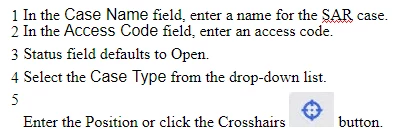
I am inserting a small image inside a numbered list. The number then stays on the line and the text is displayed below the number line. Any suggestions on how to fix this?
DARLENE5EB4_2-1623094401150.png

Thanks

225
Translate
Report
Community guidelines
Be kind and respectful, give credit to the original source of content, and search for duplicates before posting. Learn more
community guidelines
Community Expert ,
Jun 08, 2021 Jun 08, 2021

You also seem to have an issue with the font size in items 1 and 2 causing those two to look closer than 2 and 3 or 3 and 4.


Assuming you are using RoboHelp 2020 you need to go into the CSS editor and apply some settings the margin above and below lines for the above. There is an icon to increase vertical spacing.


Whilst you could use that to deal with the image problem, you would have crazy spacing between items. For that it will need a bit of experimentation. First trying clicking in item 5 and apply some top margin to just that item.


Let us know how you get on.

________________________________________________________
See www.grainge.org for free Authoring and RoboHelp Information


Help others by clicking Correct Answer if the question is answered. Found the answer elsewhere? Share it here. "Upvote" is for useful posts.
Translate
Report
Community guidelines
Be kind and respectful, give credit to the original source of content, and search for duplicates before posting. Learn more
community guidelines
New Here ,
Jun 08, 2021 Jun 08, 2021

Thank you. Yes I am using Robohelp 2020. I am new to Robohelp 2020 so I am trying to learn. I was able to edit the style and modify the line spacing but still can't figure out how to get the line number to be on the same level as the text when the image is in the text.

DARLENE5EB4_3-1623164067724.png

It works fine for bullets or any other list(a.b.c; i,ii,iii). It only looks this way for numbered lists

Translate
Report
Community guidelines
Be kind and respectful, give credit to the original source of content, and search for duplicates before posting. Learn more
community guidelines
Community Expert ,
Jun 08, 2021 Jun 08, 2021

It might be easier if you can either share the project with me or create a new project and replicate the issue there. In a new project import your CSS and apply it to a topic set up as above.


See the Contact page on my site and send the project as instructed there. Do make sure you include a link to this thread and please do not email the project direct.


It's easier to see the issue and explain the fix than to go to and fro here.

________________________________________________________
See www.grainge.org for free Authoring and RoboHelp Information

Help others by clicking Correct Answer if the question is answered. Found the answer elsewhere? Share it here. "Upvote" is for useful posts.
Translate
Report
Community guidelines
Be kind and respectful, give credit to the original source of content, and search for duplicates before posting. Learn more
community guidelines
New Here ,
Jun 08, 2021 Jun 08, 2021

The problem is resolved in a new project. It seems I must have made changes to the decimal style file. Is there a way to set it back to default or import the demical style file from the new project to the old project?

Translate
Report
Community guidelines
Be kind and respectful, give credit to the original source of content, and search for duplicates before posting. Learn more
community guidelines
Community Expert ,
Jun 09, 2021 Jun 09, 2021
LATEST

You can either the new CSS and apply it to your topics or you can open both CSS files in a text editor and replace the non working code with the working code. Backup copies first.

________________________________________________________
See www.grainge.org for free Authoring and RoboHelp Information

Help others by clicking Correct Answer if the question is answered. Found the answer elsewhere? Share it here. "Upvote" is for useful posts.
Translate
Report
Community guidelines
Be kind and respectful, give credit to the original source of content, and search for duplicates before posting. Learn more
community guidelines
Resources
RoboHelp Documentation
Download Adobe RoboHelp
