Participating Frequently
November 6, 2011
Answered

Synchronize TOC with displayed topic

  • November 6, 2011
  • 1 reply
  • 1686 views

Hello,

I am using Robohelp 9 to generate a CHM file and I am trying to synchronize the TOC with the topic displayed. For clarification: when I click a link in the contents of topic A, referencing topic B, I would like topic B to be highlighted in the TOC tree. However, topic A is highlighted even though it is no longer being displayed in the topic pane.

In other words, I am after implementing the “Synchronize Table of Contents” feature from webHelp in my chm. I ticked “always show selection” in the advanced settings but I still get the same behavior.

Thanks!
This topic has been closed for replies.
Correct answer Captiv8r

Hi Milly

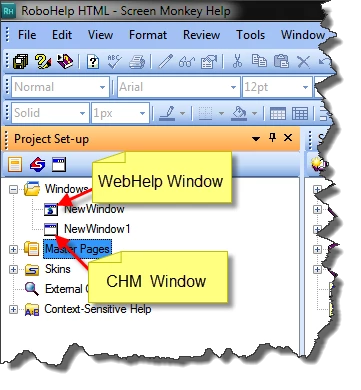
You're halfway there. Click View > Pods > Project Set-up and expand the Windows folder. Double-click the CHM window. (if you have one-you may not have one and may need to create one)

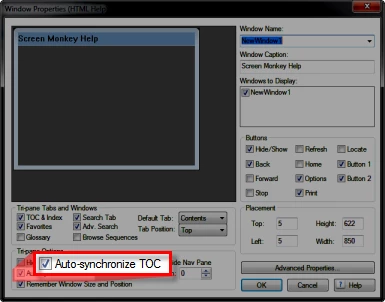
From the ensuing window properties dialog you need to enable the synchronization.

Cheers... Rick

Helpful and Handy Links

RoboHelp Wish Form/Bug Reporting Form

Begin learning RoboHelp HTML 7, 8 or 9 within the day!

Adobe Certified RoboHelp HTML Training

SorcerStone Blog

RoboHelp eBooks

1 reply

Captiv8r
Captiv8rCorrect answer
Legend
November 6, 2011

Hi Milly

You're halfway there. Click View > Pods > Project Set-up and expand the Windows folder. Double-click the CHM window. (if you have one-you may not have one and may need to create one)

From the ensuing window properties dialog you need to enable the synchronization.

Cheers... Rick

Helpful and Handy Links

RoboHelp Wish Form/Bug Reporting Form

Begin learning RoboHelp HTML 7, 8 or 9 within the day!

Adobe Certified RoboHelp HTML Training

SorcerStone Blog

RoboHelp eBooks

Participant
April 23, 2012

I'm working with RoboHelp9.0.2.271. I've enabled the Tri-pane Option "Auto-synchronize TOC" in the Window Properties of my HTML Help Window as described.
However after the generation the TOC does not follow the displayed topic.
What went wrong?

Can somebody give me an advice?


Peter Grainge
Community Expert
Community Expert
April 23, 2012

Does your window look exactly like the one above?


See www.grainge.org for RoboHelp and Authoring tips

@petergrainge

Use the menu (bottom right) to mark the Best Answer or Highlight particularly useful replies. Found the answer elsewhere? Share it here.