Copy link to clipboard
Copied
Hello,
I am using Robohelp 9 to generate a CHM file and I am trying to synchronize the TOC with the topic displayed. For clarification: when I click a link in the contents of topic A, referencing topic B, I would like topic B to be highlighted in the TOC tree. However, topic A is highlighted even though it is no longer being displayed in the topic pane.
In other words, I am after implementing the “Synchronize Table of Contents” feature from webHelp in my chm. I ticked “always show selection” in the advanced settings but I still get the same behavior.
Thanks!
Hi Milly
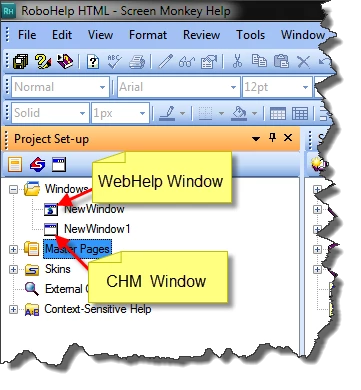
You're halfway there. Click View > Pods > Project Set-up and expand the Windows folder. Double-click the CHM window. (if you have one-you may not have one and may need to create one)
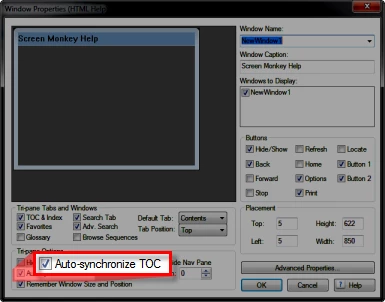
From the ensuing window properties dialog you need to enable the synchronization.

Cheers... Rick ![]()
| Helpful and Handy Links RoboHelp Wish Form/Bug Reporting Form Begin learning RoboHelp HTML 7, 8 or 9 within the day! |
Copy link to clipboard
Copied
Hi Milly
You're halfway there. Click View > Pods > Project Set-up and expand the Windows folder. Double-click the CHM window. (if you have one-you may not have one and may need to create one)
From the ensuing window properties dialog you need to enable the synchronization.

Cheers... Rick ![]()
| Helpful and Handy Links RoboHelp Wish Form/Bug Reporting Form Begin learning RoboHelp HTML 7, 8 or 9 within the day! |
Copy link to clipboard
Copied
Thanks! Took me a minute to understand that in order to create a CHM window, the HTML Help has to be set as the primary layout. Anyway, it works now, thanks again.
Copy link to clipboard
Copied
I'm working with RoboHelp9.0.2.271. I've enabled the Tri-pane Option "Auto-synchronize TOC" in the Window Properties of my HTML Help Window as described.
However after the generation the TOC does not follow the displayed topic.
What went wrong?
Can somebody give me an advice?
Copy link to clipboard
Copied
Does your window look exactly like the one above?
See www.grainge.org for RoboHelp and Authoring tips
Copy link to clipboard
Copied
Hi all
It just hit me that perhaps we are comparing spiders with hedgehogs here.
In a compiled CHM file, there are actually two things related to the Table of Contents. One is the synchronization. That aspect has been covered in this thread.
The other, which I don't believe has been covered here, is the TOC *Highlighting* of the node. To configure that, you edit the Single Source Layouts recipe and click the Edit... button.
Click images below for larger view
Then click the TOC Styles tab and ensure the option labeled *Always Show Selection* is enabled.

Post back and let us know if this helps... Rick ![]()
| Helpful and Handy Links RoboHelp Wish Form/Bug Reporting Form Begin learning RoboHelp HTML 7, 8 or 9 within the day! |
Copy link to clipboard
Copied
Hi all
all the functions are set as described. But still the result is , that the synchronization of the highlighted TOC does not follow the navigation within the content.
I've converted a project from Robohelp 5 to RoboHelp9 and regenerated a HTML Help with the described settings and I got the same result as described above. With RoboHelp5 it worked.
Copy link to clipboard
Copied
Try Tools > Update DHTML Effects.
If not, try one of the supplied sample projects or a new project with just a few topics. Click Open on the RoboHelp Starter page and then click Samples in the ribbon on the left.
See www.grainge.org for RoboHelp and Authoring tips
Find more inspiration, events, and resources on the new Adobe Community
Explore Now