
Exit
  • Global community
    • Language:
      • Deutsch
      • English
      • Español
      • Français
      • Português
  • 日本語コミュニティ
  • 한국 커뮤니티
0

Table Style Display Issue on Mac vs. Windows

New Here ,
Feb 24, 2025 Feb 24, 2025

Hi RoboHelp Community,

I’ve encountered an issue with table styles displaying inconsistently between Mac and Windows systems. Specifically, the styles I applied to tables in my RoboHelp project render as expected on Windows, but when viewed on a Mac, the styles don’t appear at all.

Has anyone else run into this problem? I’m wondering if this could be due to CSS compatibility differences or if there’s a known workaround or best practice to ensure consistent styling across both platforms.

I’d appreciate any tips, suggestions, or solutions you might have!

Thanks in advance for your help. 
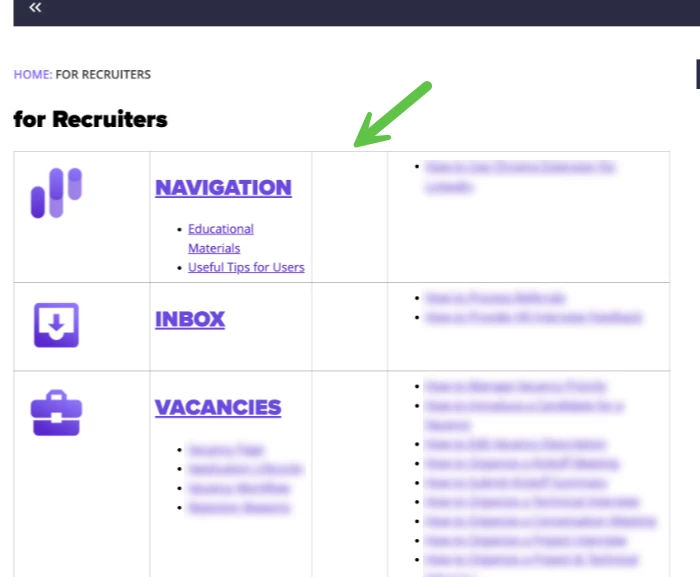
robohelpIssues.png

429
Translate
Report
Community guidelines
Be kind and respectful, give credit to the original source of content, and search for duplicates before posting. Learn more
community guidelines
Community Expert ,
Feb 24, 2025 Feb 24, 2025

Moved discussion from Premiere Pro to Robohelp forum.

Translate
Report
Community guidelines
Be kind and respectful, give credit to the original source of content, and search for duplicates before posting. Learn more
community guidelines
Community Expert ,
Feb 24, 2025 Feb 24, 2025

Are you talking about differences in the same output created in RH being shown using different browsers? 

Translate
Report
Community guidelines
Be kind and respectful, give credit to the original source of content, and search for duplicates before posting. Learn more
community guidelines
New Here ,
Feb 24, 2025 Feb 24, 2025

Yes

Translate
Report
Community guidelines
Be kind and respectful, give credit to the original source of content, and search for duplicates before posting. Learn more
community guidelines
Community Expert ,
Feb 24, 2025 Feb 24, 2025

That's kind of to be expected - all browsers have their own default CSS built into them, so the same HTML5 code will appear slightly different when displayed on Chrome/Edge or Firefox or Safari. What's the matter with how the tables are displaying?

Translate
Report
Community guidelines
Be kind and respectful, give credit to the original source of content, and search for duplicates before posting. Learn more
community guidelines
New Here ,
Feb 24, 2025 Feb 24, 2025

In the Mac view the table displays without applied table style

Translate
Report
Community guidelines
Be kind and respectful, give credit to the original source of content, and search for duplicates before posting. Learn more
community guidelines
New Here ,
Feb 24, 2025 Feb 24, 2025

anastasiiab25132022_0-1740408542358.png

That's how it looks in Widows view

Translate
Report
Community guidelines
Be kind and respectful, give credit to the original source of content, and search for duplicates before posting. Learn more
community guidelines
Community Expert ,
Feb 24, 2025 Feb 24, 2025

Which OS are you using to generate and which version of RoboHelp?

________________________________________________________

My site www.grainge.org includes many free Authoring and RoboHelp resources that may be of help.


Help others by clicking Correct Answer if the question is answered. Found the answer elsewhere? Share it here. "Upvote" is for useful posts.
Translate
Report
Community guidelines
Be kind and respectful, give credit to the original source of content, and search for duplicates before posting. Learn more
community guidelines
New Here ,
Feb 24, 2025 Feb 24, 2025

I'm using Version 2022.4.93 and 

anastasiiab25132022_0-1740408886353.png

Translate
Report
Community guidelines
Be kind and respectful, give credit to the original source of content, and search for duplicates before posting. Learn more
community guidelines
Community Expert ,
Feb 24, 2025 Feb 24, 2025

So you are generating only with the Windows version of RoboHelp, not the Mac version. The issue is just when browsing on the Mac. 


I've not seen that reported before so I suggest for this one you need to go to Adobe Support. See https://helpx.adobe.com/contact/enterprise-support.other.html#robohelp for your Adobe Support options. The email link tcssup@adobe.com is recommended as it reaches a team dedicated to Technical Communication Suite products including RoboHelp.

________________________________________________________

My site www.grainge.org includes many free Authoring and RoboHelp resources that may be of help.


Help others by clicking Correct Answer if the question is answered. Found the answer elsewhere? Share it here. "Upvote" is for useful posts.
Translate
Report
Community guidelines
Be kind and respectful, give credit to the original source of content, and search for duplicates before posting. Learn more
community guidelines
Community Expert ,
Feb 24, 2025 Feb 24, 2025

A quick google reveals that there are issues with the way Safari renders tables - there may not be a way to change that.

Translate
Report
Community guidelines
Be kind and respectful, give credit to the original source of content, and search for duplicates before posting. Learn more
community guidelines
Community Expert ,
Feb 24, 2025 Feb 24, 2025
LATEST

@Jeff_Coatsworth Nice one.

@anastasiiab25132022 Can you try another browser to determine whether Mac or Safari is the issue? 

________________________________________________________

My site www.grainge.org includes many free Authoring and RoboHelp resources that may be of help.


Help others by clicking Correct Answer if the question is answered. Found the answer elsewhere? Share it here. "Upvote" is for useful posts.
Translate
Report
Community guidelines
Be kind and respectful, give credit to the original source of content, and search for duplicates before posting. Learn more
community guidelines
Resources
RoboHelp Documentation
Download Adobe RoboHelp