
Participant
June 14, 2013
Question

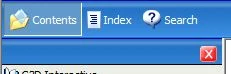
The Nav Bar items do not show at generated chm file

  • June 14, 2013
  • 1 reply
  • 1114 views

1) Using Robohelp HTML 10.0.1.292

2) Created a webhelp layout at single source layouts

3) Used the XP Blue skin

4) Generated the WebHelp

5) Converted Webhelp to CHM

6) The navigation bar displayed at the top of navigation pane does not display the items though they are configured at the skin
This topic has been closed for replies.

1 reply

Captiv8r
Legend
June 14, 2013

Hi there

Sorry, but we need more information. How exactly did you "convert" the WebHelp to CHM?

Did you simply generate a CHM from RoboHelp and expect the skin to be applied?

Did you run the WebHelp to CHM converter script supplied by Adobe?

Cheers... Rick

rrsaifanAuthor
Participant
June 17, 2013

I have created webhelp single source layout webhep_layout.  Then I have accessed the properties of webhep_layout: at Navigation, I set Skin Selection to XP Blue. Save and Generate.

Under File menu, Generate --> Webhelp to CHM Converter --> Select Webhelp Output SSL : webhep_layout --> Generate

I didn't run any script.  Just have selected the provided feature.

Thank you

GregHole_TDSi
Known Participant
September 18, 2015

Okay, now that we know what it is that is happening or what you were expecting, it's easier to tell you why. At first, it sounded like you weren't seeing ANY of the icons and the bars at the top were all blank.

As Colum said, the left and right arrow icons are part of a Browse Sequence. So if you haven't defined a Browse Sequence (And enabled it in the single source layout recipe) you don't see those icons in WebHelp.

The drop down that reads Content_1 is part of the Content Categories feature. It will only be present if you have defined multiple categories in your help. And to be honest, I'm not 100% sure that this particular feature even works in a WebHelp to CHM file. It may, but then again it may not, as it relies on multiple sets of your WebHelp files being created.

The recycle icon is only going to show up if you choose to manually synchronize your TOC. Typically WebHelp is configured to automatically synch. Hence, you don't usually see that icon even in WebHelp.

My guess is that if you generate JUST WebHelp, you will see the same thing the CHM is presenting. So nothing broken, just a misunderstanding of what the different options do.

Cheers... Rick


Hi Rick.

Did you manage to sort this issue? I too am have a similar problem which might be related.

When I run the Webhelp SSL with a skin I have created and the convert to a .CHM file I get a 'Show' link in the top left of my window. This is very annoying as I feel I need to write a help file on how to use the help file, when all I want is the window to display correctly. I have attached images of my dilemma.

Many thanks

Greg