


- Home
- RoboHelp
- Discussions
- Re: Thumbnail image not shown in merged help RH201...
- Re: Thumbnail image not shown in merged help RH201...
Thumbnail image not shown in merged help RH2017 indigo layout

Copy link to clipboard
Copied
Hi,
Using RH2017 with update 2 and am using merged responsive help with the Indigo layout.
I add a thumbnail in the parent project, and it shows a small image and pops up when clicked. This is correct.
In a merged project, the thumbnails always display a black background, as shown below, rather than the image, although it works correctly when clicked.

This seems to be a bug?
Thanks


 24
Replies
24
24
Replies
24


Copy link to clipboard
Copied
In all browsers? Please check IE, FF and Chrome.
Copy link to clipboard
Copied
Hi,
Yes it seems to be all browsers unless I'm doing something wrong. Don't think I am as it works in the parent with the same settings.
Copy link to clipboard
Copied
If it is working in the project standalone and only failing in merged help, then report it as a bug.
Please follow this link to report bugs and request features. The more people who do so, the higher it gets prioritised.
Post the link to that bug in this thread and others can vote for it.
See www.grainge.org for RoboHelp and Authoring information


Copy link to clipboard
Copied
Copy link to clipboard
Copied
I have voted for this issue albeit that I got somewhat different issues. After voting I added Tracker Bug 1130 covering wider issues with merged HTML5 help.
See www.grainge.org for RoboHelp and Authoring information
Copy link to clipboard
Copied
Cheers Peter,
It looks like this will take Adobe some considerable time to fix and test all these issues in RH2017 with merged help..
In the meantime, I am left with an upgrade that I cannot use to deploy the new Indigo layout help - a tricky one to explain to my employer.
Just as well I still have RH2015...
Copy link to clipboard
Copied
The issue of your thumbnails being black (and the TOC not synchronising in IE) apart, these are all issues that if you are generating and deploying the full merge will not cause problems. If you need to deploy the system with say 3 of 5 children, the workaround would be to have a different TOCs in the parent pointing to just the required children.
Not ideal but they are issues that can be worked around until they are fixed.
See www.grainge.org for RoboHelp and Authoring information
Copy link to clipboard
Copied
Hi,
I still have problems with Chrome syncing with over 3 merged projects.
For example, using your test project in the tracker above, the syncing works fine in Chrome.
If I add another child project - child_4, the syncing does not then work in the search or by clicking on the page in the books.
I remove the merged project from the parent and generate, it works again.
Would be grateful if you are able to confirm this yourself?
Cheers
Copy link to clipboard
Copied
Did you regenerate all the projects including the parent after adding the new child?
See www.grainge.org for RoboHelp and Authoring information
Copy link to clipboard
Copied
I have now to double check - and there still seems issues.
Cheers
Copy link to clipboard
Copied
Check to which folder the download is generating.
It might not have automatically changed to the drive where you have put the project.
See www.grainge.org for RoboHelp and Authoring information
Copy link to clipboard
Copied
I added a project and initially hit errors, as you may have guessed from my previous post. However, after correcting the paths the merge opens with all four projects and syncs OK in FF and Chrome. IE not tested as we know there is a TOC syncing issue there.
See www.grainge.org for RoboHelp and Authoring information
Copy link to clipboard
Copied
Hmm... Will try again tomorrow as i was definitely having issues in Chrome. I did reconfigure the generation output path.
My main project has 29 merged files. It initially worked fine but the synching broke somewhere along the way as more projects were added.
Thanks Peter
Copy link to clipboard
Copied
Hi,
Have tried again. In the indigo layout, clicking any page in any merged project using the icons below does not synch with the TOC in Chrome or FF. It sometimes randomly works but 99% of the time is doesn't.
If I remove the fourth merged project (or any other merged project) all works OK with just the three.

Copy link to clipboard
Copied
I have emailed via WeTransfer the project where I added a fourth project. Note the instructions in the email and test that.
See www.grainge.org for RoboHelp and Authoring information
Copy link to clipboard
Copied
Hi Peter,
Cheers for the file. Using your initial output FF doesn't sync at all using the books/pages.
In Chrome, is doesn't sync 99% of the time when using on my C drive.
However, when placed on a network drive, it work a lot better in Chrome but is still not 100% as some don't sync!?
Just going to regenerate and check.
Cheers
Copy link to clipboard
Copied
I regenerated. The first few clicks on books / topics worked in Chrome then it stopped synching completely.
Copy link to clipboard
Copied
There has to be something in your browser setup or environment. I just tested what I sent you again in Chrome and no matter how many times I click the output, it works just fine.
Can you test at home?
See www.grainge.org for RoboHelp and Authoring information
Copy link to clipboard
Copied
Yes will try at home. I reset chrome to the original settings, cleared cache etc and everything so its very strange.
Thanks
Copy link to clipboard
Copied
Hi,
I tried it at home. It appeared to work but after clicking on various books and topics a number of times via the TOC the sync was lost.
It appears to be a random issue as pages that did sync sometimes do not.
I uploaded your output to a server. It works much better there, but still randomly fails.
I will await the Update 3 and then test.
Thanks for your help.
Cheers
Copy link to clipboard
Copied
I'm testing in Windows 10 fully updated and the latest versions of the browsers.
See www.grainge.org for RoboHelp and Authoring information
Copy link to clipboard
Copied
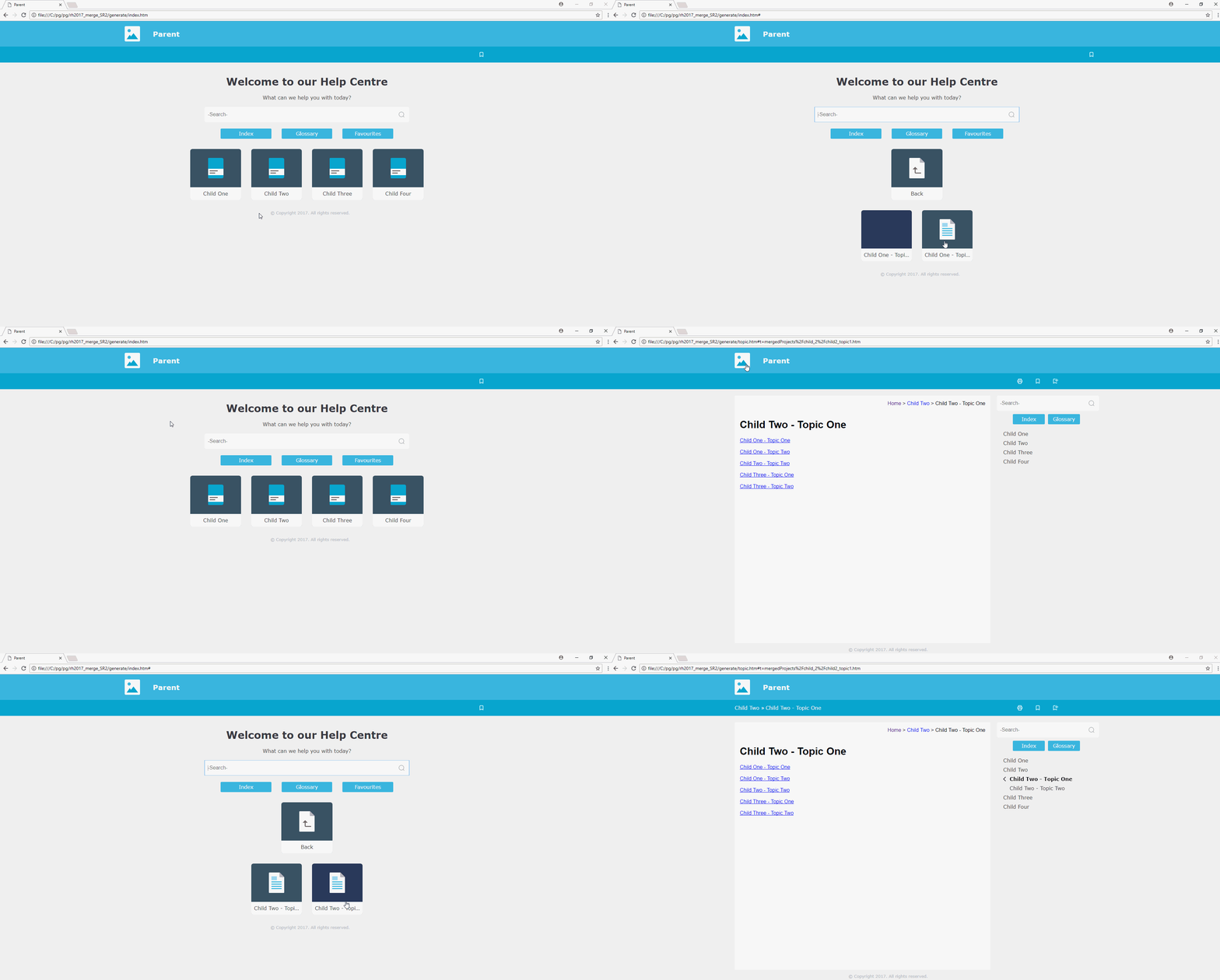
Yes so am I. Please see animated GIF of what is happening with your output for me.
If you click on it, should open full screen from the beginning:
Copy link to clipboard
Copied
What you are doing different is going back to the default page using the icon each time. It hadn't occurred to me to work that way as it is not how how I would normally use a help file. If the topic I had gone to wasn't what I wanted, I would use the inter topic links, search and index.
I agree what you are doing shouldn't break it so try my way of using the help and see if that works OK for you.If it does we have narrowed the problem down to one usecase. That can be reported but hopefully it is not the way most people would work anyway pending a fix.
Let me know how not always going back to default topic via the icon works.
See www.grainge.org for RoboHelp and Authoring information
Copy link to clipboard
Copied
Hi,
Agree it is not standard usage, although some users will do that and it does break it.
Other usage in the test project seems to work OK although my large work project with 29 merged projects and thousands of topics doesn't sync at all via the TOC in Chrome or FF. Index and search work, but syncs only when you click a result for the second time.
I'm looking into this but there does seem to be issues with larger projects.
Cheers


Get ready! An upgraded Adobe Community experience is coming in January.
Learn more
 AdChoices