
TOC pane is blank, search doesn't work
I'm using RoboHelp version 9.02.271 (just upgraded from 9.01 since that wasn't working.) After I compile my WebHelp project, the TOC pane appears completely blank and I can't search for any topic. It doesn't work when I use the defaults for compiling and it doesn't work when I use my own TOC, master page, index, and CSS file. Any assistance you can give is appreciated. Thanks, Sally C.
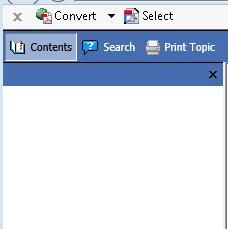
View Source in TOC:
<html><!-- saved from url=(0014)about:internet -->
<head>
<title>Search Frame</TITLE>
<meta name="generator" content="Adobe RoboHelp 9" />
<meta name="description" content="WebHelp 5.50" />
</head>
<script language="javascript" src="whver.js"></script>
<script language="javascript1.2" src="whproxy.js"></script>
<script language="javascript1.2" src="whmsg.js"></script>
<script LANGUAGE="javascript1.2">
<!--
var gbIndexLayerInit = false;
var strWrite="";
if (window.gbWhVer&&window.gbWhProxy&&window.gbWhMsg)
{
if (gbMac)
strWrite="<FRAMESET ROWS='85,100%' framespacing=0 frameborder=0>";
else
strWrite="<FRAMESET ROWS='115,100%' framespacing=0 frameborder=0>";
strWrite +="<FRAME SRC='whfform.htm' title='search form frame' name='ftsform' noresize='yes' scrolling='no'>";
strWrite +="<FRAME SRC='whfbody.htm' title='search result frame' name='ftsbody' scrolling='yes'>";
strWrite +="</FRAMESET>";
document.write(strWrite);
}
else
document.location.reload();
//-->
</script>
</html>

 AdChoices