
Participating Frequently
July 16, 2013
Question

TOC Style

  • July 16, 2013
  • 1 reply
  • 550 views

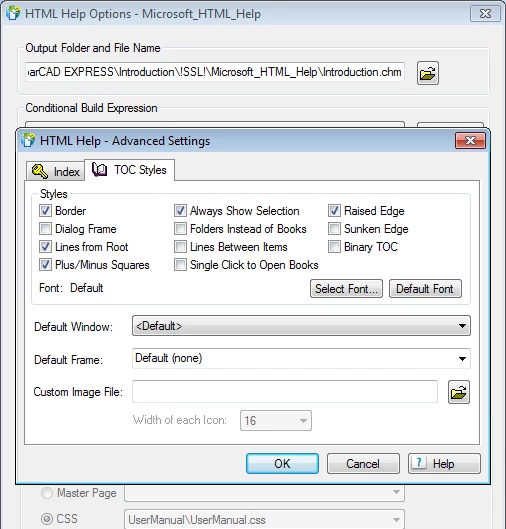
Though the TOC Style "Always Show Selection" has been checked but still in the generated chm file using RoboHelp 10 does not close the book.  When a user navigates from one link to another from topics, the related topic is not displayed.  The other books remain open, the related book from where the html file gets displayed is not displayed.  Can anyone help me with this.

Soni
This topic has been closed for replies.

1 reply

Captiv8r
Legend
July 16, 2013

Hi there

The option for Always Show Selection only highlights the selected book. There are other options you need to enable and consider. The first is on the dialog you show. It is labeled "Single Click to Open Books". And if I enable that, I typically also enable the Plus Minus Squares, which I note you have done.

Once you make this change, head to your Project Set Up pod and look at your CHM window definition. You will want to ensure that you have synchronizing the TOC enabled.

Cheers... Rick

Try_CadsAuthor
Participating Frequently
July 17, 2013

I haven't defined window for CHM.  The default window is displayed in the CHM output. I am unable to view the option that you have said "synchronizing the TOC enabled".  Can you please let me know where this can be located.

Thanks

Try_CadsAuthor
Participating Frequently
July 17, 2013

Rick will still be in bed right now.

What you are showing is a webhelp window. In theSSL pod, set Microsoft HTML help to be the default, unless you are using Rh10. Then go the Project Set Up pod and create a new window, in Rh 10 you will get an option for the window type.

In the new window you will see the required option.

Make sure you select that window when generating the help.


See www.grainge.org for RoboHelp and Authoring tips

@petergrainge


Thanks