
Participant
December 8, 2011
Question

Toolbar font size buttons

  • December 8, 2011
  • 1 reply
  • 1188 views

In our WebHelp toolbar, we're trying to add buttons for enlarging and reducing the size of the font used to display the help content.
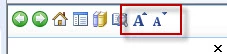
We've got the buttons added to the toolbar, but we can't get them to execute our script, which looks like this:

function resize(multiplier) {

    if (document.body.style.fontSize == "") {

        document.body.style.fontSize = "1.0em";

    }

    document.body.style.fontSize =

        parseFloat(document.body.style.fontSize) +

       (multiplier * 0.2) + "em";

}

We tested the script in a non-RoboHelp HTML page, and it worked fine:

<script type="text/JavaScript" src="fontSize.js"></script>

<p><img id="plustext" src="Bigger.jpg" width="15px" height= "15px" onclick="resize(1)" />
<img id="minustext" src="Smaller.jpg" width="15px" height= "15px" onclick="resize(-1)" /></p>
<p>Text Sizing</p>

We then attached the script to the button using the Inline JaveScript option, and for the button's OnClick action have used the function call resize(1), like this::
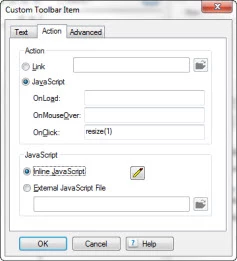
But it just won't work.  Any ideas, anybody?

Thanks in advance.

--Clay

This topic has been closed for replies.

1 reply

Willam van Weelden
Inspiring
December 8, 2011

Hi,

I haven't tested this, but I think your problem is as follows: You are setting the font size of the body element. All elements that inherit the font size from the body or elements that use a font size relative to the font size of the body will be resized. In RoboHelp you would normally work with absolute sizes such as pixels and points. In order to make this work you need to make all font-sizes in your CSS relative using em, percentages, etc.

Greet,

Willam

Participant
December 8, 2011

Thanks for the response.  I tried going to a very simple CSS that defined just a base body style and a relatively sized H1:

BODY {

  font-family: Arial;

  background-color: #ffffff;

  font-size: 100%;

}

H1 {

  font-size: 2.0em;

}

I figured the text-sizing script should then be able to resize at least the H1, but no dice.

--Clay

Willam van Weelden
Inspiring
December 8, 2011

Hi,

This just occured to me: I suspect that you're using the script from your first post for the WebHelp. That can't work for the topic because the topic is in a different frame. First, you need to retreive the topic frame, then you need to set the font size of the topics body. The following function will get the topic pane for you: http://www.wvanweelden.eu/robohelp/scripting_webhelp/get_topic_pane

If you also want it to work on the navigation pane, you need to get the navigation pane too. The following function will retreive the navigation pane:

var getSidebar = function() {

      var topicPane = GetTopicPane();

     return topicPane.parent.frames[0].frames[1];//This is the frame that hold the TOC/Index/etc.

}

Greet,

Willam