
Participating Frequently
July 16, 2010
Question

Webhelp skin: add custom text in the navigation toolbar?

  • July 16, 2010
  • 1 reply
  • 2261 views

Hello,

I am using Robohelp 8.0.0.208 and I would like to customize a skin for a webhelp output: add a title (personal text) in the navigation panel just after the print button (see screenshot).
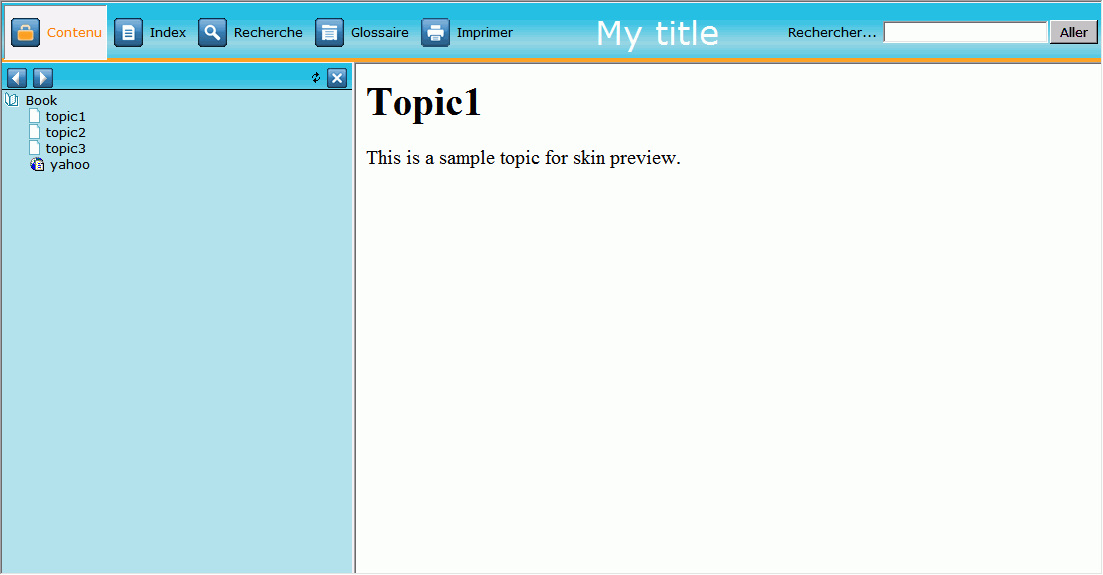
For now, the best solution I found is to add a custom button which only contains a title ( no picture and no action related to the button).  Of course this solution make the "title" button reactive which is not corresponding to I want to do (add passive text).

Is there a way to do so?

I alreday searched in the "Skinny on skins" file but without succes...

Thanks in advance for your help.

This topic has been closed for replies.

1 reply

Captiv8r
Legend
July 16, 2010

Hi there

Isn't it funny sometimes how the universe works? As luck would have it, I was working with this exact thing just last night for some folks participating in a RoboHelp class I'm facilitating.

Here's my first effort:

(Click the image to see a larger and more detailed view)

So now to answer the inevitable question about how I achieved this.

I was supplied an image that they wish to use for the header. I then used the WebHelp Skins editor and configured this image as the background image for the main toolbar.

Lastly I created buttons that were mostly transparent images but having verbiage positioned so it appeared in the little green banner near the bottom. This was the tricksiest bit. Lots of trial and error to get the text positioned properly.

So there you have it! Hope it helps... Rick

Helpful and Handy Links

RoboHelp Wish Form/Bug Reporting Form

Begin learning RoboHelp HTML 7 or 8 moments from now - $24.95!

Adobe Certified RoboHelp HTML Training

SorcererStone Blog

RoboHelp eBooks

Participant
April 12, 2011

Hi there,

I am using Robohelp 9 (trial version) and created a Help System header that I uploaded as my background image - just how you explained it.

When I went to preview this, the background image shows up multiple times throughout the top of the help system window.

How can you set the background image so it only appears one time? I set my background image to 800x600.

Any help on this would be very much appreciated!!

Participating Frequently
April 13, 2011

Hello,

As far I know about Robohelp skins, you can not configure your skin so the background image does not repeat.

The best solution I found is to use an image larger than your screen. To give you an idea, the picture I use is 2000x85 px.

Hope these explanation will help you.