
Participant
September 10, 2013
Question

Whphost.js. My TOC, Index, and Search buttons do not function in WebHelp RH9

  • September 10, 2013
  • 1 reply
  • 880 views

I've read posts about this issue but I have not received a satisfactory answer as to why this occurs or how to fix it.

Note that this problem occurs regardless of the complexity of the project. When the project is first generated (DHTML > Pure HTML is selected), I first receive a script/ActiveX warning....
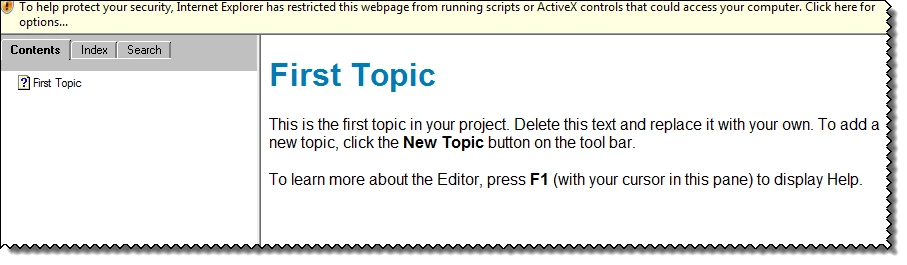
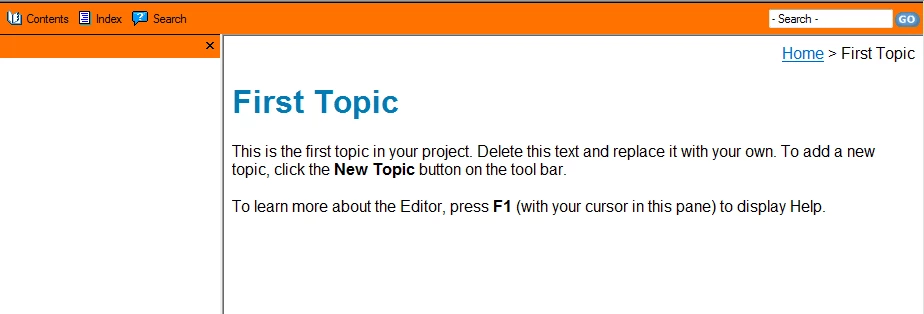
After I accept the option to allow Blocked Content, the TOC no longer appears and the Search, Index, and Glossary buttons no longer function.
When I click the Error icon on the lower left corner of the page, the following appears:
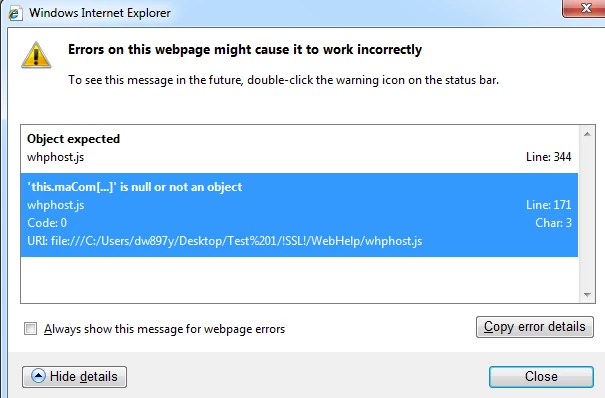
Note that this error was not encountered in RH 8. My system is Windows 7 and my browsers are IE8 and Mozilla (Firefox ESR 17.0.7).

I would appreciate any guidance regarding this situation.

Thank you.

This topic has been closed for replies.

1 reply

Willam van Weelden
Inspiring
September 11, 2013

So do you see this error on both IE and FF? IF so, it would suggest that not all resource files (whphost.js or whutils.js) are copied to the output.

Greet,

Willam

dw30076Author
Participant
September 11, 2013

William. Thank you for quick response.

Currently the error exists in both in IE and FF.

Both the whphost.js and whutils.js file can be found in the output folder.

Regards.

DW

Willam van Weelden
Inspiring
September 20, 2013

Strange. Can you try the following:

1. Remove the entire output folder.

2. Remove the entire SSL folder. (if not the same as 1)

3. Regenerate the project.

This makes sure that any corrupted file at least gets regenerated.

Also, what happens when you generate one of the example projects? Do you see the same issue?

Last, do you use any custom scripts or DHTML effects other than drop-downs?

Greet,

Willam