
Known Participant
February 18, 2012
Question

Why are my numbered lists changing formats?

  • February 18, 2012
  • 1 reply
  • 1251 views

We upgraded from RH7 to RH9. Now all the numbered lists in drop-downs are messed up. For example, the look fine in the WYSIWYG view:
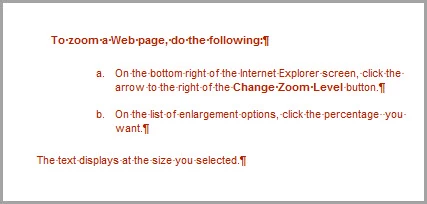
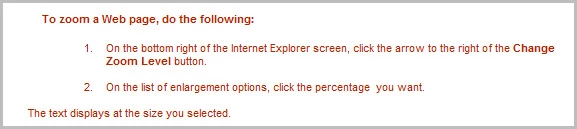
But when generated, this is the result:
The CSS reads as follows:

LI.P-DropDownTextSteps {

font-size: 8pt;

font-family: Arial, sans-serif;

list-style-type: lower-alpha;

color: #af2305;

}

In some cases, even the sans-serif font changes to a serif font and the size of the numbers changes. I have tried everything I can think of. I have spent countless hours and am really baffled.

This topic has been closed for replies.

1 reply

Peter Grainge
Community Expert
Community Expert
February 18, 2012

Take a look at Lists on my site. There is a section about upgrading.


See www.grainge.org for RoboHelp and Authoring tips

@petergrainge

Use the menu (bottom right) to mark the Best Answer or Highlight particularly useful replies. Found the answer elsewhere? Share it here.
BJeppsonAuthor
Known Participant
February 27, 2012

I looked at the informationon your list, Peter, and it seemed to make sense. I followed the instructions (as I understood them) on your document "Make your CSS list styles work in RoboHelp 8" but the results were much worse than when I started, so I apparently am missing something. Because we need to support a number of browsers, I took the approach of cleaning up CSS files. Removing all definitions starting LI.stylename where the style is NOT used as a list apparently made things worse.

Somehow the answer is here, though. The margins and indents are fine. The font, color, size, and style of the numbers themselves has changed with the upgrade. The bullets are fine.

RH has more than one CSS. The changes I'm making are to our house CSS. Should I be doing them elsewhere as well? Or should I delete other CSS?

Peter Grainge
Community Expert
Community Expert
March 2, 2012

I should also say that when I generate PDF output, the numbers are in correct fonts and sizes and appear with the correct decimal or lower-alpha numerations.


Apply default.css instead just to see that corrects things.

Then revert to your CSS whatever the result and check the case of the LI tag and class in the topic matches that in the CSS.

If that does not fix it, zip up a topic that has that problem and the CSS used by that topic. See the Contact page on my site and send me the zip file. Attach the zip file to the email notwithstanding what it says on my Contact page.


See www.grainge.org for RoboHelp and Authoring tips

@petergrainge

Use the menu (bottom right) to mark the Best Answer or Highlight particularly useful replies. Found the answer elsewhere? Share it here.