
Why has HTML in RH X5 glossary hotspots?
Hi all,
I have a RoboHelp X5 WebHelp project which is updated every quarter. I do not work in the client's office - simply send the WebHelp to them for publication. The project is updated every quarter and while testing before this quarter's publication at the end of June a problem has come up with how glossary hotspots display. After every glossary hotspot (in magenta...client's choice, not mine) we now have an extra space. In previous publications that extra space wasn't there. I've pasted a screen shot here to show you:
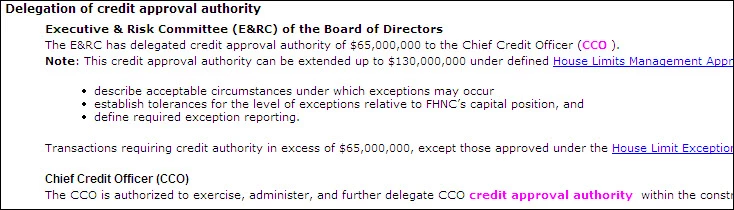
The IT guy in the client's office diagnosed it this way after looking at the HTML:
(<a class="glossterm" href="javascript:kadovTextPopup(this)" id="a1">CCO</a> <span class="glosstext" style="display:'none';" id="POPUP181927339">Chief Credit Officer - John Doe</span>).
The problem is the space between </a> and <span (highlighted above). The space needs to be right before the text inside of the <span> tag.
Copied below is code from the last quarter's publication when we didn't have the extra space followed by this quarter's project which suddenly and inexplicably has the extra space.
(<a class="glossterm" href="javascript:kadovTextPopup(this)" id="a1">CCO</a><span class=glosstext style="display: 'none';" id=POPUP43291891 > Chief Credit Officer - John Doe</span>)
What I need to try to determine is how and why the HTML would change when I made no change to content in the project and haven't knowingly made any updates to RoboHelp. The IT guy thought there might be a possibility that an automatic Adobe Updater might have touched RoboHelp somehow. If that's true, how might I get rid of this problem? An uninstall and reinstall of RH X5? And if it isn't possible that the RH software was somehow changed without my doing anything, what else could account for this change in the HTML? My client doesn't want to publish with these extra spaces but I have no idea how to get rid of them.
Any help would be greatly appreciated...thank you.
Diane
P.S.
If any of this rings a bell about some recent posts of mine, you're not crazy. I wrote about a problem I was having with a custom program written for me to identify and locate manually-added glossary hotspots so I could update definitions when necessary. RoboHelp can only find and update hotspots added with its Glossary Wizard and the client had insisted on some hotspots in places different than the wizard would place them. Suddenly with this quarter's project publication the program no longer worked and we were unable to find out why. If in fact the RH software was somehow changed through an automatic update or some such thing, that would explain why my custom program no longer worked...it was looking for HTML that is different than when the programmer first wrote the program for me.
 AdChoices