
June 8, 2011
Question

Why has HTML in RH X5 glossary hotspots?

  • June 8, 2011
  • 2 replies
  • 2112 views

Hi all,

I have a RoboHelp X5 WebHelp project which is updated every quarter.  I do not work in the client's office - simply send the WebHelp to them for publication.  The project is updated every quarter and while testing before this quarter's publication at the end of June a problem has come up with how glossary hotspots display.  After every glossary hotspot (in magenta...client's choice, not mine) we now have an extra space.  In previous publications that extra space wasn't there.  I've pasted a screen shot here to show you:
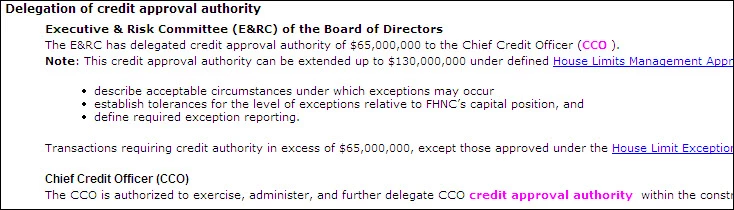
The IT guy in the client's office diagnosed it this way after looking at the HTML:

(<a class="glossterm" href="javascript:kadovTextPopup(this)" id="a1">CCO</a> <span class="glosstext" style="display:'none';" id="POPUP181927339">Chief Credit Officer - John Doe</span>).

The problem is the space between </a> and <span (highlighted above). The space needs to be right before the text inside of the <span> tag.

Copied below is code from the last quarter's publication when we didn't have the extra space followed by this quarter's project which suddenly and inexplicably has the extra space.

(<a class="glossterm" href="javascript:kadovTextPopup(this)" id="a1">CCO</a><span class=glosstext style="display: 'none';" id=POPUP43291891 >   Chief Credit Officer - John Doe</span>)

What I need to try to determine is how and why the HTML would change when I made no change to content in the project and haven't knowingly made any updates to RoboHelp.  The IT guy thought there might be a possibility that an automatic Adobe Updater might have touched RoboHelp somehow.  If that's true, how might I get rid of this problem?  An uninstall and reinstall of RH X5?  And if it isn't possible that the RH software was somehow changed without my doing anything, what else could account for this change in the HTML?  My client doesn't want to publish with these extra spaces but I have no idea how to get rid of them.

Any help would be greatly appreciated...thank you.

Diane

P.S.
If any of this rings a bell about some recent posts of mine, you're not crazy.  I wrote about a problem I was having with a custom program written for me to identify and locate manually-added glossary hotspots so I could update definitions when necessary.  RoboHelp can only find and update hotspots added with its Glossary Wizard and the client had insisted on some hotspots in places different than the wizard would place them.  Suddenly with this quarter's project publication the program no longer worked and we were unable to find out why.  If in fact the RH software was somehow changed through an automatic update or some such thing, that would explain why my custom program no longer worked...it was looking for HTML that is different than when the programmer first wrote the program for me.

    This topic has been closed for replies.

    2 replies

    June 12, 2011

    I neglected to answer one of Peter's questions.  He wanted to know if I had changed PCs...no, I haven't.  No change in PC, RH, CSS, at least not intentional.  And as some of us agreed, it would be hard to make a change to the CSS unintentionally and there's no doubt about whether or not I've changed PCs.  Unless I'm overlooking something, it seems to leave RH as the culprit but I'm stumped as to what the change could be.

    Again, thanks to all for your help.

    Diane

    Peter Grainge
    Community Expert
    Community Expert
    June 13, 2011

    I'm stumped too but I have to say that whilst RoboHelp could be the culprit, the same as any other element, at the moment it does seem as if it is getting blamed on the basis of it being the last man standing.

    Create a new project with just one topic and see what happens there. Use the default CSS and keep the topic simple. That will narrow it down to being the project or RoboHelp.

    I don't think it would be any different viewing with other browsers but check that out too.


    See www.grainge.org for RoboHelp and Authoring tips

    @petergrainge

    Use the menu (bottom right) to mark the Best Answer or Highlight particularly useful replies. Found the answer elsewhere? Share it here.
    June 14, 2011

    Glad you can't see a difference because I couldn't.  I should have pointed out that I didn't see a difference but was wondering if someone else might see something I didn't.  I just got off a 2-hour call with Adobe which started with questions about purchasing RH 9 and I happened to mention this problem to the rep.  He told me that X5 wasn't supported any longer but he'd be happy to take a look at my project anyway.  I gave him access to view my desktop and after looking at my problem project and the test project which is fine and after doing some tests on his end he couldn't find anything wrong, although he sees the problem in the output.  He asked me to give him 24 hours to look into it some more and he'd get back to me.  I told him what you said about thinking there had been a discussion in this forum about the same/similar problem with RH 8 so he'll check that avenue as well.

    In the meantime, I have no idea what the file is you suggest I replace but I'm thriled with anything I can try.  I'll do that this evening or in the morning and post the results.

    Thanks again!

    Diane


    I did as suggested:

    "...try dropping into the old project the ehlpdhtm.js file from the new project."

    Hoping I understood correctly what you wanted me to do, I copied the ehlpdhtm.js from a copy of the current, problematic project into a copy of the old, problem-free project, and generated new WebHelp.  Result:  no change in the old project.  It looks fine - did not become "infected" with the problem in my current project.  I assume that's what you were looking for - to see if that file would cause the spacing problem to appear in a project that didn't have the problem.

    Any new thoughts?

    Diane

    Captiv8r
    Legend
    June 8, 2011

    Hi there

    Almost out the door for church service but check your CSS! These are defined in the CSS.

    Cheers... Rick

    Helpful and Handy Links

    RoboHelp Wish Form/Bug Reporting Form

    Begin learning RoboHelp HTML 7, 8 or 9 within the day!

    Adobe Certified RoboHelp HTML Training

    SorcerStone Blog

    RoboHelp eBooks

    June 8, 2011

    I'll look at it, but I know for a fact I haven't touched the style sheet

    since about 9 months ago and we've had at least one publication since then -

    our last one - that didn't have the extra space problem. Do you know of any

    way a style sheet could be modified without me intentionally opening it up

    and editing it?

    Peter Grainge
    Community Expert
    Community Expert
    June 9, 2011

    No version of RoboHelp automatically applies updates so you can rule that out. It can tell you about an update but not automatically apply it. Also X5 has not had an update created for years.

    CSS changes would need to be made consciously so you can rule that out too.

    The only thing that comes to mind is that a similar issue arose with RoboHelp 8 and was covered here. Sorry but I don't know the cause.

    What happens of you open an old backup where you know this worked OK? Does that now show a space?

    Have you changed PCs?

    Maybe Rick has some other ideas?


    See www.grainge.org for RoboHelp and Authoring tips

    @petergrainge

    Use the menu (bottom right) to mark the Best Answer or Highlight particularly useful replies. Found the answer elsewhere? Share it here.