
Inspiring
February 3, 2015
Answered

Window display issues with Webhelp/Webhelp Pro output

  • February 3, 2015
  • 1 reply
  • 863 views

Hello,

I've created a couple webhelp projects after being told by our QA/Development team that the projects I created in HTML5 format were not compatible with 1.) legacy versions of IE [specifically 7 and 8 - posted another discussion on this over the past couple months, tried the shiv patch to no avail] and 2.) the control used by the program to display an HTML file set on a given [iOS] device - from what I'm told, this applies to iOS 7 and there is supposed to be a new version of the control in iOS 8 that does support the HTML features. But we're not there just yet (still need to support iOS 7), so per QA/DEV request, I created the webhelp projects to see If these work and display better on the devices.

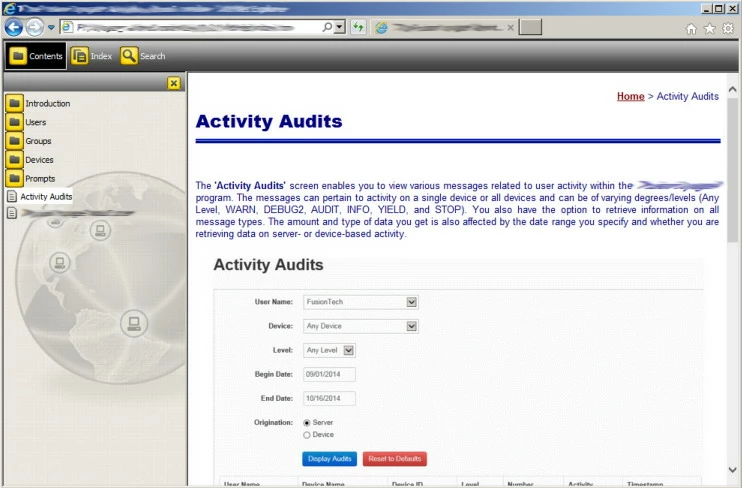
I've noticed some display issues when I generate and view the webhelp output. Initially, the books in the TOC are cut off and I have to resize the TOC pane and slide the scroll bar at the bottom of the display window to see them. But when I do this, the button for the Search field in the toolbar gets cut off. Also, the initial vertical scroll bar displayed on the right hand side of the window applies to the full window. In other words, I can't use it to scroll up or down in the displayed topic. Again I have to resize the window overall or slide the bottom scroll bar all the way to the right, at which point I can see a partial "hidden" vertical scroll bar for the topic window.

The window properties dialog for creating/editing a window for either webhelp or webhelp pro doesn't provide much in the way of customization or anything I can see related to these issues.

Can anyone offer some suggestions on how I can get the window to display properly?

Thanks in advance for any help you can provide.

Sincerely,

DH

This topic has been closed for replies.
Correct answer TW97

Maybe it’s a RH11 artefact, but I’m not getting it in RH10. Is it still misbehaving if you maximize the screen? What level of zoom settings are you using?


HA! Looks like we stumbled onto the solution inadvertently. I checked the zoom setting and this was at 90%. Changed this to 100% and voila'! No more double scrollbar. Also changed the skin - kinda diggin' this Global Connect one . But you can now use the one scrollbar to move up and down in the topic as you would expect.
Thanks for all your time and suggestions in helping me resolve this!

DH

1 reply

Jeff_Coatsworth
Community Expert
Community Expert
February 3, 2015

Well, unless you’re hosting your WebHelp on a server running RH Server, then generating the Pro flavour is going to do nothing for you.

TW97Author
Inspiring
February 3, 2015

True. I was just toying around with the window settings for webhelp pro since you get a few more options there. But in reality, these are going to be published in standard webhelp format, so I was looking for any tips, tricks, or guidance on how to get the help files to display better without having to resize, scroll here or there, and so on.

TW97Author
Inspiring
February 4, 2015

One possibility would be to use the Multiscreen output combined with Responsive.

Generate Multiscreen with two profiles. One for desktop and one for a different profile.

Then generate basic WebHelp (NOT Pro if you aren't using RoboHelp Server) and replace the desktop files with the WebHelp. Then generate Responsive HTML5 and replace the other profile's files with its files.

My thought is that the sniffer will then redirect to the WebHelp if on desktop, but redirect over to Responsive HTML5 for other devices.

Cheers... Rick


I appreciate all the feedback thus far. Unfortunately, as I stated in my original post, until we get away from supporting these legacy versions of IE (pre-9) and iOS 7 for the device help, anything involving HTML5 at this point is off the table due to various incompatibility issues. So, for the time being, no Responsive HTML5 or Multiscreen HTML5.

My hope was that upgrading to RH 11 with these output options would solve all our problems with having the help files display on iOS devices - honestly, that was THE main reason we did the upgrade in the first place. However, we've since discovered these incompatibility issues, so here we are.

Some more clarification.

What I was trying to say in my original post was that when I generate the webhelp output and click 'View Result', when the help displays in the RH viewer, that's where I'm seeing the display issues noted above. I'm not even sure if these same issues are occurring when the help is launched from the program (to display on either a desktop or one of these iOS devices) - haven't gotten any feedback from the QA/DEV team on that; just that the HTML5 versions don't work.

I configured a window to display the help, but like I said, there's not much you can do in the window properties with webhelp output. I've tried it where I just use the default browser settings and where I make some changes and still seem to have the display issues.

So, long story short, I was just checking to see if there was anything I could do to ensure that the help will display properly before I release it to QA, so I don't get dinged on this later .

Thanks,

DH