
Inspiring
February 3, 2015
Answered

Window display issues with Webhelp/Webhelp Pro output

  • February 3, 2015
  • 1 reply
  • 863 views

Hello,

I've created a couple webhelp projects after being told by our QA/Development team that the projects I created in HTML5 format were not compatible with 1.) legacy versions of IE [specifically 7 and 8 - posted another discussion on this over the past couple months, tried the shiv patch to no avail] and 2.) the control used by the program to display an HTML file set on a given [iOS] device - from what I'm told, this applies to iOS 7 and there is supposed to be a new version of the control in iOS 8 that does support the HTML features. But we're not there just yet (still need to support iOS 7), so per QA/DEV request, I created the webhelp projects to see If these work and display better on the devices.

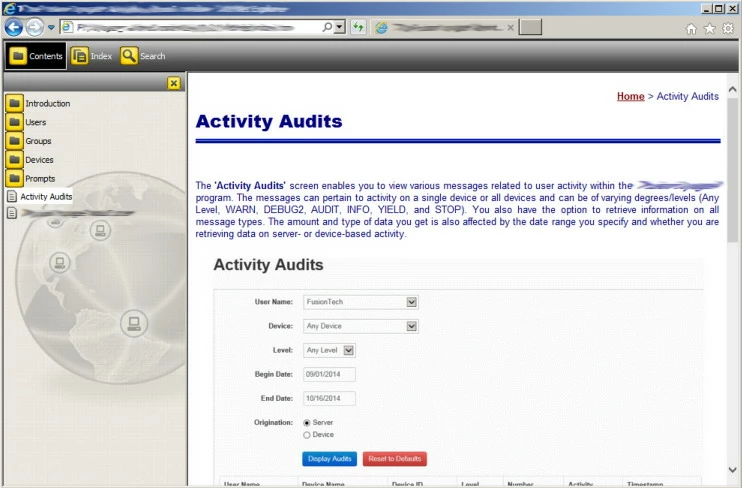
I've noticed some display issues when I generate and view the webhelp output. Initially, the books in the TOC are cut off and I have to resize the TOC pane and slide the scroll bar at the bottom of the display window to see them. But when I do this, the button for the Search field in the toolbar gets cut off. Also, the initial vertical scroll bar displayed on the right hand side of the window applies to the full window. In other words, I can't use it to scroll up or down in the displayed topic. Again I have to resize the window overall or slide the bottom scroll bar all the way to the right, at which point I can see a partial "hidden" vertical scroll bar for the topic window.

The window properties dialog for creating/editing a window for either webhelp or webhelp pro doesn't provide much in the way of customization or anything I can see related to these issues.

Can anyone offer some suggestions on how I can get the window to display properly?

Thanks in advance for any help you can provide.

Sincerely,

DH

This topic has been closed for replies.
Correct answer TW97

Maybe it’s a RH11 artefact, but I’m not getting it in RH10. Is it still misbehaving if you maximize the screen? What level of zoom settings are you using?


HA! Looks like we stumbled onto the solution inadvertently. I checked the zoom setting and this was at 90%. Changed this to 100% and voila'! No more double scrollbar. Also changed the skin - kinda diggin' this Global Connect one . But you can now use the one scrollbar to move up and down in the topic as you would expect.
Thanks for all your time and suggestions in helping me resolve this!

DH

1 reply

Jeff_Coatsworth
Community Expert
Community Expert
February 3, 2015

Well, unless you’re hosting your WebHelp on a server running RH Server, then generating the Pro flavour is going to do nothing for you.

TW97Author
Inspiring
February 3, 2015

True. I was just toying around with the window settings for webhelp pro since you get a few more options there. But in reality, these are going to be published in standard webhelp format, so I was looking for any tips, tricks, or guidance on how to get the help files to display better without having to resize, scroll here or there, and so on.

TW97Author
Inspiring
February 4, 2015

“RH Viewer”? When you click “View Result” the index.htm page in your project’s \!SSL!\WebHelp\ folder is launched in your default browser – there’s no special viewer at work here. Fire it up manually to see for yourself. Maybe we’re not getting what sort of issues you seem to be having because we can’t visualize what you’re seeing – try adding some screenshots (use the forum’s web interface) to show us what the problem is.


Yes, you're right. Sorry, I misspoke on the whole RH Viewer thing. It does launch the project in the default browser, which for me is IE 11.

Here's what I see initially. Everything looks OK on the surface, however, if I click and drag the right scrollbar down or click on the down arrow for it, it barely goes down.

If I click and drag the bottom scrollbar all the way to the right, this is what I see (see below). As you can see there's a "hidden" scrollbar for the topic display window and I can use that to move up and down within the topic. I can also click within the topic window and use the up and down arrow keys or PageUp/PageDown on the keyboard or the scroll wheel on my mouse to move up or down as well.

Main thing I'm looking for is a way to get rid of the dual scrollbars on the right hand side so there's just the one for the topic display window so users aren't confused if they click on the scrollbar in that initial view only to find it doesn't really do anything.

Thanks,

DH