
Known Participant
May 3, 2011
Answered

xpj file disappeared and RH8 now will not open

  • May 3, 2011
  • 2 replies
  • 2406 views

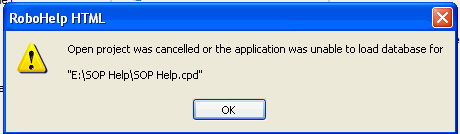
I was working in RH8 on Friday (4/29)and I clicked Save. The application (RH8) closed/crashed/disappeared (which occurs occasionally). I re-opened RH8 and browsed to the project and double clicked the xpj file. I received an error that RH could not find the file (remember however, I clicked on it to open). I was never able to get the file open even though I could see the xpj file. I loaded the project on a thumb drive and took it to another computer and received the same error.

I zipped the file just because I wanted to have a back-up. I should say that I was having problems with RoboServer 9 and took the project out of RSC 4/22 so that I could launch the WebHelp project on the intranet on 4/24. I have made several updates to the file and republished it for 4 days before the crash.

I opened RH8 and clicked open from the starter page. The application did nothing, well actually it froze and I had to go into Task Manager to shut it down. So I did the usual reboot and tried again. Same thing happened.

Next step was to go to the menu, File, Open...froze again. Now I can open RH by double clicking an xpj file (from another project because as I said the project was working on the xpj file disappeared.) However I still cannot open RH itself by using Open or the File/Open option and I have to do a Task Manager shut down.
First I deleted and re-installed RH8. Problem continued.

So, I delete CS2, and reinstalled the entire suite. Problem continues.

If I go into my zip file, you can see the xpj file and if I double click to open...it does open but no topics are in exist inside.

So then I took the version (from thumb drive) that I saved to use on another computer and double clicked the xpj file to open (because this is the only way I can open RH8). Now the error message says that the project is from an earlier version and is no longer compatible. I have version 8.0.2.208 installed and it says there are no updates.

HELP!

Make yours and Incredible Day,

Verlean

Message was edited by: Verlean

    This topic has been closed for replies.
    Correct answer Peter Grainge

    The output files contain all manner of Javascript and RH-specific instructions for browser viewing. To ask the RH engine to re-interpret that stuff in generating output anew is likely to cause it to cough up hair balls.

    Other than that, no problem.

    If there's been a minimum of formatting done, you could cleanse the content by: Select All in a viewer, Paste into Notepad, then Select All and Paste into a clean topic.

    ...and backup repeatedly.

    Good luck,

    Leon


    If you are using output files, you need to see this page on Rick Stone's site.

    http://www.robowizard.com/RoboWizard/NewProject.htm#MonthlyScry/062004.htm


    See www.grainge.org for RoboHelp and Authoring tips

    @petergrainge

    2 replies

    Community Expert
    May 4, 2011

    Regarding your first image. It seems like your entire project is missing as it is not saying the xpj file is missing, but the entire folder "SOP Help", which I assume is the folder the xpj file lives in.

    Can I confirm there are many files on your thumb drive, not just the xpj file?

    Amebr

    Peter Grainge
    Community Expert
    Community Expert
    May 3, 2011

    Have you resolved this yet?

    When replying and if you still have the problem, where is the E drive? On your machine or a network?


    See www.grainge.org for RoboHelp and Authoring tips

    @petergrainge

    Use the menu (bottom right) to mark the Best Answer or Highlight particularly useful replies. Found the answer elsewhere? Share it here.
    VerleanAuthor
    Known Participant
    May 4, 2011

    I called the helpdesk and they repeated all the steps I had already done. I had held off from deleting the cpd file and xpj file because I knew there was about 60 hours of intense work that I would potentially lose.

    I had restored my computer to several different days in hopes that I could go behind the corrupt file. It looks like the corruption occurred behind the 60 hours...boohooohoo!

    However, deleting the cd and xpj and opening the hhp with RH* was the only soution that solved my problem. An yes I lost all the work.

    To answer your question E was a thumb drive. I took my project off my computer when uninstalling and re-installing software. Just to be safe.

    I think I may have found the source of my corruption. Almost all of my documents are imported from FM8 or 9. They have .css that I convert to RH .css. There is one FM style that in particular most often will not convert even after I manually change it. It will revert back to the FM_RED style from the FM .css. This styel is red text put in to highlight recent changes. I noticed in all the FM documents that the red text has never been changed back to black even after 2-3 years. I came to the conclusion that it was never changed because the FM doc would not allow it to be changed.

    While in RH I can manually convert the color to black but I cannot map the style to any other RH style where it will convert. Sometimes it will let me manually convert...sometimes. There are over 400 topics with this FM_RED style.

    So many issues....

    So, this  original corruption may have cause my search function to break. The published webhelp file looks for the search words, returns 100% but no results are returned. This is however not only "all" search items.

    The problem seems to be in the whfbody.htm and length is "null" line 552. which I think means the search results are too large.

    Any ideas on the search function or should I start a new thread?

    Incredibly, Verlean

    VerleanAuthor
    Known Participant
    May 9, 2011

    Leon,

    ALL my backups are corrupt with the exception of the very first 2 weeks of the project. The back up file got corrupt in RoboSource Control (checked in or out by another user or uninstall and reinstall by IT).

    It's either the output files or start a six month project over from scratch...I am sure the employer is unwilling to pay me for 6 more months (okay maybe less but you understand).

    I am not happy using the output files but I felt like I was out of options.  Please explain your remark.

    Incredibly, Verlean


    Thanks Peter that was very helpful on Rick's site.

    Leon, your information was helpful and I am backing up on two different drives. I will add to RoboSource Control once I get all the scripts out!

    Incredibly,

    Verlean