

Jared Hess
Legend
October 13, 2011
Question

Zombie <span> Tag Apocalypse!

  • October 13, 2011
  • 2 replies
  • 3033 views

Using RH 9 and Windows 7, 64-bit. Recently upgraded from RH 7.

Hi Folks,

I'm trying to survive a zombie <span> apocalypse! Here's what a portion of one of my .htm topics in my project looks like inside of the Notepad++ text editor:
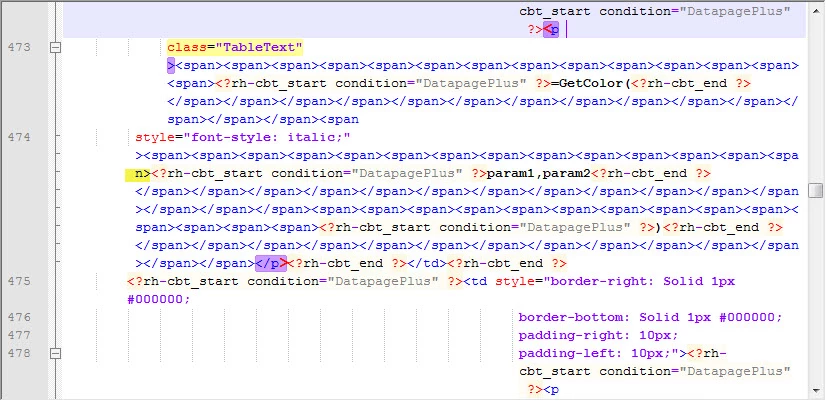
Notice that these span tags are empty. My understanding is that tags without any attributes in them don't do anything. Right?

Anyway, there are some 1000 emtpy <span> tags in 18 topics that don't have any attributes in them. I've checked the revision history for one of our files, and it appears that this started happening sometime after the upgrade to RH 9. The initial conversion to RH 9 didn't increase the # of <span> tags, but subsequent edits and saves to the file I checked seems to be causing it.

For example in this revision history view from Mercurial, it shows a single change from one revision to the next revision. Notice the increase in tags:
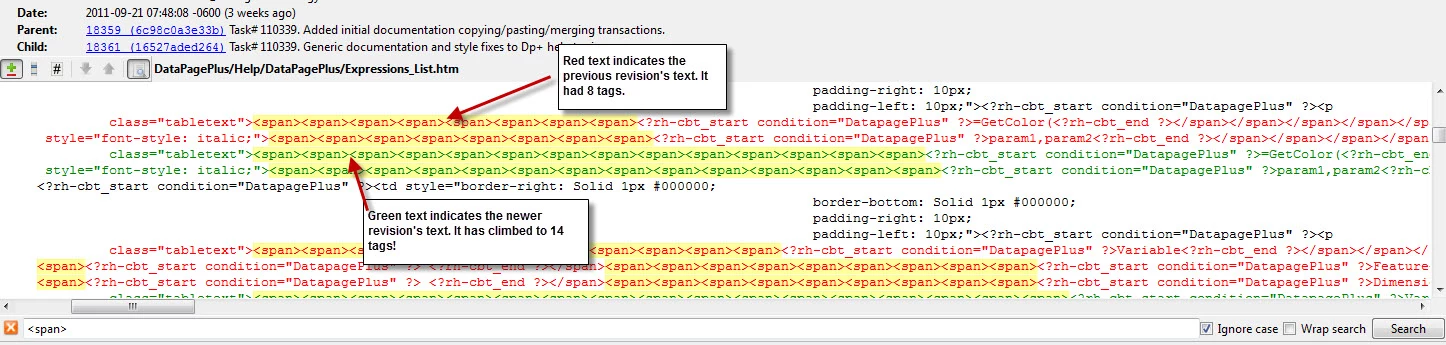
Does anyone know what's causing this? There was no visual indication this was happening inside the WYSIWYG editor in RH. It's only now when we submitted the files for localization, that our localization department ran into them when preparing this project for localization. Here's what they saw:
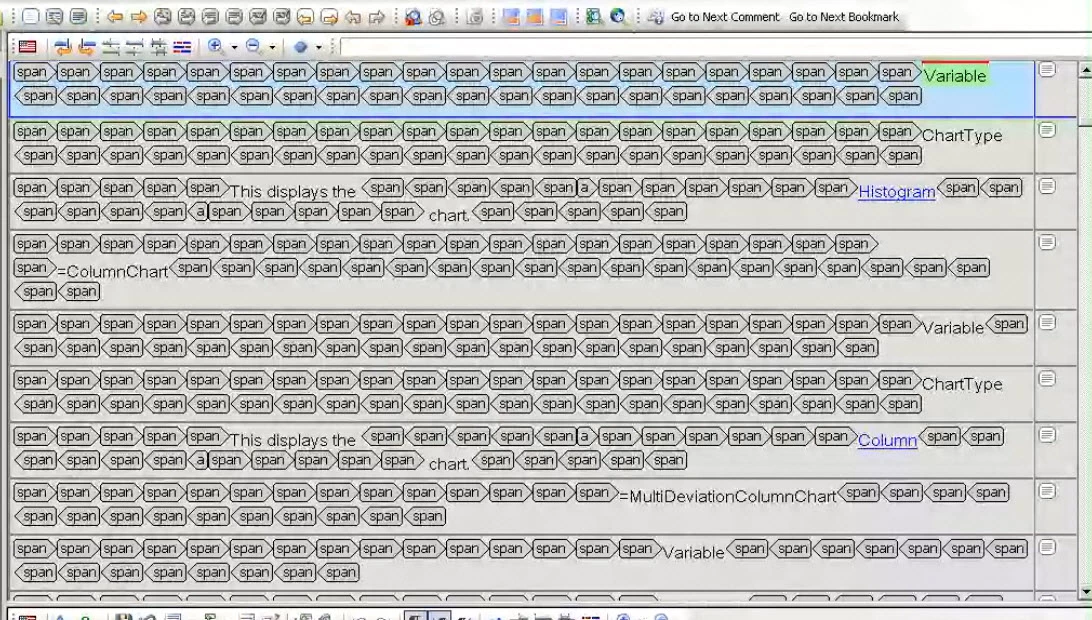
Any ideas why this is happening and on how to fix it? To fix it, I'm thinking of doing a Find and Replace across my project in Notepad++ and removing any empty <span> tag, and then opening the project back up inside of the RH editor. I'm hoping this would then remove the closing unmatched </span>?

This topic has been closed for replies.

2 replies

Inspiring
June 12, 2017

I am using Robohelp 2017 on Windows 10 OS. I copied a short phrase from one topic to another topic, and the phrase had conditional text on it. I went off to do something else, and when I went back to that topic, the Zombie Span Tag Apocalypse had happened!

I saw this thread and cheered for Willam Van Weeldon, but the link is broken. :-(

I know how to fix it; my question is how can I make RoboHelp stop trying to fix my code?! There should be a check box or even a registry setting to turn that bug--or feature--off.

Thanks,

Karla

Jeff_Coatsworth
Community Expert
Community Expert
June 13, 2017

Sorry Karla - no such flag or setting AFAIK.

Peter Grainge
Community Expert
Community Expert
June 13, 2017

This hasn't been seen since RoboHelp 9 so report it.

Use the menu (bottom right) to mark the Best Answer or Highlight particularly useful replies. Found the answer elsewhere? Share it here.
Peter Grainge
Community Expert
Community Expert
October 13, 2011

See Item 10. http://www.grainge.org/pages/authoring/rh9/using_rh9.htm

Rather than use a find and replace tool for only 18 topics, consider using Remove Attributes. Slower but safer. Just right click in each paragraph.


See www.grainge.org for RoboHelp and Authoring tips

@petergrainge

Use the menu (bottom right) to mark the Best Answer or Highlight particularly useful replies. Found the answer elsewhere? Share it here.
Peter Grainge
Community Expert
Community Expert
October 13, 2011

Note that Item 10 is shaded blue. That is explained at the top of my page. You may have done the damage before you applied the patch, you did apply it didn't you?


See www.grainge.org for RoboHelp and Authoring tips

@petergrainge

Use the menu (bottom right) to mark the Best Answer or Highlight particularly useful replies. Found the answer elsewhere? Share it here.
Jared Hess
Legend
October 19, 2011

Hi Willam

Perhaps your experience has been different than mine, but I find that all I need to do is remove the beginning span tags. When I do that, it leaves behind gobs of orphaned closing span tags. RoboHelp sees them as orphans and deletes them for me.

Cheers... Rick

Helpful and Handy Links

RoboHelp Wish Form/Bug Reporting Form

Begin learning RoboHelp HTML 7, 8 or 9 within the day!

Adobe Certified RoboHelp HTML Training

SorcerStone Blog

RoboHelp eBooks


Willam van Weeldeen wrote:

For the span tags, see http://www.wvanweelden.eu/robohelp/zombie_span_tag_apocalypse_cleaner for quickly removing the span tags from your project. It'll correctly remove the corresponding end tag of the spans, something that might give problems with a find and replace operation.


Thanks Willam! I'll try using your script when I have to do fix the zombie tags on our release code branch next.

Captiv8r wrote:

...Perhaps your experience has been different than mine, but I find that all I need to do is remove the beginning span tags. When I do that, it leaves behind gobs of orphaned closing span tags. RoboHelp sees them as orphans and deletes them for me.

Yeah, that's the route I took for our development branch. Did a Find and Replace on the <span> in Notepad++ and then opened the project in RH. RH yanks out the closing spans. I'm still checking each .htm in RH after doing this though, since I've noticed that perhaps ~1% of files will still show an occassional <span> tag for some reason. But I have to visually look at each htm to ensure that the conditional build tag isn't screwing things up anyway.