



Jared Hess
Legend
July 22, 2021
Question

Clicking on a code sample from search results puts the code all on one line

  • July 22, 2021
  • 6 replies
  • 435 views

Hello friends

I'm using RH 2017 (13.0.2.334). I'm running into an odd problem. I have a fairly long code sample in a topic. In the generated output (Reponsive HTML5), RoboHelp is often putting everything in the code sample on one line when I click on the topic from the search results.


It looks really bad, like this:

 

However, when I click on the topic from the TOC, or use the Next / Prev buttons to arrive at the topic, it looks fine, like this:
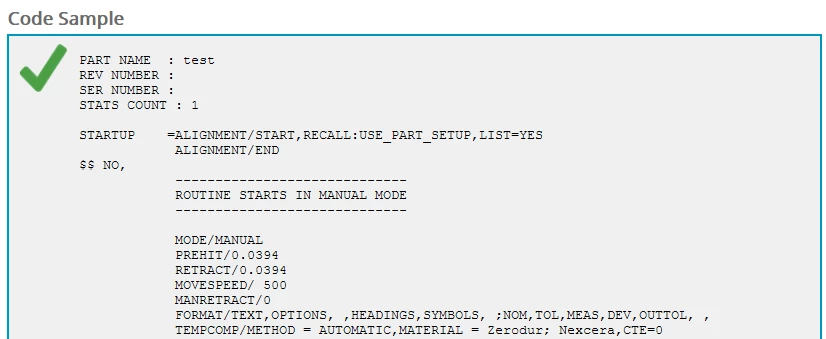
The problem occurs only when clicking on the topic link from search results.


The code sample in question has this structure:
<div class="ExampleLong">
<pre>

<code>

Code Stuff Here

</code>

</pre>
</div>


It seems like a RoboHelp bug to me. Has anyone else seen or been able to duplicate this?

I tried adding in a style definition in my CSS file for the pre tag to see if that would help.

It made no difference.

    This topic has been closed for replies.

    6 replies

    Peter Grainge
    Community Expert
    Community Expert
    August 2, 2021

    I have added to the bug report that the same issue occurs in RoboHelp 2020.5.

    ________________________________________________________
    See www.grainge.org for free Authoring and RoboHelp Information

    Use the menu (bottom right) to mark the Best Answer or Highlight particularly useful replies. Found the answer elsewhere? Share it here.
    Mark_Noc
    Inspiring
    July 28, 2021

    Believe it or not, I'm using the very latest update to RH (2020.5), so it appears that this has been an issue for some time! As for the output, this particular project uses the Responsive HTML5 output. And yes, it's MSFS! Or more precisely the SDK documentation for people to make custom scenery and aircraft within the simulation... it's a fascinating project. Oh, and I recommend the latest FS if you liked FSX! The realisim is off the charts...

    Jared Hess
    Legend
    July 28, 2021

    @Mark_Noc- Good to know we're helping Adobe with their product testing, huh? But I'm no stranger to that. Our users tell us the same things when they discover a longstanding bug in our software.


    I've filed this bug report:

    https://tracker.adobe.com/#/view/RH-9819


    Feel free to add your own comments and experience there.


    While I doubt they'll release a fix for RH 2017, I hope someone can get me a fixed script file I can use at least.


    Regarding MSFS, I'll have to try the latest! Sounds pretty cool. Good luck with your project!

    Mark_Noc
    Inspiring
    July 28, 2021

    After seeing this thread, I thought I'd do a quick check as my current project is very code-heavy...and I'm having the EXACT same issue 😞 

    Here's the same page but without using the search term:

    So I would say there is definitely a bug here with Robohelp itself.


    Jared Hess
    Legend
    July 28, 2021

    Thanks for testing that @Mark_Noc.


    That means I can stop banging my head for a solution.
    Out of curiosity, what version of RH are you using, and what is your generated output?

    (Also, that's pretty neat that your project is for or related to the Microsoft Flight Simulator! In fact, just last night, I was trying out the Microsoft Flight Simulator X. And with the flight realism turned up all the way, I feel proud of the fact that I managed to land my twin engine prop plane at three different airports in one of the beginner missions.)

    Community Expert
    July 26, 2021

    I did a shonky test in Travel the Whirls. Added just this to the default.css:

    code {

    display: block;

    background-color: grey;

    border: grey;

    }

    Added a topic called Code Sample with your sample code plus 3 or 4 lines of pseudo-VBA.


    I couldn't replicate the collapse, but maybe my code sample wasn't long enough. Could you try in a clean test project, with a single sample topic, first with just the default css and then with the bare minimum of css changes, to see if maybe it's something in your css conflicting with whatever RH2017 does when it opens the search link (I feel like it didn't/doesn't use the standard css but injects "stuff"??) ?

    Jared Hess
    Legend
    July 26, 2021

    Thanks Amebr. I do get some odd ones. 🙂 I think this might be one of these unsolvable intermittent problems.


    For example, this morning I looked at it again. After I regenerated the help, I'm now seeing that if I put quotation marks around the search term, it does tend to show the code sample as it should. If I don't, it doesn't.


    Here's a video if anyone is interested.


    I don't get it.

    Community Expert
    July 23, 2021

    Lol! I thought I hit weird problems. 😛


    I'll have a go when I get "home" (woo! lockdown 5!) but perhaps there's something that's setting pre or code to inline in certain circumstances? As always I suggest inspecting using the browser dev tools, to see if you can spot anything.