

Inspiring
May 24, 2021
Answered

How to delete active reviews?

Hi, Everyone.


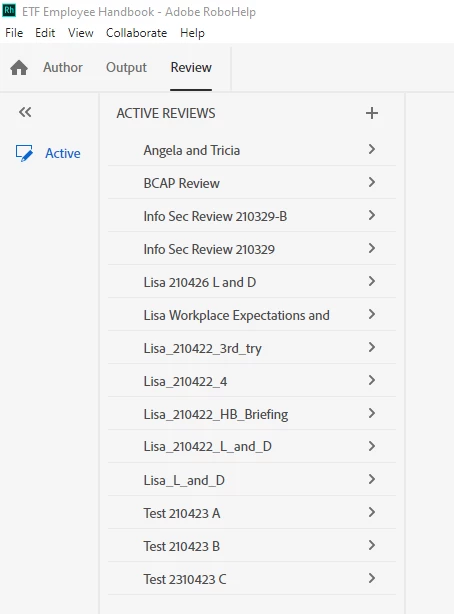
Can anyone tell me how to delete an unwanted online review? They're starting to pile up in the Active Review pane (screenshot).


Thank you!


SCREENSHOT:
 

    This topic is closed to new replies. Start a new post to keep the conversation going.
    AmebrCorrect answer
    Community Expert
    May 25, 2021

    This help topic includes instructions at the bottom of the page:

    https://helpx.adobe.com/robohelp/user-guide.html/robohelp/using/review-process.ug.html

    6 replies

    Vivek Kumar
    Adobe Employee
    Adobe Employee
    June 16, 2021

    Option to delete review from Robohelp itself has been added in update 5.

    Translate
    Inspiring
    May 26, 2021

    Excellent. Onward.

    Translate
    Peter Grainge
    Community Expert
    Community Expert
    May 26, 2021

    Local delete will be in an update.

    ________________________________________________________
    See www.grainge.org for free Authoring and RoboHelp Information

    Translate
    Use the menu (bottom right) to mark the Best Answer or Highlight particularly useful replies. Found the answer elsewhere? Share it here.
    Community Expert
    May 25, 2021

    Why it's only available from the web, if I'm reading it right, is anyone's guess, but at least there's a way. 🙂

    Translate
    Inspiring
    May 25, 2021

    Awesome, thank you, Amber!

    Translate
    AmebrCommunity ExpertCorrect answer
    Community Expert
    May 25, 2021

    This help topic includes instructions at the bottom of the page:

    https://helpx.adobe.com/robohelp/user-guide.html/robohelp/using/review-process.ug.html

    Translate
