
Inspiring
March 27, 2018
Question

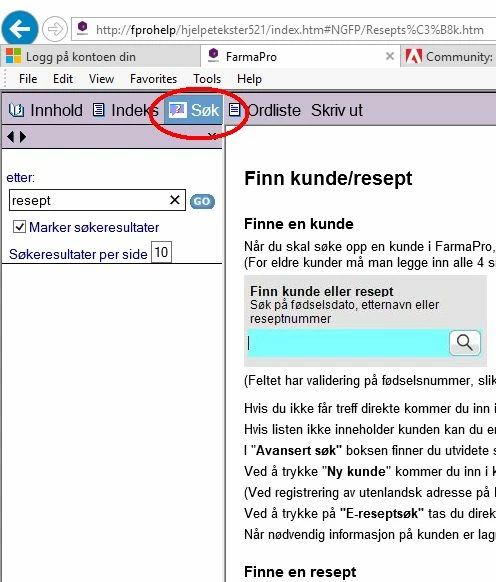
"Search" does not work in Internet Explorer 11

  • March 27, 2018
  • 1 reply
  • 1300 views

Hi.

Webhelp (RH2017) now works as it should in Chrome and Edge, but in Internet Explorer the Search function does not work.

Does anyone have a tip to solve this?

PS! I have edited the file whthost.js to solve the Chrome problem (ref. discussion "Toc books not opening in Chrome").

Regards,

Dag Sundet
This topic has been closed for replies.

1 reply

Peter Grainge
Community Expert
Community Expert
March 27, 2018

This is already covered in a long thread but the short answer is to see Item 13 in Using RoboHelp 2017

The official fix should be released very shortly if you prefer to wait for that.


See www.grainge.org for free RoboHelp and Authoring information.

@petergrainge

Use the menu (bottom right) to mark the Best Answer or Highlight particularly useful replies. Found the answer elsewhere? Share it here.
Inspiring
March 27, 2018

Hi.

I did not understand what you mean.

Your link took me to the Discussion "ToC books not opening in Chrome".

Did you meen the answer from Jeff Coatsworth?

Is there something I can do myself to fix this IE problem while I wait for Adobe to fix it?

Jeff_Coatsworth
Community Expert
Community Expert
March 28, 2018

All the files in the \Webhelp\ folder on the webserver is exactly the same as in the \webhelp\ folder localy.

I allways replace the whole folder when update the webserver.

I know that this may not be a Robohelp issue since it works fine when I run it localy.

But IE11 don't ask the "scripts and active-X" question when I run it from the webserver.

Do you know what kind of "program" Robohelp run when I click on the "Go" button in the search folder in webhelp?

Is it a script that is activated to find the word I'am searcing for?

And why does it work fine in Chrome and Edge when I run the same project from the webserver?

Thanks anyway Peter :-)


It's using JavaScript to run search and display pages - you probably will have to check if you have JS enabled on your browser and may have to add the website where the help files are located as a "Trusted Location".