


AntoninMaxSea
Inspiring
November 24, 2020
Answered

RH2020 FTP profile - INVALID SERVERS

  • November 24, 2020
  • 5 replies
  • 817 views

Hello,

I am trying RH2020 on a new Robohelp project for  using the new translation mode and i wish to try first if the ftp publishing works as same as RH2019(i am trying with the rh project version by default). I always have the error message (picture above) and i'm not able to create a new ftp profile in RH2020 as i do it in RH2019.(all codes are the same only the server directory is different and is not yet created on the ftp sever ) :
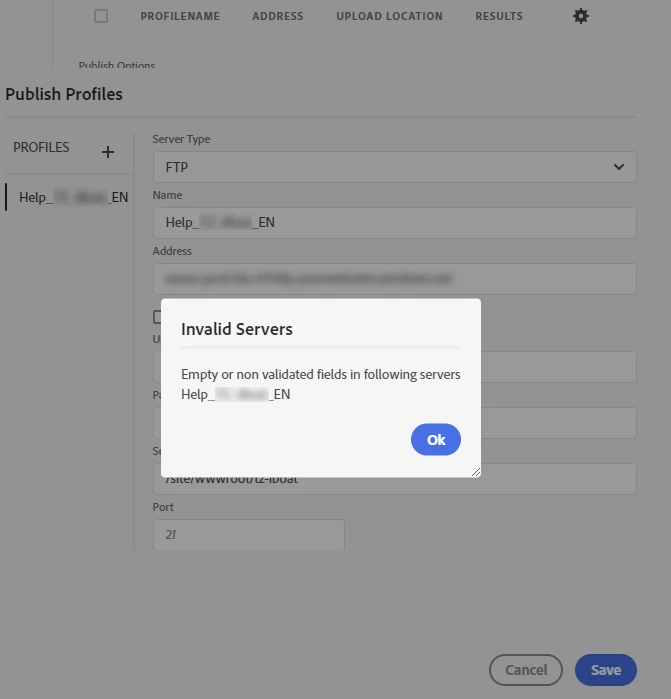
The ftp publishing in RH2019 works correctly. 

Has anyone encountered this type of problem?

Thank you in advance for your response.

MC

This topic has been closed for replies.
Correct answer Peter Grainge

The text is in a lighter grey and italics but the contrast is not sufficient and italics doesn't work well in this case as it is numeric input only.


I have created RH-8439 | Tracker (adobe.com) suggesting that if nothing is entered, the suggested input is used.


It's now up to those who got/get caught to add their vote.

________________________________________________________
See www.grainge.org for free Authoring and RoboHelp Information

5 replies

Peter Grainge
Community Expert
Peter GraingeCommunity ExpertCorrect answer
Community Expert
December 15, 2020

The text is in a lighter grey and italics but the contrast is not sufficient and italics doesn't work well in this case as it is numeric input only.


I have created RH-8439 | Tracker (adobe.com) suggesting that if nothing is entered, the suggested input is used.


It's now up to those who got/get caught to add their vote.

________________________________________________________
See www.grainge.org for free Authoring and RoboHelp Information

Use the menu (bottom right) to mark the Best Answer or Highlight particularly useful replies. Found the answer elsewhere? Share it here.
Peter Grainge
Community Expert
Community Expert
November 25, 2020

Bet the air was a bit blue. 🙂

________________________________________________________
See www.grainge.org for free Authoring and RoboHelp Information

Use the menu (bottom right) to mark the Best Answer or Highlight particularly useful replies. Found the answer elsewhere? Share it here.
Participant
December 14, 2020

I've been struggling with exactly this problem - creating a profile for the first time in RH 2020, hoping to automate an upload that I usually do with FileZilla. How dumb can a design get?! They supply a default into a field (a standard port number), then ignore it, expecting the user to notice that it's not "real", and overwrite it with the very same value from the keyboard!

Community Expert
December 14, 2020

You can request features and report issues here: https://tracker.adobe.com/

Peter Grainge
Community Expert
Community Expert
November 24, 2020

In the preset click the Publish options, then click the Settings icon. You create new profiles there or from the menus. 


Use the menu (bottom right) to mark the Best Answer or Highlight particularly useful replies. Found the answer elsewhere? Share it here.
AntoninMaxSea
Inspiring
November 24, 2020

I created a new profile from the Publish options html5 project but I also tried from the menu and got the same error. 

Tomorrow, I'll ask our IT department if it's possible that a network configuration is responsible for this error (I'm not sure because with RH2019 everything is fine) and i will inform you about 

AntoninMaxSea
Inspiring
November 25, 2020

Hello Peter i found why! I  just enter the port number 21 with the keyboard! it's the only thing that i didn't beacause I supposed that it was define by default!

Peter Grainge
Community Expert
Community Expert
November 24, 2020

You have said again you cannot create a profile. Do you mean you cannot create a new one or simply this one doesn't work and what you mean is you cannot create one that works?


I have never seen that message so I am inclined to think it is a local issue for your IT guys to resolve.


If no one else comes along I suggest trying Adobe Support. See https://helpx.adobe.com/contact/enterprise-support.other.html#robohelp for your support contact options.

________________________________________________________
See www.grainge.org for free Authoring and RoboHelp Information

Use the menu (bottom right) to mark the Best Answer or Highlight particularly useful replies. Found the answer elsewhere? Share it here.
AntoninMaxSea
Inspiring
November 24, 2020

I can't create any ftp profile in this dialog regardless of the name or folder I configure with the same connection settings that work with RH2019 or a client ftp such as FileZilla.

Peter Grainge
Community Expert
Community Expert
November 24, 2020

Not that anyone has posted. What is stopping you creating a new profile?


Have you tried creating the folder on the server first? I don't believe that is necessary but it's worth a try. 

________________________________________________________
See www.grainge.org for free Authoring and RoboHelp Information

Use the menu (bottom right) to mark the Best Answer or Highlight particularly useful replies. Found the answer elsewhere? Share it here.
AntoninMaxSea
Inspiring
November 24, 2020

No I haven't created a folder on the server yet, thinking that this could create other conflicts since normally Robohelp is in charge of creating it! But I'm going to try and tell you !