

MirandaIris
Participant
May 29, 2022
Question

Adobe Stock is messing my svg files after upload

  • May 29, 2022
  • 2 replies
  • 202 views

Hello everyone.

I'm trying to upload this image (this is what it looks like when I open the .svg in my browser) 



But after I upload it to my Stock, it looks like that (everything is out of place)
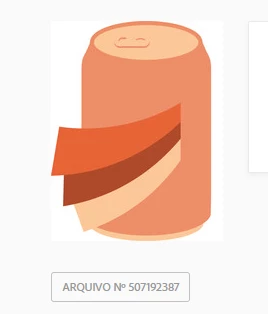
 

Does anyone know how to solve that problem? Nobody is going to download this weird thing lol

This topic has been closed for replies.

2 replies

Abambo
Community Expert
Community Expert
May 29, 2022
quote

Does anyone know how to solve that problem? Nobody is going to download this weird thing lol


By @MirandaIris

If you are certain that your file is correct, you can use a zip file to upload the vector file and the corresponding preview, so that the Adobe system does not need to generate the preview. I would check the SVG in different programs, including Illustrator, if you have access to that software.

ABAMBO | Hard- and Software Engineer | Photographer
Nancy OShea
Community Expert
Community Expert
May 29, 2022
  • Where are you seeing this image  -- in Adobe Stock Inventory?
  • Which browser are you using?
  • Did you validate your SVG code for possible errors before you submitted it to Stock?  
  • Did you include a JPG of the image when you submitted to Stock?


Nancy O'Shea— Product User & Community Expert