
tammyMLA
Participant
August 20, 2023
Answered

AI Picture and Not a Real Person

  • August 20, 2023
  • 3 replies
  • 1214 views

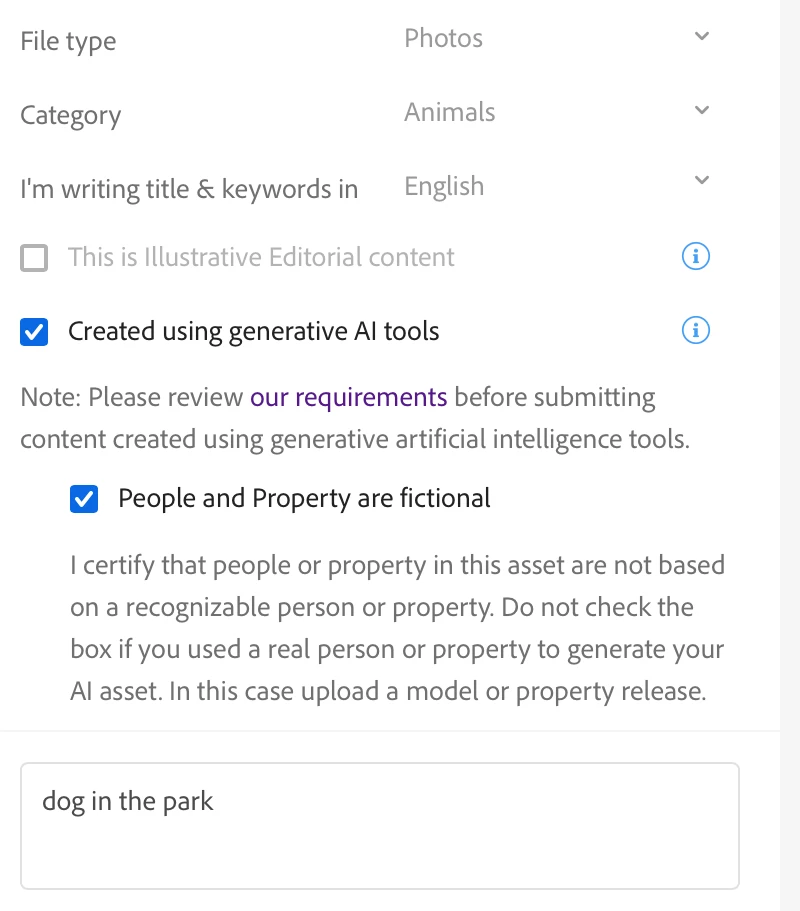
Hi, I made an AI picture that is not of a real person. I selected both options for AI picture. But, it tells me I need a model release. Theres no one to get a model release from. 


Please Advise. TYIA

This topic has been closed for replies.
Correct answer Abambo

You can submit a property release (you are the property owner and the artist), stating that the shown person is a fictional person. Indeed, if you have ticked both options (see picture), this should not be the answer. 
3 replies

Nancy OShea
Community Expert
Community Expert
August 20, 2023

How long ago did you submit this?  I ask because rules regarding Generative AI submissions were changed recently.  If you submitted this before the new rules went into effect use the forms below.


Model/Property Releases:
REAL PEOPLE = Model Release, signed by the human(s) depicted in the asset.

https://helpx.adobe.com/stock/contributor/help/model-release.html

FAKE PEOPLE = Property Release, signed you as creator of the artwork.
https://helpx.adobe.com/stock/contributor/help/property-release.html

Hope that helps.


Nancy O'Shea— Product User & Community Expert
Abambo
Community Expert
AbamboCommunity ExpertCorrect answer
Community Expert
August 20, 2023

You can submit a property release (you are the property owner and the artist), stating that the shown person is a fictional person. Indeed, if you have ticked both options (see picture), this should not be the answer. 

ABAMBO | Hard- and Software Engineer | Photographer
daniellei4510
Community Expert
Community Expert
August 20, 2023

Hi, @Abambo...actually, I tried selecting Photo for a photorealistic AI image, in addition to the boxes noted in your upload. But when I attempt to upload it, I get the warning as shown here. Maybe it's just meant to remind the contributor that a property release MAY be required and the image will be accepted regardless. But the warning message is kind of off-putting, even though it has been stated elsewhere that photorealistic AI can be labeled as photos.

Adobe Community Expert | If you can't fix it, hide it; if you can't hide it, delete it.
Abambo
Community Expert
Community Expert
August 21, 2023

OK, it hasn't been submitted yet. So, if you checked both flags, submit. It's probably a bug in the system, as they added the second flag only recently. I recommend ignoring that.

ABAMBO | Hard- and Software Engineer | Photographer
daniellei4510
Community Expert
Community Expert
August 20, 2023

Did you mark it as a Photograph rather than an Illustration?

Adobe Community Expert | If you can't fix it, hide it; if you can't hide it, delete it.
tammyMLA
tammyMLAAuthor
Participant
August 21, 2023

I marked it a photo.

Abambo
Community Expert
Community Expert
August 21, 2023

If it says during submission "Potentially missing model release on 1 image - Deselect from submission" just ignore that. It doesn't say that you have to submit a model release, it just says that there is a potentially missing release. As you ticked both flags, you are good.


ABAMBO | Hard- and Software Engineer | Photographer