Participating Frequently
February 5, 2023
Answered

All photos not accepted.

  • February 5, 2023
  • 5 replies
  • 2024 views

Hi, I have a simple question, all my photos that I uploaded similar to the ones I've attached weren't accepted for quality issues. This is frustrating because I wanted to upload more similar photos, photographed in similar lighting conditions, with the same camera, and I don't know what's wrong?

This topic has been closed for replies.
Correct answer Abambo

Your first picture has an exposure problem:
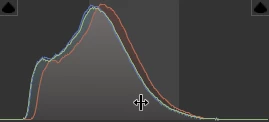
The histogram is missing blacks (left) and parts of the highlights and all whites. You have a rather high noise level and some chromatic aberration.


Your second picture has similar exposure problems:
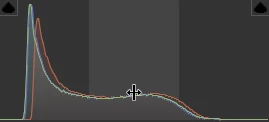
The histogram as shown creates a flat look with missing contrasts.


Your last picture's histogram:
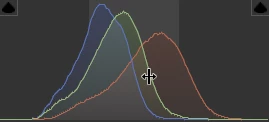
That leads us to the blue carpet. The histogram is really more equilibrated and needs only marginal tweaks. The noise level is, however, quite high. Generally, you should allow for a little more DOF.

5 replies

Participant
February 9, 2023
OK I'm recving
Abambo
Community Expert
Community Expert
February 9, 2023
quote
OK I'm recving
By @uzaifnadeem

What's your issue?

ABAMBO | Hard- and Software Engineer | Photographer
Nancy OShea
Community Expert
Community Expert
February 5, 2023


@Michael-buf 

Lots of rejections could signal dirty equipment.

When was the last time you did a thorough camera, sensor and lens cleaning?


Nancy O'Shea— Product User & Community Expert
Participating Frequently
February 6, 2023

Hi Nancy. I think it's rather something else. I have cleaned recently.

Nancy OShea
Community Expert
Community Expert
February 6, 2023

Typically higher ISO settings will produce greater noise signals.  But some cameras with dual gain ISO will give better results at higher ISO than lower ones.  It's a finesse game and every camera is different.


Perform an equipment test. It's the first step in understanding your camera's limits.

  1. Find an object -- a toy, piece of fruit, anything you have on hand will do. 
  2. Place object on a solid surface in a well lit space.
  3. To reduce motion, mount your camera on a stable tripod. Use a remote shutter if you have one.
  4. Test camera equipment, from various focal distances, apertures, ISO and shutter speeds. Take notes.
  5. Compare RAW photos in Photoshop or Lightroom.  Examine each one at 100-300% magnification. 
  6. When done, you should have a range of settings that produce best results in your camera.


Nancy O'Shea— Product User & Community Expert
George_F
Community Expert
Community Expert
February 5, 2023

There is something odd about the focus on these that I can't quite place my finger on.  As I look around the frame while zoomed in, there appear to be random blurry spots.  Were they taken with a macro lens or long focal length?  Maybe that's what @Abambo was talking about with the depth of field.  Including the metadata would be helpful for reviewing. 


On the wooden floor especially, I feel like every other plank is blurry.  But I also feel like my eyes are being deceived.  Would you mind sharing a bit about your equipment and settings?

George F, Photographer & Forum Volunteer
Participating Frequently
February 6, 2023

Hi George. About the equipment: Nikon Z 6II, Viltrox AF 85 (portrait lens, I know). Exposure: ISO 320/ 85 mm / F:1,8 / 1,30s. You're all right about sharpness, the problem is probably the use of f/1.8.


I wanted to thank you all for your help, I appreciate it.

jacquelingphoto2017
Community Expert
Community Expert
February 5, 2023

Hi @Michael-buf,

Too much of the first photo is out of focus, it exhibits color noise and is slightly underexposed.

The second photo is not in sharp focus and is also underexposed.


The third seem to be similar to the second and you added special effect. You are to keep your photos as close to natural as possible.

The fourth also has an exposure issue. The highlights seem to be too high and it too has a focus problem.

Always endeavour to make the elements in the forefront of your capture in focus, otherwise remove it. You need to set the correct depth of field for your captures.

You will benefit by reading through all the information at Stock Contributor Learn and |Support, Creating Better Photos for Adobe Stock and these additional tips to improve you submissions.


Please note: The last link contain videos to LinkedIn Learn Photography courses one of which might auto-start when the link opens.


Best wishes

Jacquelin


Participating Frequently
February 5, 2023

Thank you for your response Jacquelin. I appreciate it.

jacquelingphoto2017
Community Expert
Community Expert
February 6, 2023

You are welcome @Michael-buf .

Best wishes

Jacquelin

Abambo
Community Expert
AbamboCommunity ExpertCorrect answer
Community Expert
February 5, 2023

Your first picture has an exposure problem:

The histogram is missing blacks (left) and parts of the highlights and all whites. You have a rather high noise level and some chromatic aberration.


Your second picture has similar exposure problems:

The histogram as shown creates a flat look with missing contrasts.


Your last picture's histogram:

That leads us to the blue carpet. The histogram is really more equilibrated and needs only marginal tweaks. The noise level is, however, quite high. Generally, you should allow for a little more DOF.

ABAMBO | Hard- and Software Engineer | Photographer
Participating Frequently
February 5, 2023

hi ABAMBO, thank you for your answer, it's really helpful for me. So I'm wondering, if I make a correction, can I try to upload the photos to the market again? Is it possible?

Abambo
Community Expert
Community Expert
February 9, 2023
quote

So I'm wondering, if I make a correction, can I try to upload the photos to the market again? Is it possible?


By @Michael-buf


Yes.

ABAMBO | Hard- and Software Engineer | Photographer
