
'NO-AI' NOT ALLOWED
Participating Frequently
January 11, 2025
Answered

ATTENTION! Starting today, Adobe Stock hides AI images for customers BY DEFAULT!

  • January 11, 2025
  • 14 replies
  • 16686 views

I visit the site every day in the search section. And today I noticed that suddenly by default "Exclude Generative AI" is now set when searching!

This is a serious loss for the creators of AI content, because from now on AI content will sell even worse, several times worse.
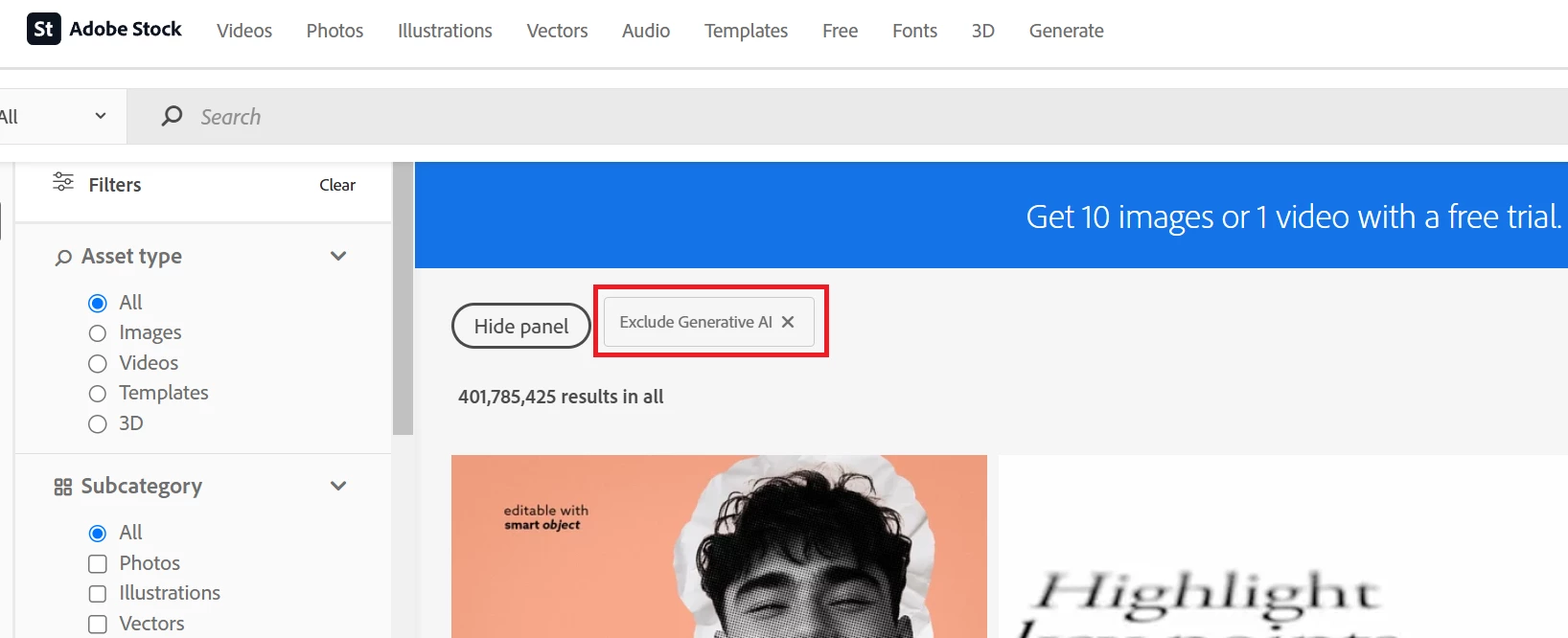


Even if the user does not find a relevant image among regular photos and illustrations, Adobe Stock will not suggest options from AI content when setting "Exclude Generative AI"!


This is a terrible innovation for AI creators, about which the creators of AI content were not informed in any way. 


How long will it last? Or forever?


Is there any information about this anywhere? News? I have not received any letter from Adobe.

This topic has been closed for replies.
Correct answer Raul Ceron29343509

Hey Contributors!

As part of our commitment to providing the best experience for both customers and contributors, we periodically test user functionality for a subset of our customers


With the results of these tests, we continue to improve content discovery for our customers, enabling them to easily find the best content to meet their needs.


We will continue to keep the contributor community informed and engaged as we introduce new features and improvements.
 

Cheers!

14 replies

M8FunNotWar
Participant
February 27, 2026

Best. News. EVER! 

Abambo
Community Expert
Community Expert
January 13, 2025

Adobe rolled back the modifications. I suppose, based on that, that they tried something, and it did not work out as they thought it should.


ABAMBO | Hard- and Software Engineer | Photographer
Raul Ceron29343509Community ManagerCorrect answer
Community Manager
January 15, 2025

Hey Contributors!

As part of our commitment to providing the best experience for both customers and contributors, we periodically test user functionality for a subset of our customers


With the results of these tests, we continue to improve content discovery for our customers, enabling them to easily find the best content to meet their needs.


We will continue to keep the contributor community informed and engaged as we introduce new features and improvements.
 

Cheers!

jane-e
Community Expert
Community Expert
February 27, 2026

@Raul Ceron29343509 

Thank you to the Adobe Team! ❤️ This is great news!

Jane

Participant
January 13, 2025

I think this feature makes sense. Though it's risky for sales as an AI artist if Adobe stock customers (consumers) want AI-generated content, why do they go for Adobe instead of AI platforms like Firefly? Customers (consumers) in Adobe stock want their money worth it by original content from designers. They can use Firefly if they need AI-generated content.

This is my point of view as a contributor of both (AI and hand crafted digital stuff) and may help you also.

Participating Frequently
January 13, 2025

Probably the best news we've had in a while.

Participating Frequently
January 12, 2025

Filters are designed to allow users to manually select their preferences and save them for future use.
Now those customers who look for AI generated assets are forced to adjust pre-selected settings each time, this undermines the purpose of filters and creates unnecessary friction. THIS IS NOT A USER FRIENDLY EXPERIENCE.

By just paying attention to a customer base who complained about AI generated content, Adobe has completely ignored those who were ok with it...


Abambo
Community Expert
Community Expert
January 12, 2025
quote

Filters are designed to allow users to manually select their preferences and save them for future use.
Now those customers who look for AI generated assets are forced to adjust pre-selected settings each time, this undermines the purpose of filters and creates unnecessary friction. THIS IS NOT A USER FRIENDLY EXPERIENCE.


By @Devan1238

Before this update, enabling this filter needed multiple operations, and not all customers did know about the filter. Today, all you have to do is to click a simple flag.


So don't complain. This is much more userfriendly than the prior situation. 

quote


By just paying attention to a customer base (...)

By @Devan1238

Adobe created something that is easier to use than what was before.

ABAMBO | Hard- and Software Engineer | Photographer
Abambo
Community Expert
Community Expert
January 13, 2025
quote
quote

Am I wrong?


By @'NO-AI' NOT ALLOWED

Yes, you are wrong. Check out with Shutterstock, how they handle this.


By @Abambo


For some unknown reason, your response feels toxic and I didn't see the reasoning, so from my point of view, you didn't give an adequate response. I'm upset by this fact, because I don't understand the reason for your reaction to my messages.


Shutterstock does not sell AI content from its photo bank and has not started working with AI contributors, unlike Adobe Stock. So the offers to go to Shutterstock look strange and inappropriate. You could have given an example of Vecteezy, Freepik, Dreamstime, Devianart, Creative Market, 123rf or any other services where 100% AI content is sold, but you only give an example of Shutterstock. I wonder why you give an example of those sites that do not work with AI contributors?


And why do you react to my messages like that, what's the matter?


quote

For some unknown reason, your response feels toxic and I didn't see the reasoning, so from my point of view, you didn't give an adequate response. I'm upset by this fact, because I don't understand the reason for your reaction to my messages.


By @'NO-AI' NOT ALLOWED

If you did follow my reasoning, you will have notioced, that I agree, that a sticky solution would have been better. But as a customer, who always needed to disable the generative AI assets from invading my search requests, and who needed always several clicks to get to that, I feel that this interesting new behaviour as an entity brings advantages to all buyers. 


Those who want to see generative AI assets, can do so by doing only one easy click.


Formerly, customers who did want to exclude generative AI needed to know about the filter option, needed to click the filter widget, needed to search for the generative AI section and needed to exclude generative AI. And this for each visit to the site, which was highly annoying and not at all userfriendly.


quote

Shutterstock does not sell AI content from its photo bank and has not started working with AI contributors, unlike Adobe Stock. So the offers to go to Shutterstock look strange and inappropriate. You could have given an example of Vecteezy, Freepik, Dreamstime, Devianart, Creative Market, 123rf or any other services where 100% AI content is sold, but you only give an example of Shutterstock. I wonder why you give an example of those sites that do not work with AI contributors?


By @'NO-AI' NOT ALLOWED

I do not source or contribute to any of Vecteezy, Freepik, Dreamstime, Devianart, Creative Market, 123rf, so I won't comment on their policy, nor how they create their user interface. I contribute to Shutterstock, so I know that they pay only 10 cents per asset (max, except if you have higher sales volumes that reset periodically) and that they do not offer a market place for your generative AI assets. So, all in all: you can be unhappy with Adobe's decision(s), but they allow you to contribute and the pay you high amounts of royalties. 


ABAMBO | Hard- and Software Engineer | Photographer
Participant
January 12, 2025

Hello when searching on AdobeStock by default there is a check mark exclude AI this is a bug of some kind or this is done on purpose so as not to sell AI content???? If you don't believe me, try searching!!!


[Moderator merged the thread]

photorebelle
Inspiring
January 12, 2025

No, it's not a bug. Read on this forum there are already very informative threads.

Participant
January 11, 2025

This is a very big stupidity, we need to convey to them that in order to make a flag in people's accounts to disable, for example, AI work and that's it, new clients will not look for where to turn on AI... they will simply leave, isn't it clear, and those who don't like it, go to the settings once, turn it on and that's it...

Alexandra34520339p8jn
Participant
January 11, 2025

That is quite unfair and demotivating for AI contributors, what's the sense to upload if noone will see your content with this filter

Jill_C
Community Expert
Community Expert
January 11, 2025

Buyers have been asking for such an automatic filter for a long time, because many do not want to use AI images in their designs. Sometimes it's a decision by the management of their company or agency or even their clients. Having to navigate down to the AI section of the filter panel in the left side if the screen is time-consuming. Now it's a default at the top of the page of search results. And for those who DO want to include AI images in their results, clicking that box to turn off the filter takes a fraction of a second. Imdint think this will have any noticeable impact on sales of AI images, but time will tell.

Jill C., Forum Volunteer
Known Participant
January 11, 2025

Nobody except a niche group ever requested an AUTOMATIC filter. They have a filter to exclude it that works perfectly fine, this is just not normal to exclude by default. Filters don't work that way, imagine if you have to go to filters to ADD every single thing you want, and not the other way around which is the normal and simple way, exclude what you do not.

Worker404
Inspiring
January 11, 2025

If so this could be why my sales have dropped so significantly, since when did this auto filter update start?

'NO-AI' NOT ALLOWED
Participating Frequently
January 11, 2025

As I wrote above - I noticed this since yesterday.
Probably they started implementing it yesterday, but maybe for a small number of users it was implemented earlier.

I had good sales before January 10th for AI images. Let's see what the sales will be after January 10th.

Participant
January 11, 2025

I have ai selected when I use ai for even a small part of the image even when removing something 

daniellei4510
Community Expert
Community Expert
January 11, 2025

Admirable. Not required in most cases, but better safe than sorry.

Adobe Community Expert | If you can't fix it, hide it; if you can't hide it, delete it.
Participant
January 11, 2025

Ohh I thought I read that I had to thank you so much.  I would like to add that when I do a search it does include ai