
GuruGambit111
Participating Frequently
September 4, 2021
Answered

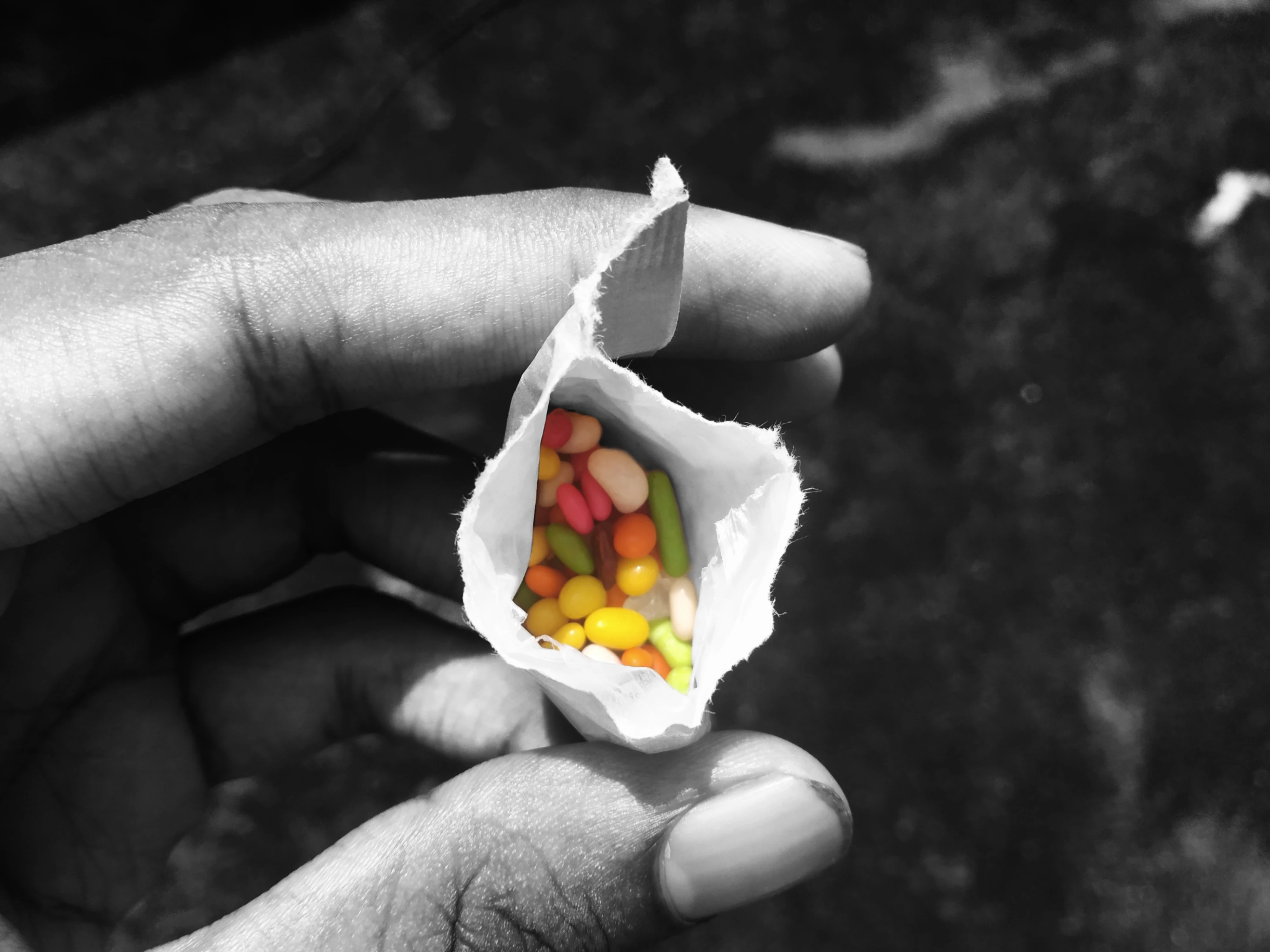
Can anybody please tell me what may be the technical issues regarding this photo ?

  • September 4, 2021
  • 3 replies
  • 608 views

[Moderator moved from Stock to Stock Contributors.]
This topic has been closed for replies.
Correct answer RALPH_L

The highlights on the bag are overexposed with no details and the candies are not sharp.

3 replies

RALPH_L
Community Expert
RALPH_LCommunity ExpertCorrect answer
Community Expert
September 5, 2021

The highlights on the bag are overexposed with no details and the candies are not sharp.

Nancy OShea
Community Expert
Community Expert
September 4, 2021

I kind of like this image.  And I am reluctant to say NEVER because in photography, sometimes rules are broken for a reason and with good results. 


Stock has some colorized B&W images in their database.  Used correctly on a visually & technically perfect photo, the effect can be quite dramatic.  See example.


  • Examine your image at 100-200% magnification.  Candies are not in focus. 
  • Candies are in too much shadow. 
  • Candy color vibrancy must pop more. 
  • Also the model's thumbnail needs trimming/cleaning.


The devil is in the details.


Good luck!


Nancy O'Shea— Product User & Community Expert
GuruGambit111
Participating Frequently
September 6, 2021

Will keep the remarks in mind when i click photos next time. Thanks for the help !

Kevin Acla Photography
Participant
September 6, 2021
Even me, I have technical issues on my photos, don't know why.
Legend
September 4, 2021

You seem to have converted part of it to black and white. (I see why, but Adobe Stock isn't a gallery for artistic expression). Adobe want the "illusion of reality" - a carefully managed and fixed realistic picture. The expectation is that effects and tricks will be added by the purchaser.

GuruGambit111
Participating Frequently
September 4, 2021

Well now that I think about what you pointed out I understand the problem here as well. Thanks for helping me out 🙂
