
Participating Frequently
May 4, 2017
Answered

Can't Log in as a Stock Contributor from Premiere Pro CC

  • May 4, 2017
  • 2 replies
  • 661 views

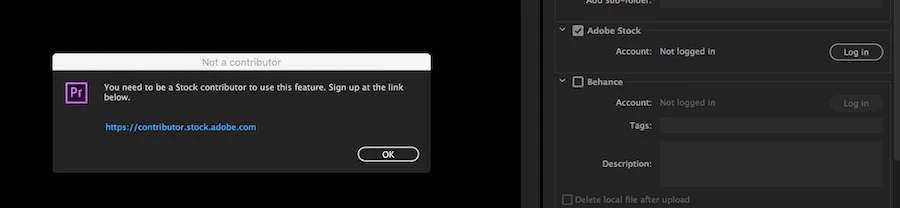
I am an Adobe Stock contributor and have uploaded several videos direct from Premiere Pro over the last week. Even as recently as yesterday I had no problems logging in and uploading, but today, when I attempt to Log In from the "Publish" tab during the Premiere Pro Export process, it tells me I am not a stock contributor and need to sign up (see image).

I have logged in on the link provided, logged out, logged in again, tried restarting Premiere, restarting my computer, checking forums and FAQs but cannot solve the problem.

Hoping somebody can help.

Cheers,

Michael.
This topic has been closed for replies.
Correct answer MatHayward

Hi Michael,

I checked your contributor account and everything looks good. Can you confirm you are logged into your Creative Cloud account when using Premiere and that the Adobe ID is the same as your contributor account?

You can upload your clips using ftp as a workaround but it would be ideal to figure out what is causing this issue.

-Mat

2 replies

Inspiring
May 7, 2018

That did help at all !!! Still searching how to figure it out!!??

MatHayward
Legend
May 10, 2018

Please submit a ticket via the Adobe Stock Contributor Portal by clicking the contact us link and we will look into it for you.

-Mat

MatHayward
MatHaywardCorrect answer
Legend
May 17, 2017

Hi Michael,

I checked your contributor account and everything looks good. Can you confirm you are logged into your Creative Cloud account when using Premiere and that the Adobe ID is the same as your contributor account?

You can upload your clips using ftp as a workaround but it would be ideal to figure out what is causing this issue.

-Mat