
Known Participant
October 20, 2018
Answered

Change the name DISPLAYED on my contributor's account?

  • October 20, 2018
  • 2 replies
  • 4937 views

How do I change the name displayed on my Contributor's account.  Right now it is displaying my real name form my personal information.  I do not like that.  My adobe account profile name is "The Nature Guy", but that is not what is showing up on my picture sale pages and account.  How do I make my profile name show up on my contributor's account and image pages?

After posting this I saw that my real name is appearing here too.  NOT COOL!  Has Adobe ever heard of Identity THEFT!
This topic has been closed for replies.
Correct answer WendellaBee

As I have stated before,

"It does not matter whether I use a private browser, regular browser, logged in, not logged, or a if I use a different computer at a different location and a different IP address. "

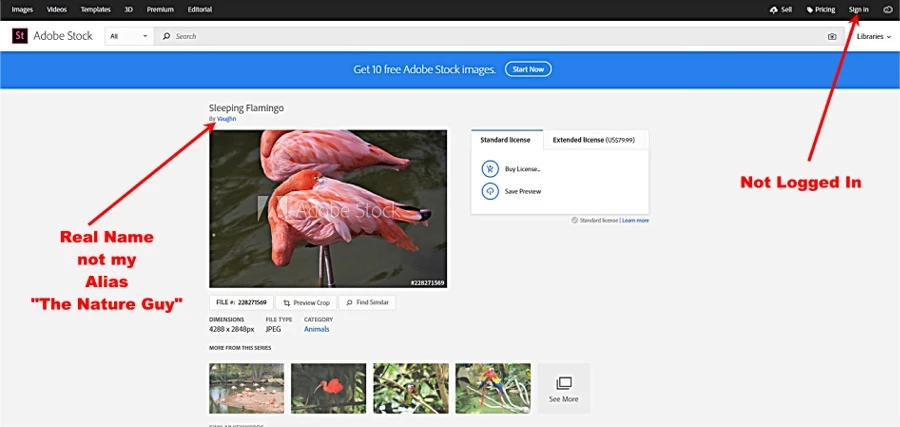
I understand that when I am logged into my account it is showing my name.  But i have literally change every possible name information are in my adobe account to "The Nature Guy" and my real name is still showing up on my PUBLIC stock photos and gallery. Just in case you are having difficulty understanding what I am saying.  If a anyone looks at my stock photos, they are seeing my real name, NOT my alias. 

I just took this screenshot.


Hi TNG,

You can change the name that appears with your Contributor portfolio here: https://contributor.stock.adobe.com/en/account  It'll take about an hour for that to propagate to the Adobe Stock website.

EBQ

2 replies

Sheena Kaul
Community Manager
Community Manager
October 22, 2018
R Neil Haugen
Legend
October 20, 2018

You apparently aren't aware of how Jive works.

Use the settings in your user profile to set what you want like three different levels of details displayed for what.

Then understand that after you set that, what you see is not what other's see.

So ... go to your User Profile,  and set it as you want. You're the one in charge, not Jive's forum software nor Adobe. Just you.

Neil

Everyone's mileage always varies ...
Known Participant
October 20, 2018

Does this apply to pages I am viewing in an Incognito page that is NOT logged into my adobe account?  Because that is where I am seeing me name.   I have changed even my personal name in my adobe account to my profile name, and my personal information name is STILL showing up on my contributors account and images.  I don't know what Jive is, but this does not JIVE with me!

Known Participant
October 23, 2018

Hi TNG,

You can change the name that appears with your Contributor portfolio here: https://contributor.stock.adobe.com/en/account  It'll take about an hour for that to propagate to the Adobe Stock website.

EBQ


Wow!  Thanks!  That worked.  I clicked every conceivable link I could find and I could not find that page.