
Participating Frequently
August 30, 2017
Answered

How do I delete photos from uploaded files

  • August 30, 2017
  • 1 reply
  • 2376 views

  Hello everyone. I am a newbie. I upload my photos via FTP and then photos are in my contributors page, where I can edit them and submit. I have files here I decided not to submit. How do I delete them? Thank a lot.

[Moved from the Forum comments forum (which is for issues with these forums themselves) and into an Adobe Stock forum - moderator]
This topic has been closed for replies.
Correct answer marog-pixcells

Hy Otto

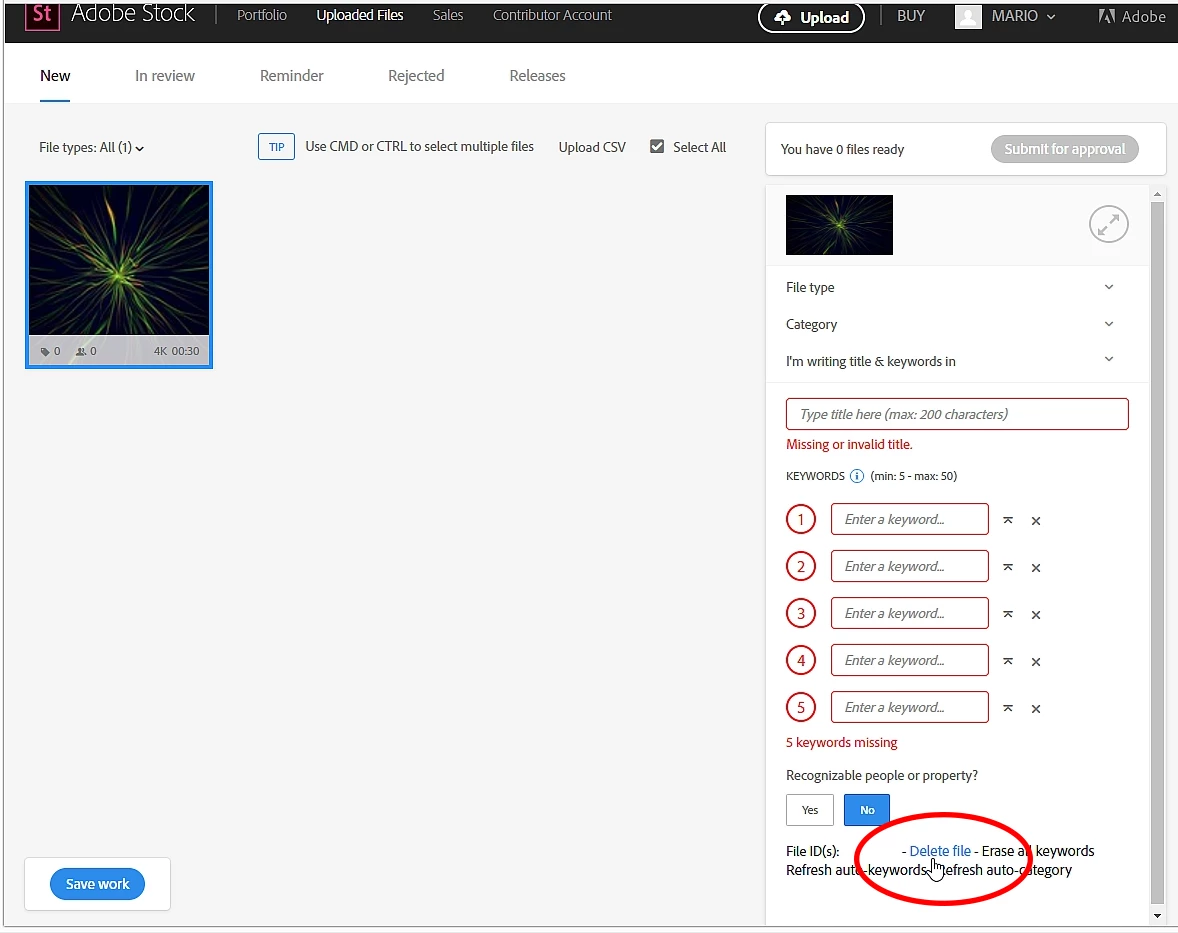
- go to: AdobeStock Contributor / Uploaded Files / New

- select the image(s) you want to delete

- look to the right of the screen under the keyword boxes and click "Delete files"

Best regards,

Mario

1 reply

marog-pixcellsCorrect answer
Inspiring
August 30, 2017

Hy Otto

- go to: AdobeStock Contributor / Uploaded Files / New

- select the image(s) you want to delete

- look to the right of the screen under the keyword boxes and click "Delete files"

Best regards,

Mario

Participating Frequently
August 30, 2017

Hi Mario,

What a shame I have not seen that!. Thanks a lot.

Inspiring
August 30, 2017

Hi Otto,

That`s not a shame!

I wish you much success with AdobeStock!

regards,

Mario