Inspiring
June 21, 2022
Question

Image rejected - don't want to make same mistake(s) in future submissions.

  • June 21, 2022
  • 4 replies
  • 1492 views

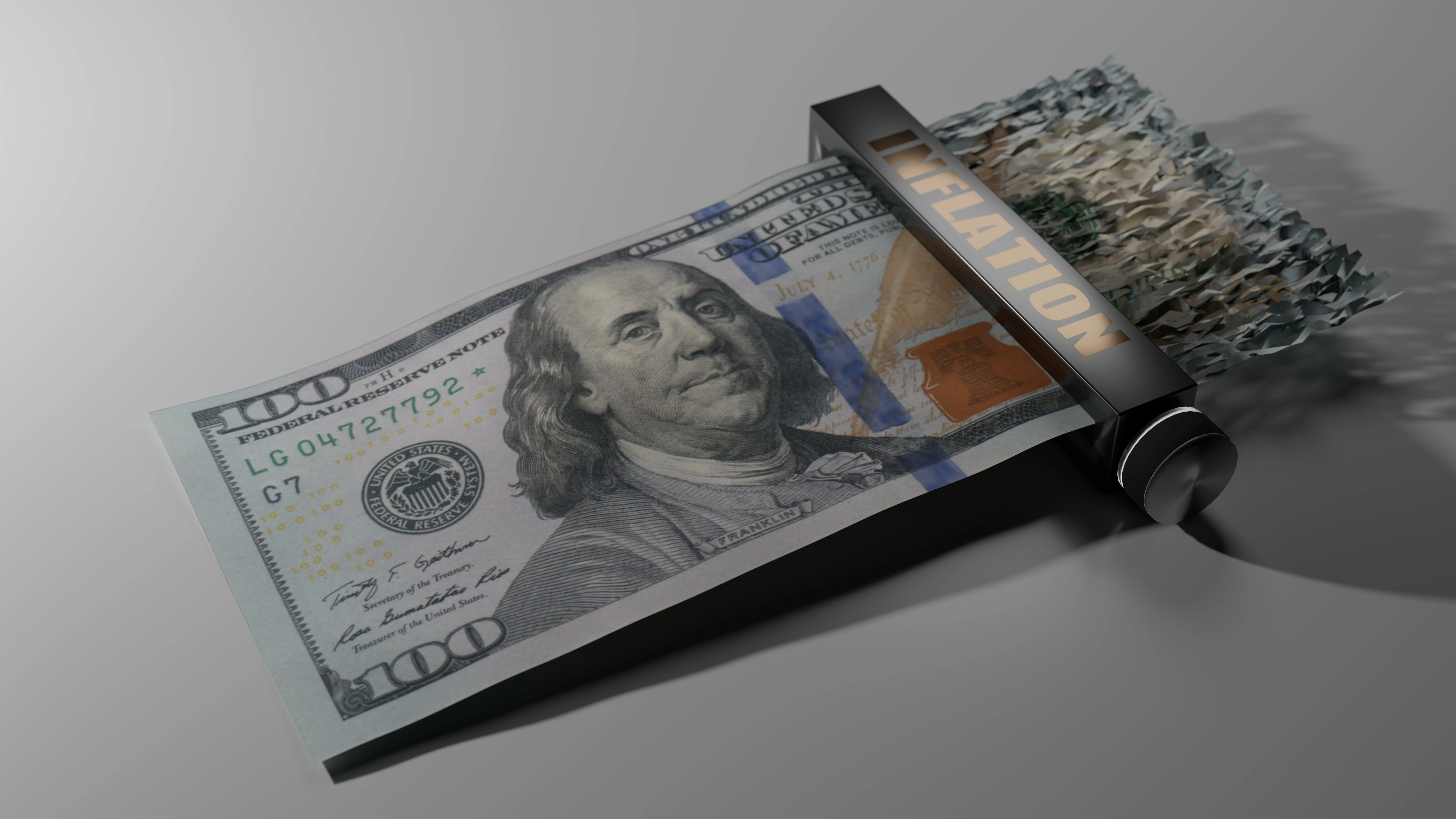
Wondering why this image was rejected.  Want to avoid whatever issue the rejection reason was in future submissions.  Thanks for your time.
 

This topic has been closed for replies.

4 replies

Abambo
Community Expert
Community Expert
June 22, 2022

The underexposure can easily be addressed in Photoshop or Camera Raw; however, your picture exposes some weird aliasing (at 200%).

That will make it difficult to sharpen in ACR or Photoshop and resubmit.

There is also kind of moiré in the bill (here Franklin's coat):


I would also increase the geometric accuracy of the cylinder:


ABAMBO | Hard- and Software Engineer | Photographer
Inspiring
June 22, 2022

The resubmission was rejected 😞 


This image is cursed.. lol..


However - I think this second time I screwed it up by submitting in PNG format.  Will images be automatically rejected due to this?  I'm asking because not sure if I should give up at this point or give it another go.  My assumption at the moment is yes (rejected due to PNG) - but I'm surprised it didn't outright reject it at upload time.


Outside of that screw-up on my part, I had adjusted lighting, exposure, and DOF.  I've not made any changes noted in your very last post above but more than happy to dive in with those as well and resub.  The one that concerns me most is the moire artifacts - the rest are simple to correct. The moire might be a jpg artifact of the included resource image - but not sure, will investigate.  Not a fan of lossy compression formats..!


That all said - I might just need to abandon this one and move on.  Lessons learned.


Here's what the last submission looked like (converted to jpg this time):


As prior - super appreciate all the scrutiny and feedback!

Abambo
Community Expert
Community Expert
June 24, 2022

... and it's now re-re-submitted 🤞.  I did manage to find a decent high resolution public domain hundred dollar bill scan on wikimedia for the UV texture - so this saved me a lot of trouble.  It was a 1999 issue and I do like the look of the newer bills better, but this'll have to do.  Fixed all the other issues - the weird zig-zags on the "Inflation" lettering were due to flaws in the font I used to create that bump map and I applied a subdivision modifier to the knob - effectively tripling its geometry while also smoothing it out in the shader.


One thing I did not do was increase the exposure.  I know all three of the reviewers here pointed out the exposure - which I did up considerably after the first pass (that was definitely too dark!) - but after some experimenting with higher exposures on this last render I just felt any more exposure started to wash out the image.  The contrast between the bill and the white surface under it becomes more non-existent and other details start to go away (including shadow contrast).  I played with the lighting as well - both intensity and location and just came to the conclusion that I liked it best as it was.  🤷‍♂  There probably is a better way and I maybe just haven't found it.


If this doesn't make it - I'll probably give it up as cursed and move on.  Either way - many lessons learned.


Here's the latest submitted render:


This one is much better. However, the fat INFLATION was more pleasant. The font is, however, good outlined. Thirty years ago, we did outline fonts and logos like this with a tablet and a crosshair mouse… ;-).


I still have found a small error, that may get you a refusal, if the moderator is picky:

(It may well be, that this is in your scan.)


n.b. I also like the first 100-dollar-note better because of the colours, however, this one is the classical green Dollar.

ABAMBO | Hard- and Software Engineer | Photographer
Abambo
Community Expert
Community Expert
June 22, 2022

Great picture, great idea. If I'm correct, this is a 3D render. But it will be vetted like a photo. So, you should watch your histogram for exposure. And you need to tweak sharpness and noise. And as @reedesign1912 , I do not think that you should expect IP problems for this one. If yes, shredder more of your bill...


If you are new to stock, you should consider these resources: https://helpx.adobe.com/stock/contributor/tutorials.html
Please read the contributor user manual for more information on Adobe stock contributions: https://helpx.adobe.com/stock/contributor/user-guide.html
See here for rejection reasons: https://helpx.adobe.com/stock/contributor/help/reasons-for-content-rejection.html
and especially quality and technical issues: https://helpx.adobe.com/stock/contributor/help/quality-and-technical-issues.html

ABAMBO | Hard- and Software Engineer | Photographer
Inspiring
June 22, 2022

Thanks for the guidance Abambo. You are correct - this is a rendered image.  I'll consider it a compliment if it was difficult to tell :).


I had gone over the Adobe resources cited prior - but I am indeed new to this process and still learning. Hopefully I can tweak my ways enough until I get things exactly how you'd prefer.


For future projects I'll pay more attention to the histogram and verify exposure - as well as focus. For sharpness and focus - that can be a bit tricky with renders.  On this submission I was a bit too "agressive" with the aperture and you guys justifiably called that out.  Funny thing with 3D renders is that if you do not introduce some type of depth of field, the entire image will be tack sharp but it will also be "too perfect" and consequently "look fake."  So - I suppose the trick is to find that exact balance.  There is a similar issue with motion blur - which I had to use on another submission.  Hope that one is OK.


Thanks again - really appreciate the feedback.

Abambo
Community Expert
Community Expert
June 22, 2022

Some tricks I learned when I was doing 3D (a long time ago):

  • If you output a depth map, you can modify the DOF in Photoshop. It's basically a post-processing function.
  • By rendering at a higher bit rate (i.e., 12 or 16 bits per pixel) you will have more leverage to adjust the "exposure".
  • 3D Programs tend to simulate real cameras, so working in real dimensions will help. In the real world, the more macro you are, the less DOF you get.
  • It's probably better to render without DOF (and having a 3D render look) than having an out of focus look.
  • Your textures (like the 5-Dollar-Bill) need to be sharp as the program tends to transform the texture and as such introducing most likely some unsharpness.

At the time, we did use all those fancy features like ray tracing, shadows, DOF, fog sparsely, because of the increased rendering time. I remember a rusty blast furnace that we rendered took days for a SD-sequence of a second or two. That's now done in the graphics card in a few seconds for a minute long 4k sequence…

ABAMBO | Hard- and Software Engineer | Photographer
reedesign1912
Inspiring
June 21, 2022

It is underexposed and the white balance is a bit off.  It really needs some brightness to make it "pop" more.  The biggest issue however, is lack of focus.  Take a look at this section viewed at 100% magnification.


I don't think you need to worry about the IP violations as the other contributor was discussing regarding US banknotes.  In your case, the whole banknote is not visible so it isn't an issue for unscrupulous individuals who would want to counterfeit the money.


On a side note, I like the concept and think this would be a good seller for you.

Rob R, Photographer
Inspiring
June 21, 2022

Excellent - thanks Rob and Jill for your responses.  I'll make the suggested corrections and give it a resubmit!

Jill_C
Community Expert
Community Expert
June 21, 2022

What reason was given? Technical issues? It appears to be underexposed.

Jill C., Forum Volunteer
Inspiring
June 21, 2022

Correct - "technical issues."  Underexposed could be it - fortunately that's easy to fix and re-submit...  I just don't want to spend any more time on it if it's something else.
