Participant
September 17, 2023
Answered

Images uploading upside down

  • September 17, 2023
  • 2 replies
  • 818 views

In 2023, I have had a couple of images that upload upside down. Even if I rotate the image and then upload, it still shows up as upside down.  I never had this issue before.  Can you help me?  I attached one of the images.

This topic has been closed for replies.
Correct answer Nancy OShea

Learn to hold your iPhone camera properly.  Home button should be on the right.

Make sure to hold your iPhone right side up. When shooting pics in landscape orientation, keep the camera lens at the top left corner.

 

iPhone has built-in auto correction software that compensates for improperly oriented photos. But that won't help to you online or when viewing from other devices.


To correct upside-down images in Photoshop:

1. Use Ctrl/Cmd + T to Transform. 

2. Drag image handles clockwise or counterclockwise to rotate.

3. Go to File > Export > Export As > JPG. 

4. Scroll down to Metadata and check the box for NONE.  Also check the box to convert Color Space to sRGB.
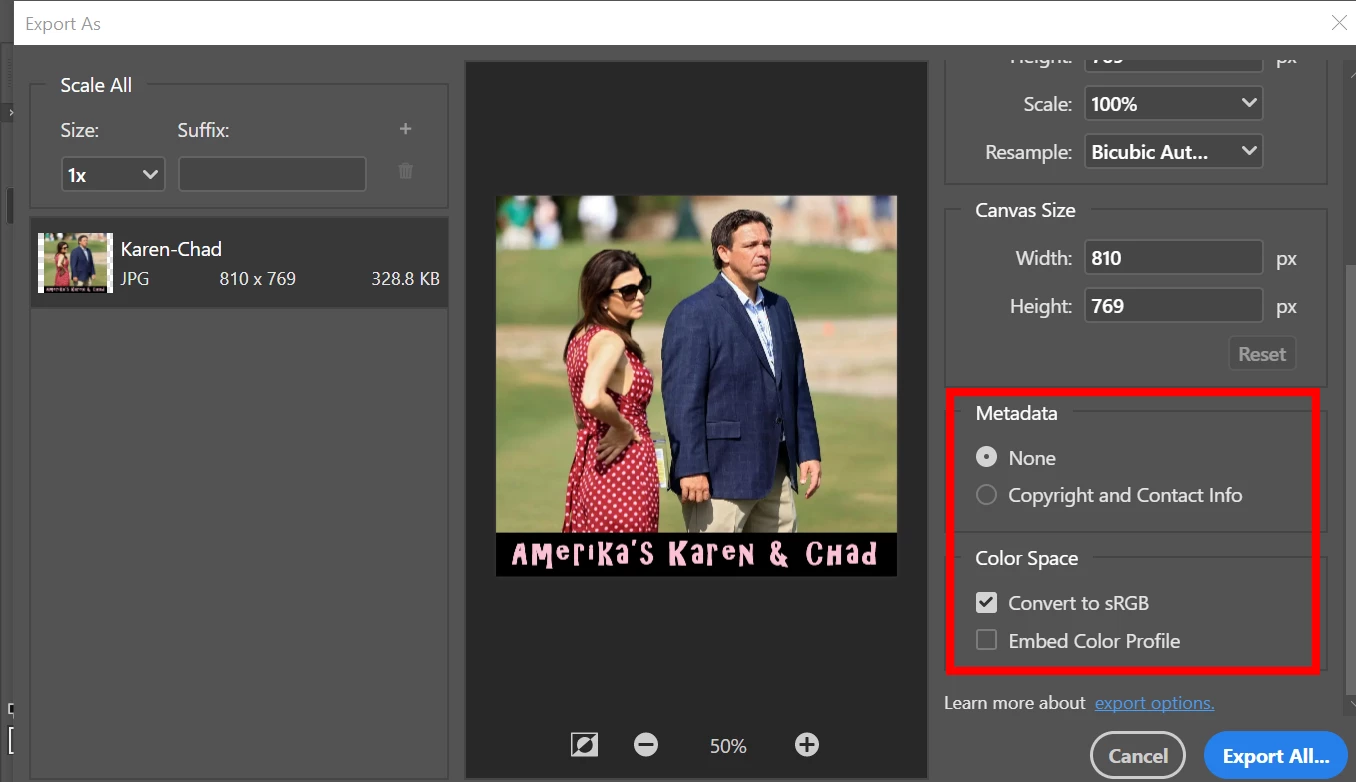
This will preserve your Jpg's proper orientation when you upload it.


Hope that helps.


2 replies

Nancy OShea
Community Expert
Nancy OSheaCommunity ExpertCorrect answer
Community Expert
September 17, 2023

Learn to hold your iPhone camera properly.  Home button should be on the right.

Make sure to hold your iPhone right side up. When shooting pics in landscape orientation, keep the camera lens at the top left corner.


iPhone has built-in auto correction software that compensates for improperly oriented photos. But that won't help to you online or when viewing from other devices.


To correct upside-down images in Photoshop:

1. Use Ctrl/Cmd + T to Transform. 

2. Drag image handles clockwise or counterclockwise to rotate.

3. Go to File > Export > Export As > JPG. 

4. Scroll down to Metadata and check the box for NONE.  Also check the box to convert Color Space to sRGB.

This will preserve your Jpg's proper orientation when you upload it.


Hope that helps.


Nancy O'Shea— Product User & Community Expert
Jill_C
Community Expert
Community Expert
September 17, 2023

Even if you fixed the orientation problem, the image would still be rejected for technical issues due to the excessive noise.

Jill C., Forum Volunteer
BethanyelAuthor
Participant
September 17, 2023

Okay, that is good to know, but it isn't the first time this has happened. Any idea why so I can address it the next time?

Jill_C
Community Expert
Community Expert
September 17, 2023

I edit all images in Lightroom Classic, and it seems that rotated images stay rotated. 

Jill C., Forum Volunteer
