Participant
December 9, 2023
Answered

increased rejection rate with cause "Quality issue"

  • December 9, 2023
  • 6 replies
  • 1332 views

I have 12 illustrations been rejected due to quality issues some of them are 5120X7680 with more than 33mb in size, something is not correct i can say and unfortunately i can't upload them here now. that's so frustrating please fix that Adobe

This topic has been closed for replies.
Correct answer daniellei4510

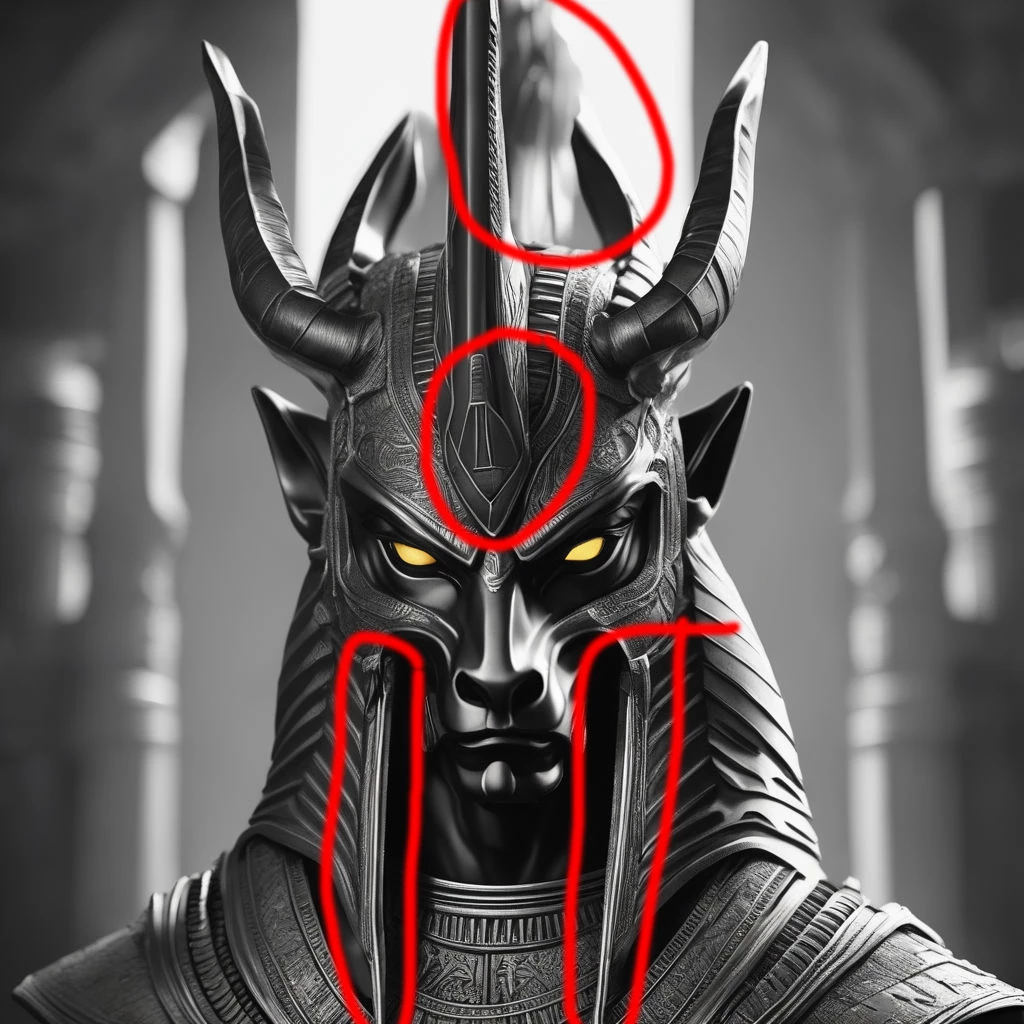
The size of these images are fine for review. I've circuled what I believe are the issues. At least some of them. These probably would have passed months ago when Adobe first started accepting AI, but there are unfinished lines on the pharoh image for example. The two straight-on images should be mirrored identially on both sides of the image, as they would be if created by an artisan in real life. This is typical of AI and without a good deal of editing, these would not get past the moderators by today's standards. The finer details are the likes of these without giving them another thought. The time it would take to correct the issues far outweigh the less time it would take to re-generate as many times necessary to get them closer to perfection. I've watched YouTube videos where the creators ooh and ahh over how incredible AI is at creating such results but they never show us the full-sized images, which fall apart when viewed full sized or with the detail necessary for commercial use. You aren't doing anything wrong. AI just isn't doing it right, and I think we're still a ways off before it gives us results that don't require further editing.


6 replies

Legend
December 11, 2023

And these lines is a total mess. And they all have to be straight and parallel.

Mo.HameedAuthor
Participant
December 10, 2023

Mo.HameedAuthor
Participant
December 10, 2023

Sample of the uploads I've attached in my other reply, sorry if the quality isn't as it was uploaded as I'm already have problems in uploading large files in my current remote location

daniellei4510
Community Expert
daniellei4510Community ExpertCorrect answer
Community Expert
December 10, 2023

The size of these images are fine for review. I've circuled what I believe are the issues. At least some of them. These probably would have passed months ago when Adobe first started accepting AI, but there are unfinished lines on the pharoh image for example. The two straight-on images should be mirrored identially on both sides of the image, as they would be if created by an artisan in real life. This is typical of AI and without a good deal of editing, these would not get past the moderators by today's standards. The finer details are the likes of these without giving them another thought. The time it would take to correct the issues far outweigh the less time it would take to re-generate as many times necessary to get them closer to perfection. I've watched YouTube videos where the creators ooh and ahh over how incredible AI is at creating such results but they never show us the full-sized images, which fall apart when viewed full sized or with the detail necessary for commercial use. You aren't doing anything wrong. AI just isn't doing it right, and I think we're still a ways off before it gives us results that don't require further editing.


Adobe Community Expert | If you can't fix it, hide it; if you can't hide it, delete it.
George_F
Community Expert
Community Expert
December 10, 2023

Are you having difficulty uploading them?  At 33mb, they shouldn't be too large to upload.  I'm not sure how helpful we can be without seeing the files.

George F, Photographer & Forum Volunteer
Nancy OShea
Community Expert
Community Expert
December 9, 2023


Did your read the vector requirements for illustrations?


Did you submit vectors as EPS, Adobe Illustrator or SVG files?

Are your vector paths closed?

Are your layers properly labled so customers can use them?

Did you submit a signed property release by you as the artist?

=============

Property Release:
https://helpx.adobe.com/stock/contributor/help/property-release.html

Nancy O'Shea— Product User & Community Expert
Abambo
Community Expert
Community Expert
December 9, 2023

@Nancy OShea ,

Illustrations are pixel assets.


ABAMBO | Hard- and Software Engineer | Photographer
daniellei4510
Community Expert
Community Expert
December 9, 2023

Illustrations are assets I've always taken to mean are non-photographic.  I don't think the term is synonmous with vector graphics. I could be convinced you could call a vector graphic an illustration, I don't think the reverse is always going to be true.


Well it is called Adobe Illustrator, so some confusion can be expected. 🙂

Adobe Community Expert | If you can't fix it, hide it; if you can't hide it, delete it.
Abambo
Community Expert
Community Expert
December 9, 2023

The size of your asset is not a quality criteria. 


If you are new to stock, you should consider these resources: https://helpx.adobe.com/stock/contributor/tutorials.html
Please read the contributor user manual for more information on Adobe stock contributions: https://helpx.adobe.com/stock/contributor/user-guide.html
See here for rejection reasons: https://helpx.adobe.com/stock/contributor/help/reasons-for-content-rejection.html
and especially quality and technical issues: https://helpx.adobe.com/stock/contributor/help/quality-and-technical-issues.html

ABAMBO | Hard- and Software Engineer | Photographer
Jill_C
Community Expert
Community Expert
December 9, 2023

There is far more to "quality" than just resolution and file size. If the file size of your asset was too small, you wouldn't even have been able to upload it to the site. Read on the Learn&Support pages the aspects of quality  that are checked by the Moderators:

https://helpx.adobe.com/stock/contributor/help/photography-illustrations.html


Reduce the size of 1 or 2 of your assets slightly and upload them here for feedback from the community members.


Jill C., Forum Volunteer