Participating Frequently
September 20, 2024
Answered

my photo rejected for quality

  • September 20, 2024
  • 5 replies
  • 1473 views

I don't understand why this was rejected for Quality Issues? It was accepted on other sites.
This topic has been closed for replies.
Correct answer Ricky336

That's what I started out doing, but then I changed my mind because of a phenomenon that happens on occassion. Do you ever use Lightroom Classic? I use it mostly. I send images to Photoshop if a correction cannot be made in Lightroom. I have had a number of occassions where an image, that I was positive to be flawless, was rejected. Upon re-examination,  I saw there was RED ( highlight alert), when I know it was not there prior to submission. Sometimes, it happens when I'm still editing. With some images, depending upon where I'm clickling, the red will flash on and off. If I see that happen, I have learned to back off a bit more, just to be safe.. I have come to assume it's a flaw in the program. I wonder if anyone else has had it happen?

My trust in the software is somewhat broken...


Hello,


quote

...I have had a number of occassions where an image, that I was positive to be flawless, was rejected. Upon re-examination,  I saw there was RED ( highlight alert), when I know it was not there prior to submission. Sometimes, it happens when I'm still editing. With some images, depending upon where I'm clickling, the red will flash on and off. If I see that happen, I have learned to back off a bit more, just to be safe.. I have come to assume it's a flaw in the program. I wonder if anyone else has had it happen?

My trust in the software is somewhat broken...


By @ImaRetiredTeacher


I use Lightroom Classic a lot. When editing, the highlight alert may happen. If you reduce exposure and reduce the highlights, the highlight warning disappears, but then you increase the contrast and alter the tone curve, the highlight warning reappears; all of these actions influence exposure. It isn't a flaw in the programme. It is something you have to be aware of when editing/enhancing.

5 replies

Ricky336
Community Expert
Community Expert
September 21, 2024

Hello,

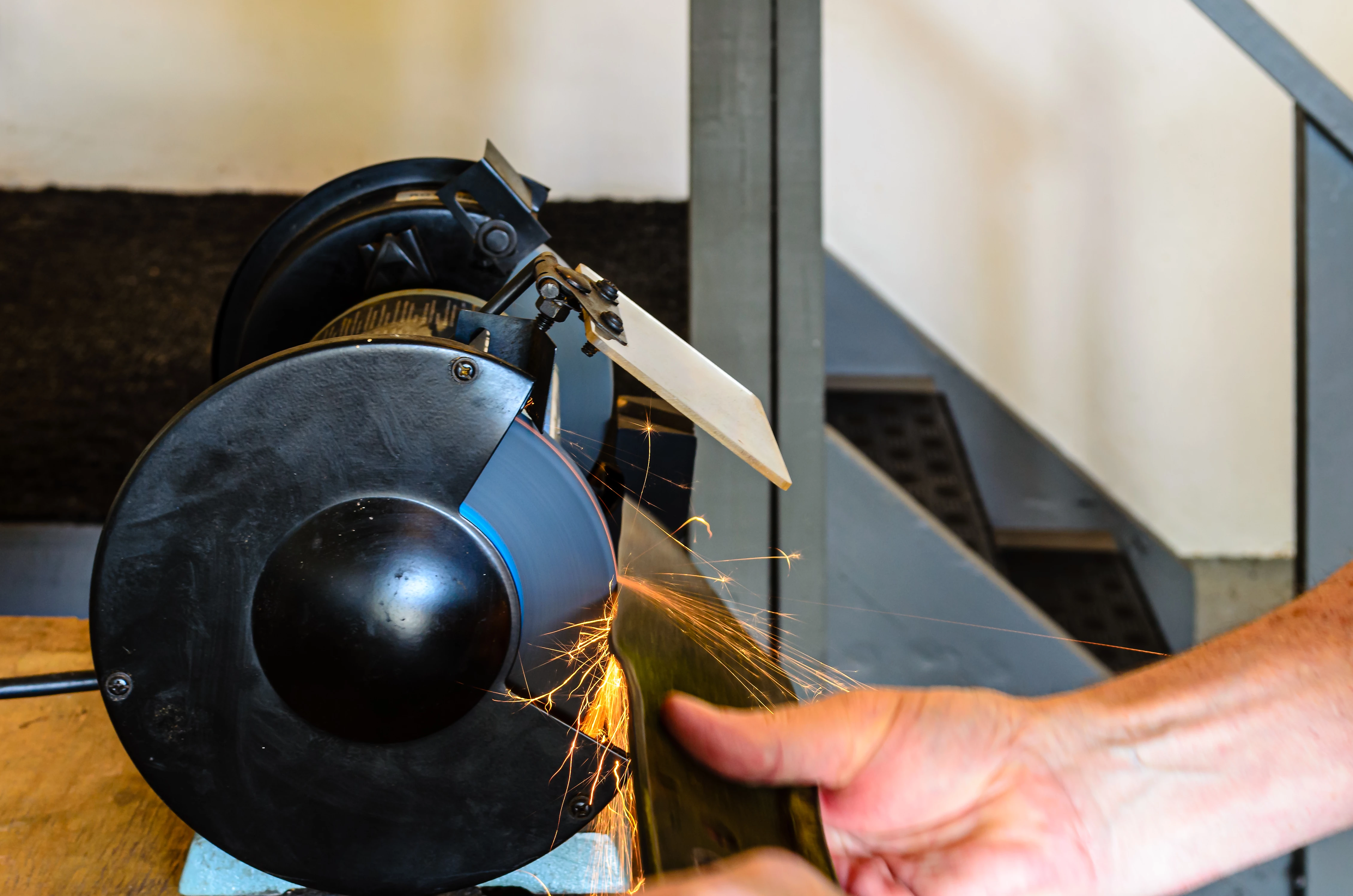
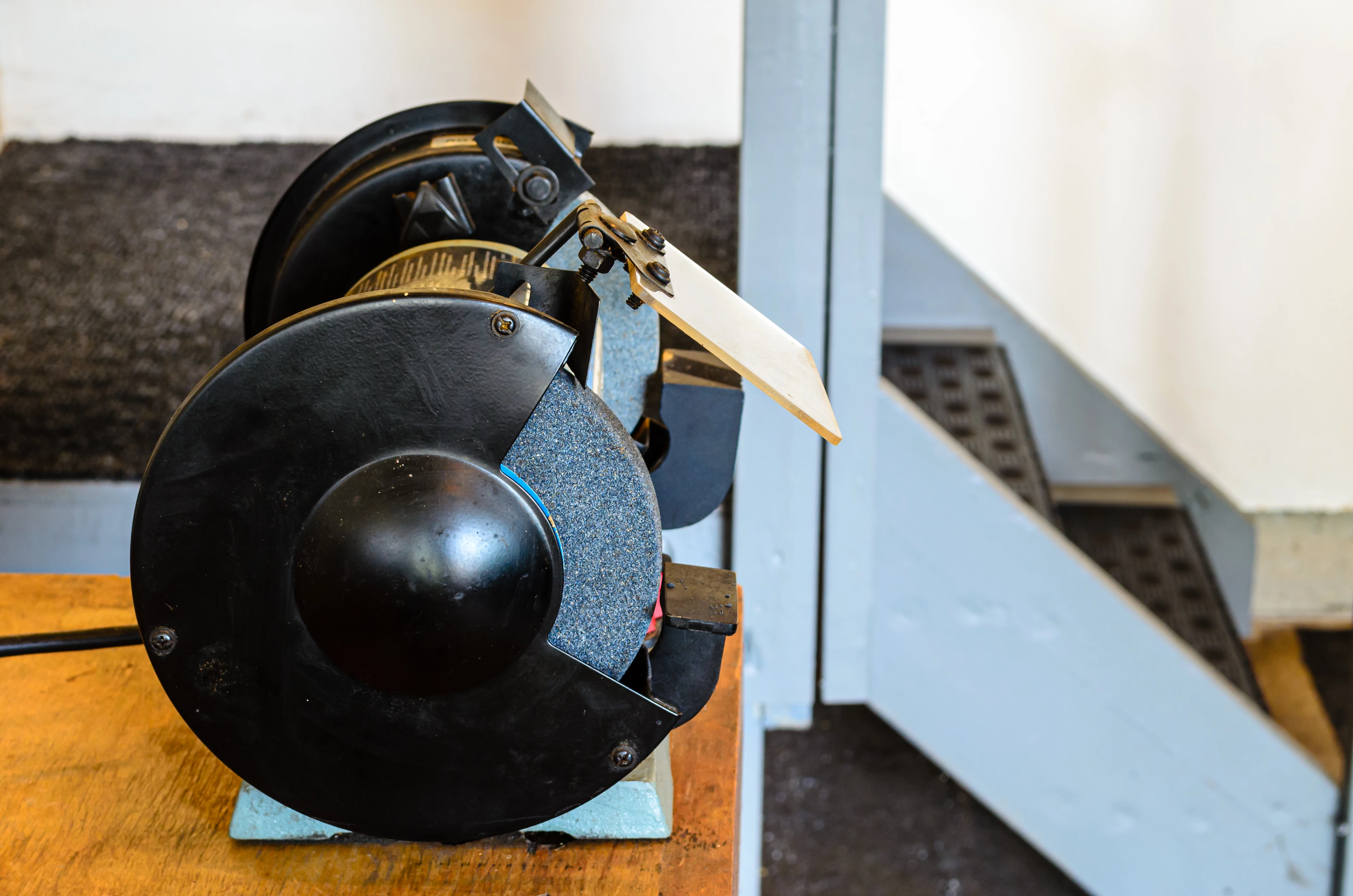
A different pair of eyes - I also think the most probable reason for rejection is the focus - The hand should be in focus, and the whole bench grinder should be in focus, not just the front part. It would help if you increased your f stop as well;  4.8 is a bit too shallow to get everything in focus.

jacquelingphoto2017
Community Expert
Community Expert
September 21, 2024

Hi @gerryb70481725 ,

The first picture has motion blur. Your shutter speed was too slow, hence, could not freeze the motion. I also believe the depth was a bit too shallow.


The depth of field for the second picture was also too shallow, hence, the subject is not completely in focus..

Best wishes

Jacquelin

ImaRetiredTeacher
Known Participant
September 21, 2024

This is a great example of a question I have always had. Is the brightness of the sparks and the reflection on the screw heads ok? I always darken things like that because I felt I was being rejected if they were as bright as I believed they should be.

daniellei4510
Community Expert
Community Expert
September 21, 2024

Trust your Histogram. Avoid 100% white and 100% black and you'll be good to go.

Adobe Community Expert | If you can't fix it, hide it; if you can't hide it, delete it.
Nancy OShea
Community Expert
Community Expert
September 20, 2024

I see focus problems (right side) for both.


Nancy O'Shea— Product User & Community Expert
Jill_C
Community Expert
Community Expert
September 20, 2024

In the first image, the hand is out of focus. Both images should perhaps have been captured from an angle rather than straight on to see more of the equipment. DOF is a bit too shallow.

Jill C., Forum Volunteer
daniellei4510
Community Expert
Community Expert
September 20, 2024

The image, to me, is poorly cropped. I would like to see the entire hand. The second image would be more interest if photographed at a 45 degree angle or from the front.'

Having images accepted on other sites is no guarantee they will be accepted on Adobe Stock.

Adobe Community Expert | If you can't fix it, hide it; if you can't hide it, delete it.
Participating Frequently
September 20, 2024

Thanks for your quick feedback
