
bole_bolo
Participant
March 5, 2019
Question

Photos rejected because of artifacts problem

  • March 5, 2019
  • 2 replies
  • 909 views

Hi there, I am new in Photography, and I would appreciate your advice or suggestion.

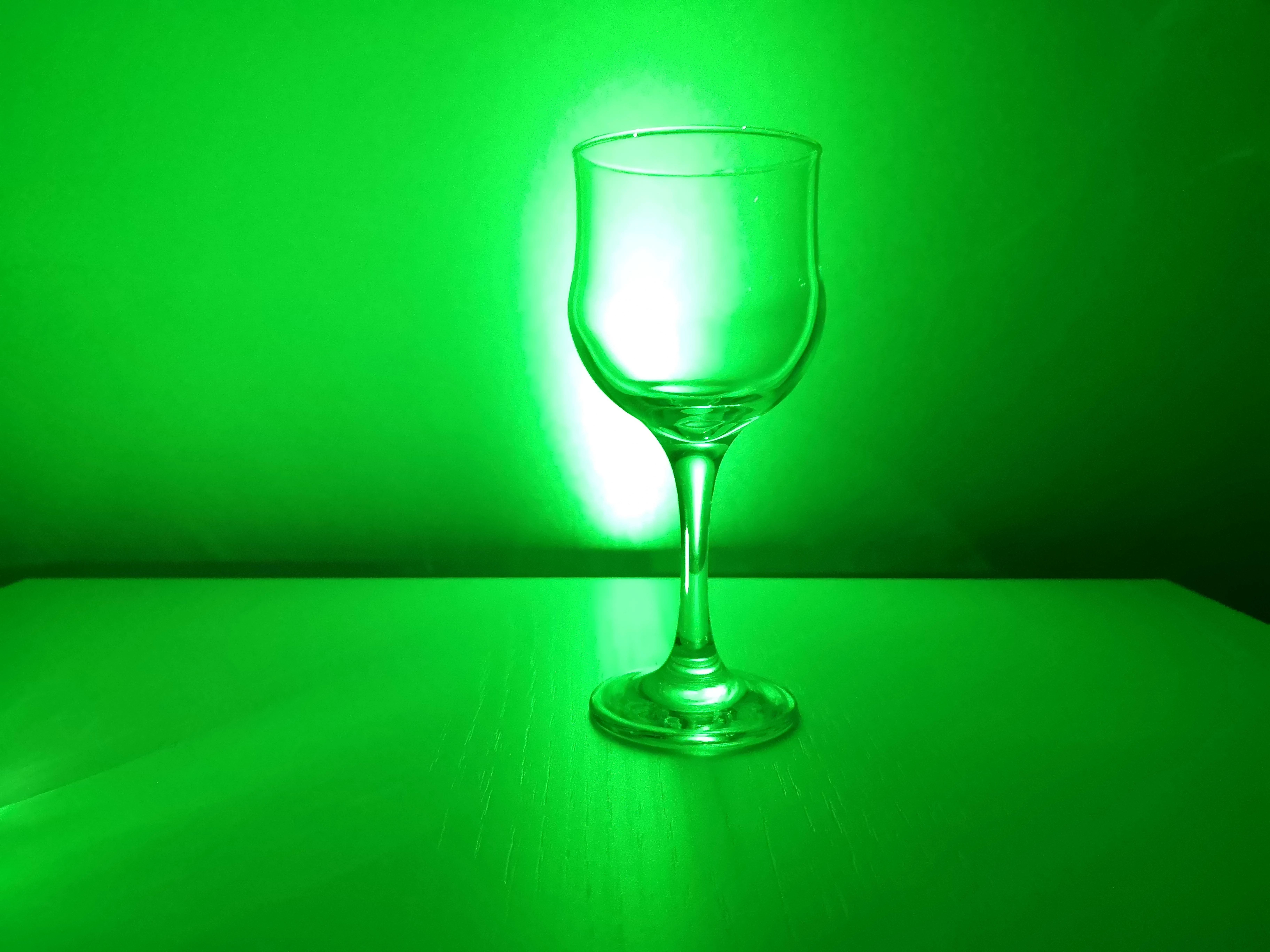
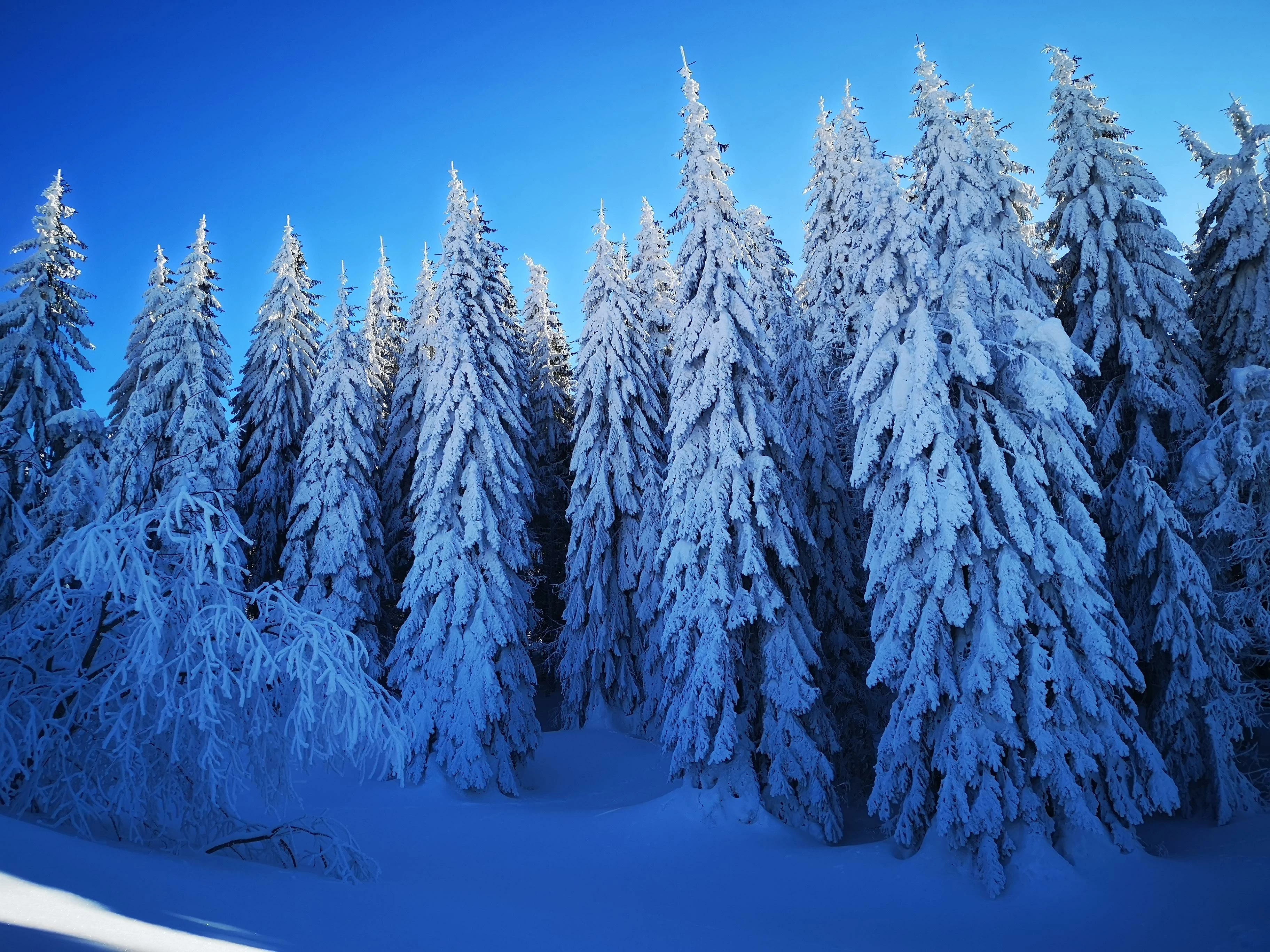
I publish some photos and some were accepted, bat all rejected is rejected  for same reason 'artifacts problem' . I don't know what kind of artifacts problem is on this pictures. Could anybody explain me what is the problem, or give some advice/suggestion?
This topic has been closed for replies.

2 replies

Ricky336
Community Expert
Community Expert
March 5, 2019

In addition, you have banding in the blue sky and signs of artifacts - JPEG compression:

Did you take these pictures with a smartphone by any chance??

Have a closer look. Notice the 'blocky' nature of the pixels. This happens a lot with JPEG files. The more the compression, the more 'blocky' the pixels are.

As for colour temperature, bearing in mind that the snow is in shade, it will give a blue colour. I personally don't feel that it needs to be corrected that much.

Main problem for both pictures is indeed artifacts.

bole_bolo
bole_boloAuthor
Participant
March 5, 2019

Yes I took all the pictures with my p20 pro, both rejected and accepted.

I have to mention that I am an Android developer, and photography is just my hobby. Exhaust valve, way to relax myself.

As for color temperature, that was very funny to me, the snow was really blue in the shade, possibly because of the bright blue sky.

As for artifacts - JPEG compression: I have option to take pictures in RAW FORMAT, would this help, and  would this be a better option?

Thanks a lot for your answers and suggestions, I really appreciate it

bole_bolo
bole_boloAuthor
Participant
March 5, 2019

bole_bolo  wrote

Yes I took all the pictures with my p20 pro, both rejected and accepted.

I have to mention that I am an Android developer, and photography is just my hobby. Exhaust valve, way to relax myself.

As for color temperature, that was very funny to me, the snow was really blue in the shade, possibly because of the bright blue sky.

As for artifacts - JPEG compression: I have option to take pictures in RAW FORMAT, would this help, and  would this be a better option?

Thanks a lot for your answers and suggestions, I really appreciate it

Thought it looked like it was from a smartphone.

As for the blue - it is not so much that it is a blue sky, but rather the colour temperature. Yes, colour has a temperature measured in Kelvin, and this alters how a picture looks. As the snow is in the shade, it gives a blue colour cast. And as the snow is white, it is going to appear bluer.

Color temperature - Wikipedia

Yes, if you can. then it is better to shoot in raw, as this gives you more flexibility! (Like altering your white balance - colour temperature etc.)

BUT, you then need a raw converter to read the file. Hence Lightroom is a good option - but there are others you can choose from. I use Lightroom, and I find it very good!


Thank you very much, man.

You're awesome ricky336!!!

Abambo
Community Expert
Community Expert
March 5, 2019

The first picture:

There are so many proplems, related to your camera, the floor, the lightning, that they can’t all be counted. Here are some of the defects, I’ve seen and as I’m on an iPad, I do not have the possibility for an extensive analyses:

As mentioned, also the floor is full of traces of use.

Some of the artefacts shown here seem to be camera related, others are simply because the colour is oversaturated.

The second image also exhibits the same kind of camera related artefacts, so I suppose you have quite a big sensor dust or hot pixels problem. But that picture also is way out of a correct colour balance. The snow should not be that blue...

To be honest: You are overdoing in both pictures the image saturation. I do not think that the glas picture can be saved, for the snow image I have limited hope...

ABAMBO | Hard- and Software Engineer | Photographer
bole_bolo
bole_boloAuthor
Participant
March 5, 2019

Thank you for a quick answer.

I personally think some of that white spots is  the reflection of water droplets on glass picture and reflection from the snow on picture 2, but I will pay attention to this in the future.

And about image  oversaturation, yes I love colors that is true. Maybe that is bad for stock photos.

Ricky336
Community Expert
Community Expert
March 5, 2019

I agree that the white spots are reflections from the ice crystals and not sensor dust or hot pixels. Hot pixels occur in time exposures generally.

Be careful with saturation. Adobe Stock seem not to like images that are oversaturated!