
Participant
April 12, 2024
Resuelto

please tell me why my AI image is rejected?

  • April 12, 2024
  • 6 respuestas
  • 2363 visualizaciones

I sent several Generative AI images but they were all rejected, please give me input about my generative AI images

Este tema ha sido cerrado para respuestas.
Mejor respuesta de Abambo

Don't post that many, errors are mostly similar: 
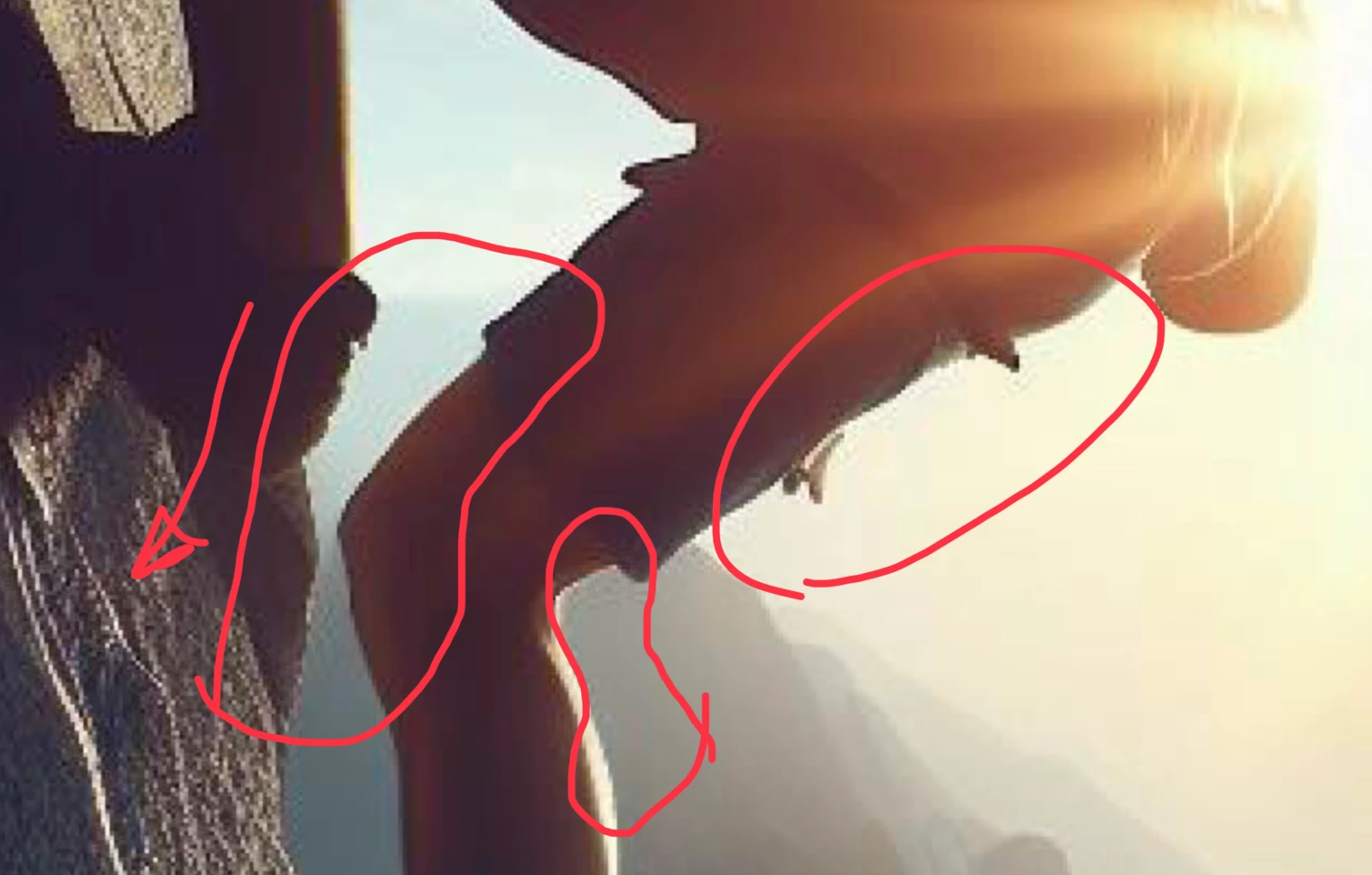
Check your assets at 100% and correct the errors you see. If you can't correct, do not submit. The mountan climber is full of compression artefacts, in addition to aliasing (stair effect on hard edges). 

6 respuestas

Nancy OShea
Community Expert
Community Expert
April 12, 2024

Customers expect commercial-ready artwork.


Carefully examine details like hands, face, nose, mouth & eyes.  Count fingers.  Are they proportioned correctly?  Do the details make sense visually?  AI images are imperfect because machines are stupid that way.  It's up to the contributor to find all imperfections and fix them if possible or discard the image. Compare your best work with Stock inventory.  Is yours as good or better than what Stock has?  Would you buy it? 


Read the Stock Contributor User Guide for more tips:


Nancy O'Shea— Product User & Community Expert
Abambo
Community Expert
AbamboCommunity ExpertRespuesta
Community Expert
April 12, 2024

Don't post that many, errors are mostly similar: 

Check your assets at 100% and correct the errors you see. If you can't correct, do not submit. The mountan climber is full of compression artefacts, in addition to aliasing (stair effect on hard edges). 

ABAMBO | Hard- and Software Engineer | Photographer
RALPH_L
Community Expert
Community Expert
April 12, 2024

Definet ly too soft and the Apple logo is not allowed.

daniellei4510
Community Expert
Community Expert
April 12, 2024

Let's look at the woman at the laptop again. She's still a little robotic- or trance-like for my taste as opposed to photorealistic, but I ran her through some facial restoration software and brightened up her eyes. Since you appear to be mostly interested in people, facial restsoration software is a must for even the best AI rendorings of people. It can fix eyes, nostrils, lips and teeth in the majority of cases, so long as the subject is not in three-quarter or full profile. Do a search for GFPGAN on YouTube to see how to find and take advantage of it. If you're a Mac user, it only works on Chrome, not Safari. And one last thing that I always recommend: stay away from the default square format of AI. Use different aspect ratios and explore different compositions.

Adobe Community Expert | If you can't fix it, hide it; if you can't hide it, delete it.
Participant
April 12, 2024

 Thank you for the suggestion

daniellei4510
Community Expert
Community Expert
April 12, 2024

Women and Laptop: The Apple logo needs to be removed. This is an intellectual property issue.

a Man Standing: The man's hands are poorly rendereed. View at 100%. The shadow doesn't see quite right.

a group of people: the (what are they...paddels?) on the windmill are poorly rendered.

Woman Laptop 2: the fingers are poorly rendered.

Girl with headphones: the hands again.

a person climbing: artifacts around the edges of his body.

Team Work: hands, teeth and other facial features.

Eid Murbarak: the etchings on the building are flawed.


That should be enough to indicate that you're probably not viewing your images at 100% or more. There are probably more issues with each example I've noted, but it only takes one problem to get a rejection.


Adobe Community Expert | If you can't fix it, hide it; if you can't hide it, delete it.
Participant
April 12, 2024

thank you for the suggestion

Jill_C
Community Expert
Community Expert
April 12, 2024

I looked at just a few. The first two have soft, jagged edges and have an overall low res appearance. Did you upscale these? The clock face is poorly drawn with inaccurate numbers.

The girl's eyes and teeth and malformed, as well as her hand. 

You must zoom in to at least 100% on each image and inspect each area to detect flaws. If the flaws cannot be fixed by further editing, discard and move on to the next. 

Jill C., Forum Volunteer