
Known Participant
August 28, 2021
Answered

Problem with collections

  • August 28, 2021
  • 1 reply
  • 506 views

I don't seem to undestand how to manage the collections in Adobe stock. I already have 2 collections here, but I don't know how to create new collection or add more photos into those, or even remove old collections because the delete feature is grayed out. I also cannot change the collection name or anything on those lines. 

Here is a tutorial that is trying to help with those, but I don't have such buttons shown in the post:
New For Adobe Stock Contributors: Customized Portfolios
This topic has been closed for replies.
Correct answer RALPH_L

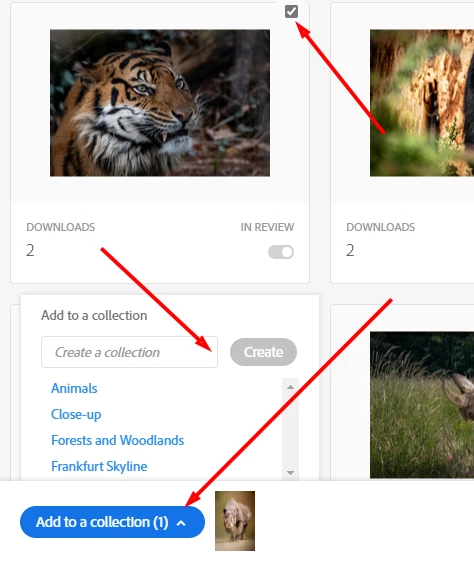
To add photos to an existing collection or create a new collection just check a photo on your dashboard then click the button that appears at the bottom of the screen.

You can then add to an existing or create a new collection.

1 reply

RALPH_L
Community Expert
RALPH_LCommunity ExpertCorrect answer
Community Expert
August 28, 2021

To add photos to an existing collection or create a new collection just check a photo on your dashboard then click the button that appears at the bottom of the screen.

You can then add to an existing or create a new collection.

aartturiAuthor
Known Participant
August 28, 2021

Oh, I see. There is 2 ways to select photo. Either click the photo or click the checkbox. I have no idea why didn't I see this before. I also figured that I cannot delete collection that I featured when I tried to manage it.

Thank you very much! 🙂