Participant
April 28, 2024
Answered

QUALITY ISSUES on my ai images

  • April 28, 2024
  • 6 replies
  • 734 views

Greetings,


can someone explain what is the issue with this picture? It seems Adobe has rejected my image claiming there are quality issues.

This topic has been closed for replies.
Correct answer Abambo

Well, Adobe does not only claim quality issues, there are severe issues. You really need to check your assets before submission. The errors in these assets are flagrant and even visible without looking at the detail. Just because you used Firefly, does not mean that it is perfect.
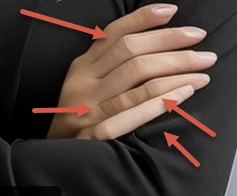
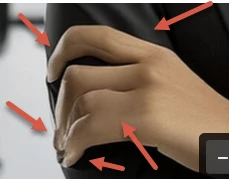
Without even looking at the details, you see that many defects, that it was easy to reject.


One issue with geometry is that AI has no clue about how it should look correctly for non-organic structures, like windows or desks:

If this were an ancient office building, I could imagine that the windows are not straight in a line. That never happens with newer structures.

6 replies

Abambo
Community Expert
AbamboCommunity ExpertCorrect answer
Community Expert
April 28, 2024

Well, Adobe does not only claim quality issues, there are severe issues. You really need to check your assets before submission. The errors in these assets are flagrant and even visible without looking at the detail. Just because you used Firefly, does not mean that it is perfect.
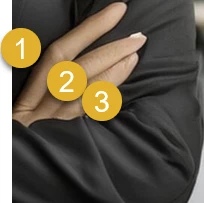
Without even looking at the details, you see that many defects, that it was easy to reject.


One issue with geometry is that AI has no clue about how it should look correctly for non-organic structures, like windows or desks:
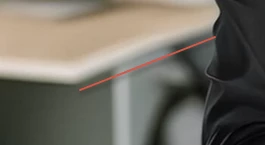
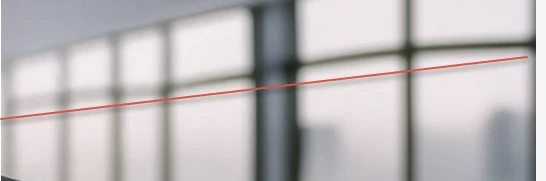
If this were an ancient office building, I could imagine that the windows are not straight in a line. That never happens with newer structures.

ABAMBO | Hard- and Software Engineer | Photographer
RALPH_L
Community Expert
Community Expert
April 28, 2024

Please take the time to review your images before submission. When I look at the hand on the first image, it is clear to me that the image was not reviewed. Reviewing your image before submission will save you a lot of time and work and will increase your odds of earning winnings on your efforts. 

daniellei4510
Community Expert
Community Expert
April 28, 2024

I also ran your image through facial restoration software. which even the best AI results should take advantage of to fix eyes (one eye was copied and pasted over the other), teeth, lips and nostrils. It seldom works for hair and ears. And I used generative fill (generative fill is your friend) to fix the left side of her shirt to look more in line with how a shirt would look. The button would still need fixing. 

Adobe Community Expert | If you can't fix it, hide it; if you can't hide it, delete it.
daniellei4510
Community Expert
Community Expert
April 28, 2024

Also, while I'm guilty of it myself, the image of a male or female CEO or whoever smiling with arms crossed is so common place among stock images that you'd probably have better luck competing against the millions of flower images on Adobe Stock, even if these had turned out to be perfect. But if you must, include some people in the background. Make the subject a doctor or a nurse or a construction worker. Anything but a CEO. 🙂

Adobe Community Expert | If you can't fix it, hide it; if you can't hide it, delete it.
jacquelingphoto2017
Community Expert
Community Expert
April 28, 2024

Hi @Abzol300396881qut ,

The first file has artifacts and indication of excess compression. 

Some hairs are lose.

Artifacts

Sections are not properly rendered. In this case the mouth and teeth. The left side of the mouth seem to be slightly deformed and teeth are not properly formed, some are left out.

There's also problem with the finger and fingernail rendering.

Setting aside that the second file is similar to the first and you should avoid submitting similar files, the second file is also with excess artifacts and poor rendering. For example these fingers without nails.

You should zoom in on your files at between 100 and 200% to look for what's not correctly rendered and quality issues.

Best wishes

Jacquelin


daniellei4510
Community Expert
Community Expert
April 28, 2024

AI is not perfect, nor is Firefly. View your results from corner to corner. If you want photorealism, the results need to be photorealistic.


Adobe Community Expert | If you can't fix it, hide it; if you can't hide it, delete it.
