Participant
September 27, 2023
Answered

Quality Issues

  • September 27, 2023
  • 6 replies
  • 934 views

Can anybody help me to understand, why these pictures have been rejected due to quality issues?

Thanks a lot! Felix

This topic has been closed for replies.
Correct answer Abambo

Look at your pictures at 100%. You are missing contrasts and details. And you have a white line around objects.
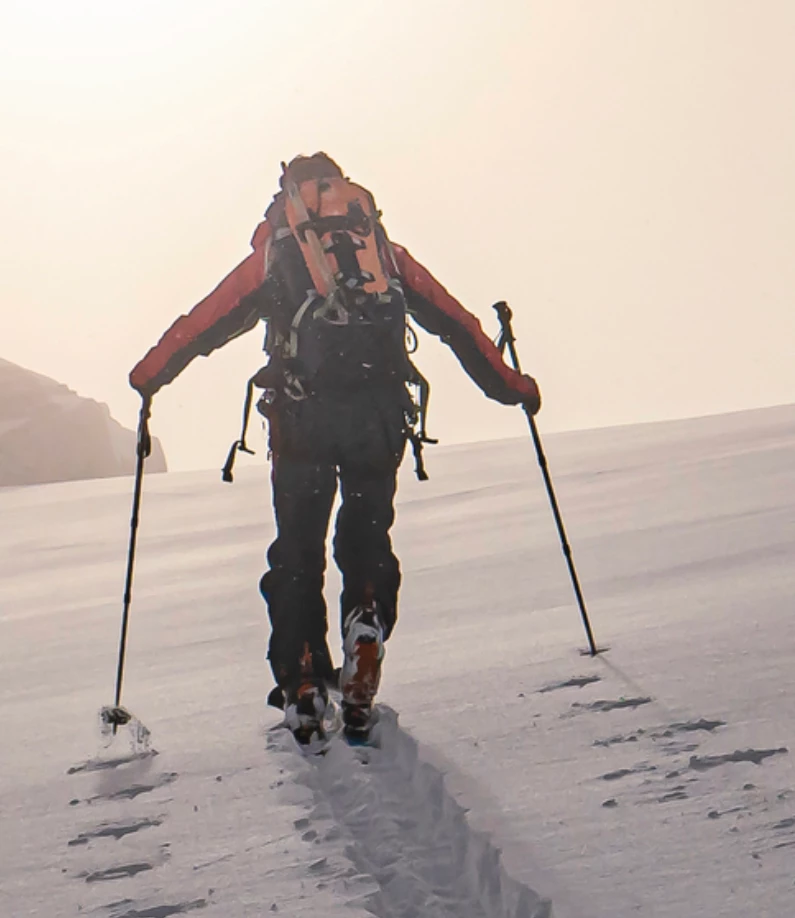
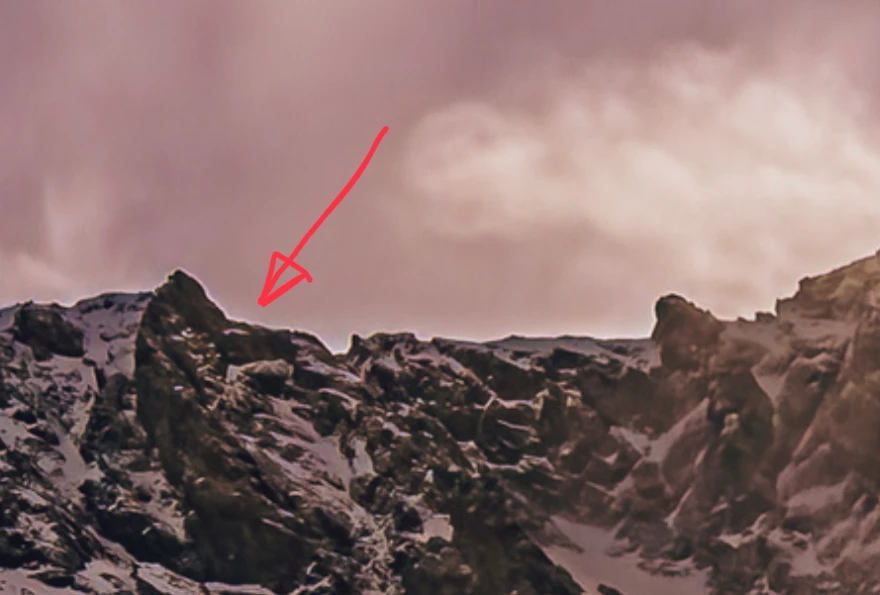
You can try to fix the issues as indicated, but I don't think that you can save these pictures.

6 replies

Abambo
Community Expert
AbamboCommunity ExpertCorrect answer
Community Expert
September 28, 2023

Look at your pictures at 100%. You are missing contrasts and details. And you have a white line around objects.

You can try to fix the issues as indicated, but I don't think that you can save these pictures.

ABAMBO | Hard- and Software Engineer | Photographer
persikiAuthor
Participant
September 29, 2023

Thanks for the hints. I try to fix it.

Ricky336
Community Expert
Community Expert
September 28, 2023

Hello,

Take note of the white balance. In the two shots, they have somewhat of a magenta cast. The snow should be whiter than they are currently. Minor adjustments to the exposure may help, taking note of your white and black points.

Take note of the sun, especially in the mountain range shot. It's just too much here. You could spend time in Photoshop as @daniellei4510 suggested, but personally, I would leave this shot and move on. The sun is too much of a problem to fix in my view.

The skier shot, works well I think; it is worth spending more time on. But do fix the white balance. I don't think the skier walking into the sun is an issue, but reduce the highlights a bit more.

persikiAuthor
Participant
September 29, 2023

Many thanks for your advice. I'll try to fix that an see how far it comes. 

George_F
Community Expert
Community Expert
September 28, 2023

To add to my previous post:  These issues are most noticeable when viewing at 100%-200% view.


If you haven't seen the Photo Submission Guidelines in the Adobe Stock Contributor User Guide yet, those can be found here: https://helpx.adobe.com/lv/stock/contributor/help/photography-illustrations.html


Cheers!

George F, Photographer & Forum Volunteer
daniellei4510
Community Expert
Community Expert
September 27, 2023

The haloing around the mountain (and the snow) is a relatively easy fix if you have Photoshop. Create a new layer and change it from Normal to Darken. Then use the Clone Tool to sample the sky as needed as you work your way around the mountain. The dark areas won't be affected and the haloing will start to match the sky and disappear. That said, @Jill_C's comments should also be taken into account.

Adobe Community Expert | If you can't fix it, hide it; if you can't hide it, delete it.
persikiAuthor
Participant
September 29, 2023

Alright, I gonna try this. Thanks a lot!

Jill_C
Community Expert
Community Expert
September 27, 2023

1. The skier is a really interesting image, but the halo around his edges and the large blownout spot in the sky are probably the reasons for rejection. 

2. The mountain image has artifacts, white balance issue, chroma noise and chromatic aberration. These can probably can corrected with skillful editing.


Jill C., Forum Volunteer
George_F
Community Expert
Community Expert
September 27, 2023

Greetings!


Looking quickly through the first photo of the mountain range, there are what appear to be some dead pixels or sensor spots of some sort in the sky, there is a noticeable halo where the mountain meets the sky, and the photo appears a bit soft in focus.


For the hiker in the snow:  Based on the histogram there are some exposure issues here, the blacks and some of the shadows areas are missing detail.  The photo appears soft in focus.  There are some spots in the sky and artefacts in the snow.


I hope this perspective helps!


Cheers!

George F, Photographer & Forum Volunteer
