
Mixcity
Known Participant
October 11, 2023
Answered

Question for you on a recalled image

  • October 11, 2023
  • 3 replies
  • 1830 views

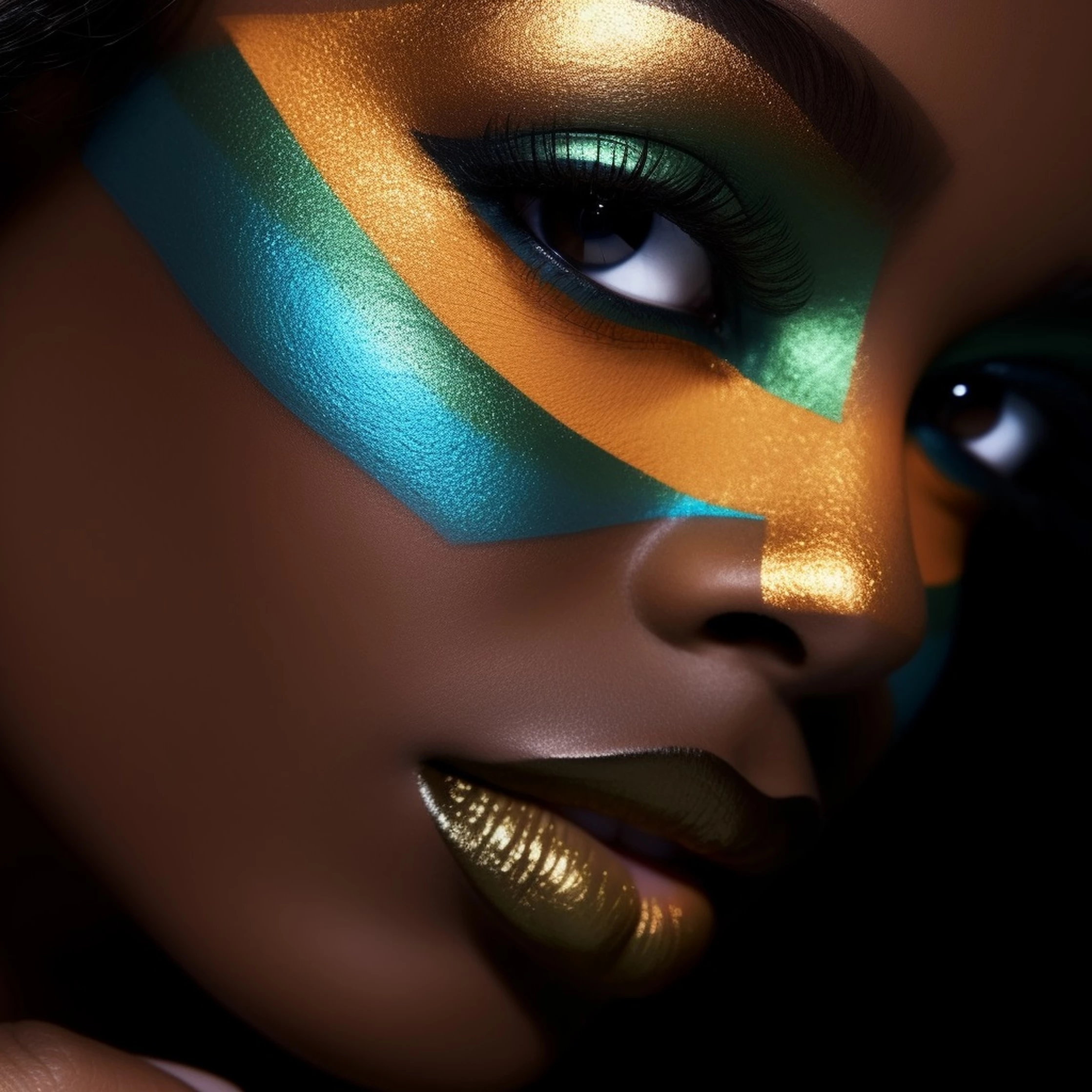
Hi everyone, I am a bit lost because I've submitted an image created with AI and I've ticked the box (generated with AI) and I also ticked the box saying that the person represented doesn't exist (she's fictive). However the image was recalled saying that I need to attach an authorization from this person. 

...Did I miss something? I've attached the image so you can see. This image is entirely created by AI, I did not use any name of a real person in the prompt or whatsover. 

I've submitted this image about five weeks ago, but surprinsingly that was not the first image I've sent. However that was the first image that has been reviewed. I'm precising that point because I assumed that the review would work in FIFO (first in, first out) but it seems that is not the case, at least with the images I've submitted. 

It's my first image ever reviewed by Adobe (Honestly I feel a little bit like celebrating, especially because I did not think this would happen before December-January) and the good news is that it was not rejected (it appears under my "recall" folder) but I wonder what to do differently now. Should I resubmit it when I will have a chance but then, what should I do differently? I thought ticking "generated with AI" and "the person is fictive" was enough, but it seems not. 

Thanks in advance to anyone who is able to shed some light on this. 

PS - Since I had one image reviewed, I was able to send one new image for review from my waiting batch of images. 

This topic has been closed for replies.
Correct answer Jill_C

Actually, I think the Moderator chose the wrong rejection reason code. Rather than needing a model release, it has technical issues. Her eyes don't match, there is an oddly colored shadow under the chin and a crosshatch patterned texture on her chest and also her hands, and her thumbnails are flawed.

3 replies

daniellei4510
Community Expert
Community Expert
October 11, 2023

I've had that happen to me. I simply went ahead and created a property release and resubmitted. They weren't refused, they just wanted to see a release for some reason.

Adobe Community Expert | If you can't fix it, hide it; if you can't hide it, delete it.
Mixcity
MixcityAuthor
Known Participant
October 11, 2023

Thank you, Danielle, I was particularly waiting for your feedback as I know you've also been submitting AI images. I very much value your experience in this field.

I don't think I will resubmit this particular image for the reasons mentioned by Jill. I've worked a lot on the quality of my images since I've submitted my first ones - mostly thanks to this forum - so this is not an image that would necessary fit into my portfolio today. But it's good to know that it happened to you too. If that happens to me in the future for an image that I really like, I will keep this in mind. Thanks again for your input! 

Nancy OShea
Community Expert
Community Expert
October 11, 2023

If model is fake, submit a signed property release by you as the creating artist.

If model is based on a real human, submit a signed model release.

==========
Model/Property Releases:
https://helpx.adobe.com/stock/contributor/help/model-release.html
https://helpx.adobe.com/stock/contributor/help/property-release.html

Nancy O'Shea— Product User & Community Expert
RALPH_L
Community Expert
Community Expert
October 11, 2023

I see no reason why this image needs a model release.

I think it could be refused for "quality".

Mixcity
MixcityAuthor
Known Participant
October 11, 2023

Thank you for your feedback Ralph! The image wasn't rejected for quality though, it was sent back with a request to attach an authorization from the model. 

Abambo
Community Expert
Community Expert
October 11, 2023
quote

Thank you for your feedback Ralph! The image wasn't rejected for quality though, it was sent back with a request to attach an authorization from the model. 


By @Mixcity


But still it has quality issues. 

ABAMBO | Hard- and Software Engineer | Photographer
Jill_C
Community Expert
Jill_CCommunity ExpertCorrect answer
Community Expert
October 11, 2023

Actually, I think the Moderator chose the wrong rejection reason code. Rather than needing a model release, it has technical issues. Her eyes don't match, there is an oddly colored shadow under the chin and a crosshatch patterned texture on her chest and also her hands, and her thumbnails are flawed.

Jill C., Forum Volunteer
Mixcity
MixcityAuthor
Known Participant
October 11, 2023

Thank you for your feedback Jill! The image wasn't rejected tough, it was sent back with a request to attach an authorization from the model. 

Abambo
Community Expert
Community Expert
October 11, 2023

But it still has technical issues:


You can now delete this asset and correct the errors, or you submit a proberty release and get this picture accepted and removed by Adobe because the first buyer notifies the errors. I for my part would correct the issues. It is not honorable, to submit assets that are not correct, just because the moderator did issue the wrong notification.

ABAMBO | Hard- and Software Engineer | Photographer