
Participant
November 6, 2021
Answered

Rejected photo - Technical Issues

  • November 6, 2021
  • 4 replies
  • 884 views

Hi there! I got these 2 photos rejected for technical issues. What might they be? Thanks!

This topic has been closed for replies.
Correct answer Nancy OShea

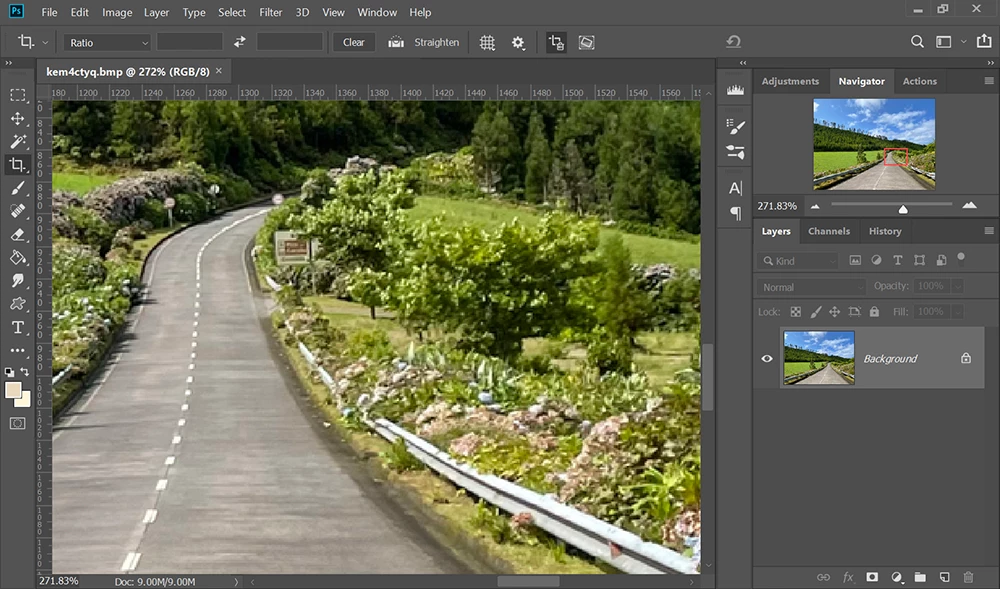
Examine images at 100-300% magnfication to see the defects. 


4 replies

Abambo
Community Expert
Community Expert
November 7, 2021
quote

Hi there! I got these 2 photos rejected for technical issues. What might they be?


By @Marta5E42

Your camera (iPhone 12) makes nice-looking pictures, but when you examine them in detail, as suggested by @Nancy OShea, you will see that there is a painterly look where it should be details. This is due to the small sensor and aggressive noise reduction. In this case, I fear that your camera software took those nice details, like the tree needles, the grass, or the water wavelets, as noise and eliminated them out, doing more bad than good.


If you are new to stock, you should consider these resources: https://helpx.adobe.com/stock/contributor/tutorials.html
Please read the contributor user manual for more information on Adobe stock contributions: https://helpx.adobe.com/stock/contributor/user-guide.html
See here for rejection reasons: https://helpx.adobe.com/stock/contributor/help/reasons-for-content-rejection.html
and especially quality and technical issues: https://helpx.adobe.com/stock/contributor/help/quality-and-technical-issues.html

ABAMBO | Hard- and Software Engineer | Photographer
jacquelingphoto2017
Community Expert
Community Expert
November 7, 2021

Hi @Marta5E42,

Noise grain is visible in the water of the first image. There also seem to be small amounts of blue fringing in the dark area of the forest.

The second image has blue color fringing around the edge of the trees in the highlights. Also the grassy area quality is not looking good. It give me the impression of photo taken with camera with small sensors. In addition its minutely underexposed.

Best wishes

JG

Photographer and Nutrition Author


Nancy OShea
Community Expert
Nancy OSheaCommunity ExpertCorrect answer
Community Expert
November 6, 2021

Examine images at 100-300% magnfication to see the defects. 


Nancy O'Shea— Product User & Community Expert
@MNiessenPhoto
Legend
November 6, 2021

Hi Marta,

The first one has banding in the sky, with purple and green artefacts:

and possibly the white balance should be corrected.


On this screen, the second one doesn't look sharp on this screen and a bit on the dark side. Not absolutely sure that's the rejection reason, though 😉

Hope that helps,

Michael

_____________

Michael Niessen - Photographer, photo-editor, educator

Photo-editing (Ps/Lr/LrC) and photography workshops & one-on-one training (off- and online)