
Known Participant
May 29, 2024
Answered

scanned films rejected with "QUALITY ISSUES."

  • May 29, 2024
  • 11 replies
  • 1164 views

The images, like this one, was scanned using a digital camera from old slides. Many of them have been rejected for "QUALITY ISSUES." Please tell me what the main problems are and how to improve them. Thank you.

This topic has been closed for replies.
Correct answer Ricky336

Hello,

To get a better result, you will need to scan the slide with a scanner that can also scan film/slides, rather than using a digital camera. The method you used has given a colour cast - blue. It has also interfered with the exposure, so you have to make adjustments in Photoshop -  for example:
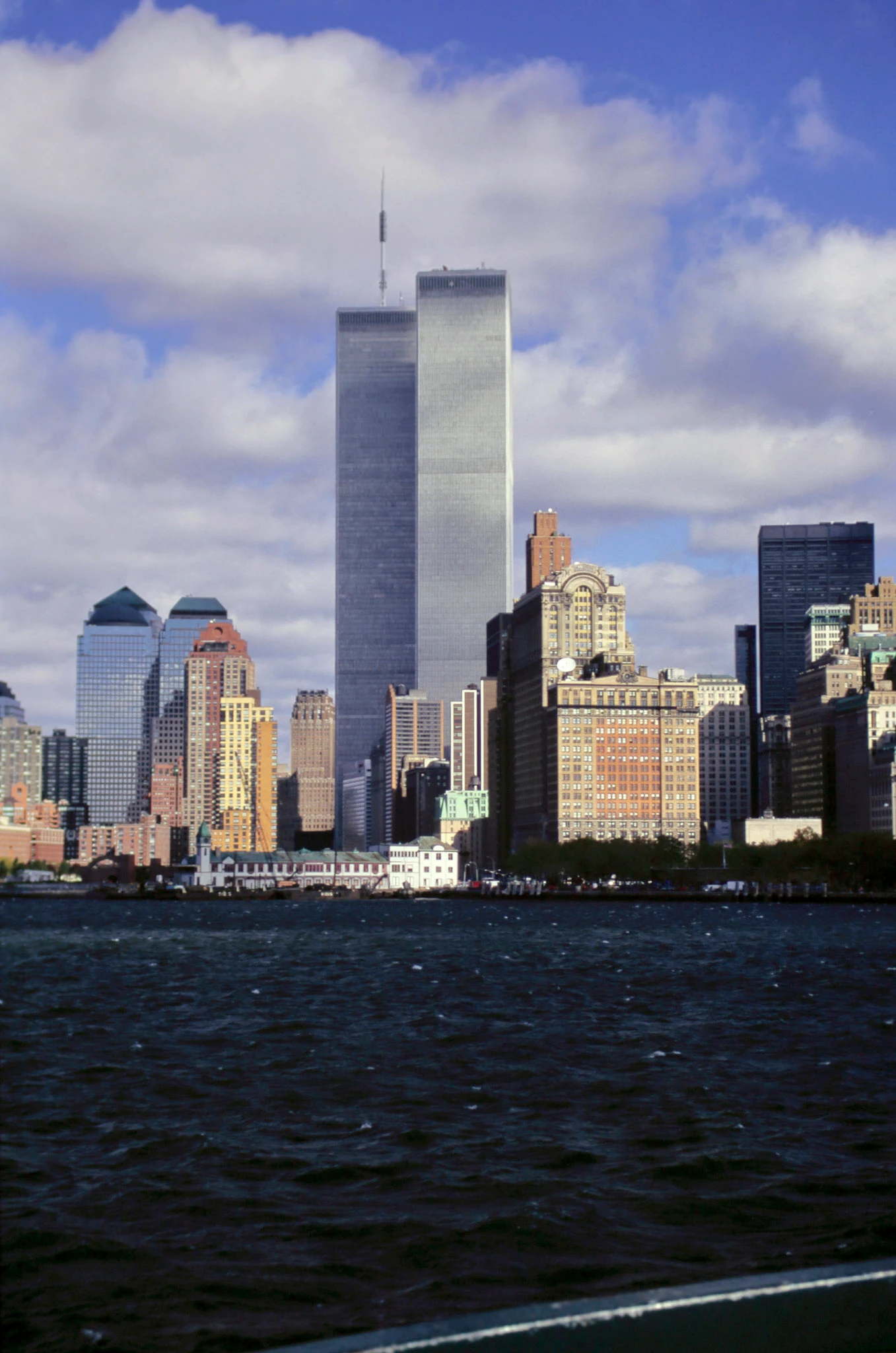
 

But, even if you made these corrections, it still probably won't pass, due to the overall quality.

Therefore, I wouldn't bother scanning slides with a camera, unless you have a top-quality flatbed scanner that can scan slides.

11 replies

daniellei4510
Community Expert
Community Expert
June 6, 2024

The comments which follow remind me of a time quite a few years back when the company I work for hosted an online event with Graham Nash (of Cosby, Stills, Nash and Young). There was no video streaming then, so it was all text-based and, as a moderator, I sent the better questions to Graham.

Anyway, that's not the point. The point is, Graham was knee-deep in the rising popularity of digital photography and printing, and the band had scores of 35mm photographs that had been destroyed in a fire. Only the contact sheets were saved. But from those contact sheets, Graham and others with similar interests in digital technology, were able to scan the images on those sheets and ultimately produce a book of those images.

But that's not the point, either. That's just a little music history about what digital technology was capable of achieving even at the outset, when we were amazed that a digital camera could produce a 640x480 pixel image. (Canon once loaned me their first camera with a digital back and insured it for $10,000; a year later, when I asked if they wanted it back, they told me it wasn't worth the postage to do so).

The point is (I'm getting there!), as @Ricky336 mentioned, a slide scanner would be needed to produce a high-quality, commercially viable result. Because if the same could be done from a contact sheet of 35mm images years ago, even an inexpensive slide scanner will do so with ease. And if you don't want to invest in a scanner, there are a number of online companies that can do so for you.


That was my point. The online scanning services.

Adobe Community Expert | If you can't fix it, hide it; if you can't hide it, delete it.
Abambo
Community Expert
Community Expert
June 6, 2024

@daniellei4510,

Some remarks:

  • Quality scanners can not be acquired anymore. There is simply no market for them. for decades, I had scanners to scan photos so that we could use them in our print productions. Most of the pictures were site works pictures from the supervisors, many with the date burnt in. They were bad quality, but for the size we did need them, they were OK. 
  • All modern production scanners today are cameras, as that is fast and with resolutions of up to a 100 Mp, even good page scanners won't produce better results.
  • When scanning from film (either the paper prints or the negative film), the limitstion is not only with the scanner, but also with the limited quality of the film/prints. I regularily scan from old pictures to produce digital art. Very little pictures produce the same clean image than my camera does. Even if I miss the focus by a small amount, I get a better picture then my old shots with my film camera. The lens, the sensor, the post-processing, all that makes that my images are incredibly sharp. 
  • I take thes incedibly sharp pictures and apply filters to them, so that they have the look and feel of my old film pictures. And people find them fantastic after obviously diminishing the quality. It's not always a question of resolution and sharpness.
  • Stock loves this clean sharp look, where you pixel peep and don't see a defect in a 50Mp picture. So anything I produced 20 years ago is not good enough for stock, but great for my eyes and memory.
ABAMBO | Hard- and Software Engineer | Photographer
daniellei4510
Community Expert
Community Expert
June 6, 2024

@Abambo 


I spent a year scanning a large body of my work (negative and slides) with my Epson V600 scanner (and quite a few that I scanned much earlier with a Flextight drum scanner, eventually bought out by Hasselblad) that they gave me on loan. $17,000. A lack of the proper inputs on newer computers made it obsolete. I gave it to a guy who collected scrap metal.


Anyway, the scans from the V600 required a lot of post editing, not much unlike post editing AI. They turned out well, but in the majority of cases I had Hasselblad negatives to work from. So that helped. They were of models, which, at one time, I had the proper signed releases. But I've moved so many times they that I eventually lost them, so there is nothing to be done with them commercially. Pity that.

Adobe Community Expert | If you can't fix it, hide it; if you can't hide it, delete it.
CYSUNAuthor
Known Participant
June 6, 2024

Thank you all for your reply, now I can see the problem. Very helpful.

Abambo
Community Expert
Community Expert
June 6, 2024

You're welcome.

ABAMBO | Hard- and Software Engineer | Photographer
Ricky336
Community Expert
Ricky336Community ExpertCorrect answer
Community Expert
June 2, 2024

Hello,

To get a better result, you will need to scan the slide with a scanner that can also scan film/slides, rather than using a digital camera. The method you used has given a colour cast - blue. It has also interfered with the exposure, so you have to make adjustments in Photoshop -  for example:


But, even if you made these corrections, it still probably won't pass, due to the overall quality.

Therefore, I wouldn't bother scanning slides with a camera, unless you have a top-quality flatbed scanner that can scan slides.

jacquelingphoto2017
Community Expert
Community Expert
May 30, 2024

Hi @CYSUN ,

The Photo is too cool (blue), out of focus and noisy. You need to zoom in on your images at between 100 and 200% to find the issues.

Best wishes

Jacquelin

daniellei4510
Community Expert
Community Expert
May 30, 2024

SCAM ALERT.

Adobe Community Expert | If you can't fix it, hide it; if you can't hide it, delete it.
Nancy OShea
Community Expert
Community Expert
May 29, 2024
Nancy O'Shea— Product User & Community Expert
Abambo
Community Expert
Community Expert
May 29, 2024

Scans of film rarely do meet the quality requirements of today's digital images. The unique time when I think that scans are equivalent is when you have professional images from a middle format or higher camera, crisp sharp and well exposed.

ABAMBO | Hard- and Software Engineer | Photographer
CYSUNAuthor
Known Participant
May 29, 2024

Hello Everyone, Thank you for your opinions. They are very helpful.

Jill_C
Community Expert
Community Expert
May 29, 2024

White Balance seems a bit too blue. I would also edit out the railing in the  foreground. 

Jill C., Forum Volunteer
RALPH_L
Community Expert
Community Expert
May 29, 2024

Exposure and sauration is off.