
Participant
August 24, 2022
Answered

Thumbnail got over-saturated when submit file Adobe Stock

  • August 24, 2022
  • 1 reply
  • 342 views

Hello, I just uploaded my first ever file as an Adobe contributor and now facing a big problem here: my thumbnail got saturated on the web. 


I tried saving EPS in both CMYK and RBG, trying to save as EPS 8, but none of them seem to work. Here is the screenshot from both sides.
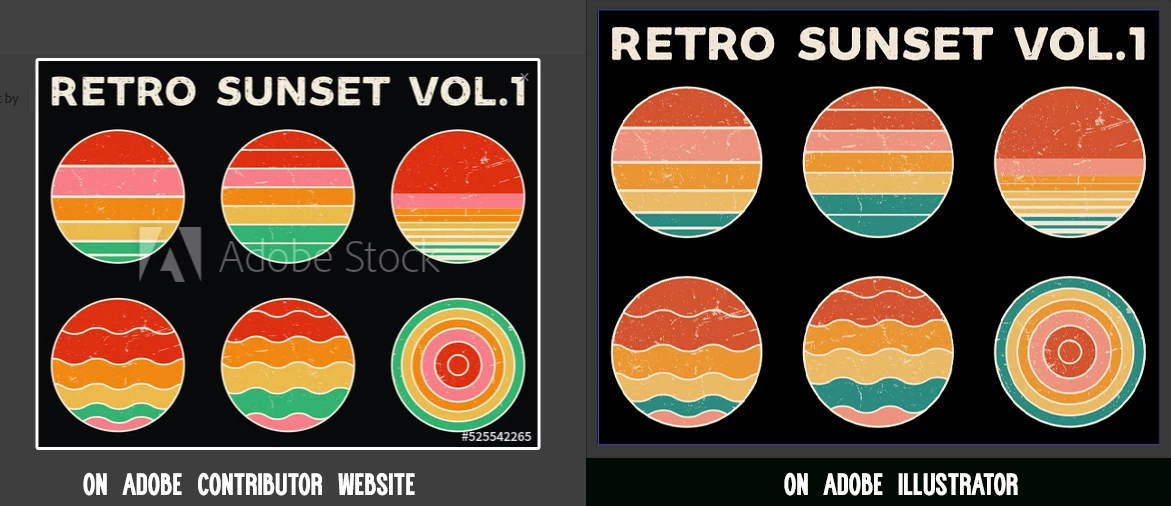
This topic has been closed for replies.
Correct answer Nancy OShea

Owing to the inherent differences between browsers, vector & raster images and various display settings,  color variation on the web is very common.  It's the nature of the beast I'm afraid. 


There's not much you can do about it except save images in sRGB color space and hope for the best. Remember, people are not buying the preview thumbnail.  It's just an approximate low-res representation of the actual image.


Don't sweat the small stuff.  Focus on what's important which is creating great graphics that people want to buy.


Good luck with your sales!


1 reply

Nancy OShea
Community Expert
Nancy OSheaCommunity ExpertCorrect answer
Community Expert
August 24, 2022

Owing to the inherent differences between browsers, vector & raster images and various display settings,  color variation on the web is very common.  It's the nature of the beast I'm afraid. 


There's not much you can do about it except save images in sRGB color space and hope for the best. Remember, people are not buying the preview thumbnail.  It's just an approximate low-res representation of the actual image.


Don't sweat the small stuff.  Focus on what's important which is creating great graphics that people want to buy.


Good luck with your sales!


Nancy O'Shea— Product User & Community Expert
Xuan AnAuthor
Participant
August 25, 2022

Today I came back to the submiting page and found out that the previous saturated one had turned to normal color while the latest uploaded had been saturated. Well, I will take your advise and move on, it's what it is.


Thanks a lot!

Abambo
Community Expert
Community Expert
August 25, 2022

Gnerate the preview image yourself, put both in a zip file and upload the zip file. Make sure, your preview is a sRGB-Profile image.

ABAMBO | Hard- and Software Engineer | Photographer