writingaddict
Participant
August 24, 2018
Answered

Adobe Stock image - when I try to download image it automatically asks me to licence Illustrator

  • August 24, 2018
  • 1 reply
  • 779 views

I have a subscription to Adobe Stock and used to be able to download images without a problem. But suddenly, today, when I tried to download an image I am asked to licence Illustrator so that I can open the image. What has changed? Thanks for ANY help! Rita

    This topic has been closed for replies.
    Correct answer twaritar3263062

    I have no need or want for Illustrator, and could always download images in the past and open in my old version of Photoshop. And now I need to have the Illustrator app to open an image? In other words,  I am blackmailed into subscribing to another app. Time to say goodbye to Adobe Stock. I'm starting to see a lot of complaints with Adobe.


    Hi Rita,

    Sorry to hear that that you are facing issues with Adobe Stock services.

    As Sheena Kaul​ mentioned earlier in her above post that vector files work the best with Illustrator only but can be used in Photoshop as a rasterised image.

    However, if you do not have Illustrator, rather than subscribing the app you can always use the 7 day trial version(in order to use the vector file you have downloaded from Adobe Stock).

    You may use this link to download the trial version of Illustrator: Download a free trial or buy Adobe products | Adobe free trials & downloads

    I would request you to share the File ID which you are referring to so that we can check why you get a prompt to launch Illustrator app (ideally you should be able to use the image in Photoshop as a raster). If there is a problem with the file, we can check that and can fix the issue.

    In addition when you are downloading the file from Adobe Stock  please save the file to your desktop first and then open the file with Photoshop or Illustrator(trial version). Below is the screenshot:
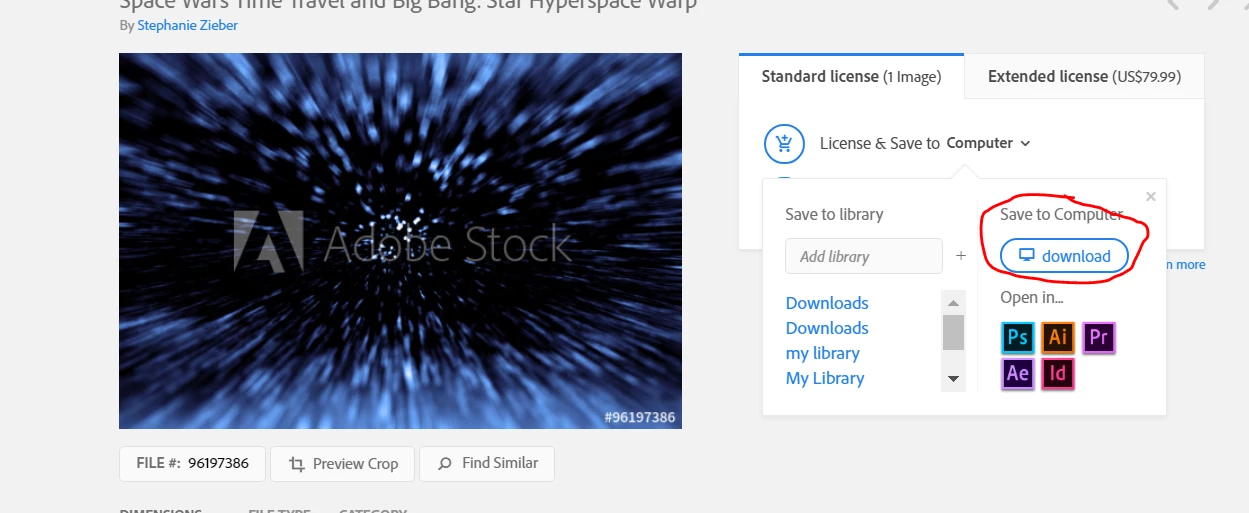
    Regards,

    Twarita

    1 reply

    Sheena Kaul
    Legend
    August 24, 2018

    Hi Rita,

    This seems to be a strange behavior.

    Can you please post a screenshot of the error message that you get? Does this happen with a single file or with other AI vector files as well?

    Moreover, vector files work the best with Illustrator only but can be used in Photoshop as a rasterised image.

    Regards,

    Sheena

    writingaddict
    Participant
    August 24, 2018

    It's not an error message, but rather I'm asked to licence Illustrator after I sign in. Yes, I know that about vector files, but I don't want or need illustrator. I should note that this only happened after the recent update to Adobe Creative.

    WendellaBee
    Adobe Employee
    Adobe Employee
    August 24, 2018

    Hi RA,

    Can you provide the ID of one of the files that is causing this behavior? I suspect it's not a jpeg and that's why you are getting the prompt to launch Illustrator.

    EBQ