
Exit
  • Global community
    • Language:
      • Deutsch
      • English
      • Español
      • Français
      • Português
  • 日本語コミュニティ
  • 한국 커뮤니티
0

Adobe Stock subscription opened without my knowledge

New Here ,
Feb 21, 2023 Feb 21, 2023

Hello, I purchased and am using Creative Cloud All Apps 100 GB membership. However, one day after this process, Adobe Stock membership was opened without my knowledge. I've never had any use. When I want to cancel, it asks me for the whole year's money. How can I cancel this?
TOPICS
Account management , Licensing , Plans and purchase
207
Translate
Report
Community guidelines
Be kind and respectful, give credit to the original source of content, and search for duplicates before posting. Learn more
community guidelines

correct answers 1 Correct answer

Community Expert , Feb 21, 2023 Feb 21, 2023

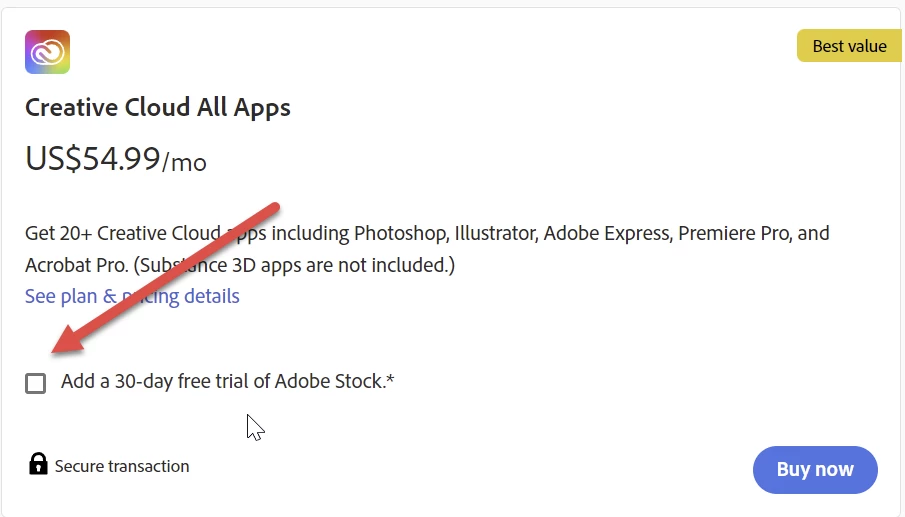
You have probably taken the stock membership together with your creative cloud all apps subscription. It's just a checkmark to set, but you need to set it.

Abambo_0-1676988626099.png

You would have needed to cancel this after the 30 days.

As a side note: it asks you half of the remaining due as stated in the terms & conditions.


To solve your problem, I would suggest contacting Adobe customer care and talking you out of this additional subscription. Adobe customer care can be contacted by beginning a secure chat session

...
Translate
Community Expert ,
Feb 21, 2023 Feb 21, 2023
LATEST

You have probably taken the stock membership together with your creative cloud all apps subscription. It's just a checkmark to set, but you need to set it.

Abambo_0-1676988626099.png

You would have needed to cancel this after the 30 days.

As a side note: it asks you half of the remaining due as stated in the terms & conditions.


To solve your problem, I would suggest contacting Adobe customer care and talking you out of this additional subscription. Adobe customer care can be contacted by beginning a secure chat session at https://helpx.adobe.com/contact.html?rghtup=autoOpen. Pop-up blockers must be disabled! If the chat window fails to open, or is non-responsive, use a different device to start the interaction.
Support phone numbers may be found here: https://helpx.adobe.com/contact/phone.html. Please note that phone charges may apply.

For support via Twitter:
https://twitter.com/AdobeCare

(see also here: https://community.adobe.com/t5/creative-cloud-services/how-to-contact-adobe-support/td-p/11875703 or here
https://community.adobe.com/t5/account-payment-plan/how-to-contact-adobe-support/td-p/11843852)

ABAMBO | Hard- and Software Engineer | Photographer
Translate
Report
Community guidelines
Be kind and respectful, give credit to the original source of content, and search for duplicates before posting. Learn more
community guidelines